Text to voice - convert & save
Zaktualizowano
Aktualna wersja
1.0.60
Sprzedawca

Przestań martwić się nadmiernymi opłatami podczas korzystania z Text to voice - convert & save na telefonie komórkowym, uwolnij się od małego ekranu i ciesz się korzystaniem z aplikacji na znacznie większym wyświetlaczu. Od teraz korzystaj z aplikacji na pełnym ekranie za pomocą klawiatury i myszy. MEmu oferuje wszystkie zaskakujące funkcje, których się spodziewałeś: szybką instalację i łatwą konfigurację, intuicyjne sterowanie, koniec z ograniczeniami baterii, danych mobilnych i niepokojących połączeń. Zupełnie nowy MEmu 9 to najlepszy wybór do używania Text to voice - convert & save na twoim komputerze. Zakodowany przez naszą absorpcję, menedżer wielu instancji umożliwia otwarcie 2 lub więcej kont w tym samym czasie. A co najważniejsze, nasz ekskluzywny emulator może uwolnić pełny potencjał twojego komputera, sprawić, że wszystko będzie płynne i przyjemne.
Pokaż więcej
Ciesz się wspaniałym doświadczeniem podczas grania w Text to voice - convert & save na komputerze z aplikacją MEMU App Player. Jest to potężny darmowy emulator Androida Umożliwia korzystanie z tysięcy aplikacji Androida. Text to Speech - AI Voices turns any text into natural, human-like audio.
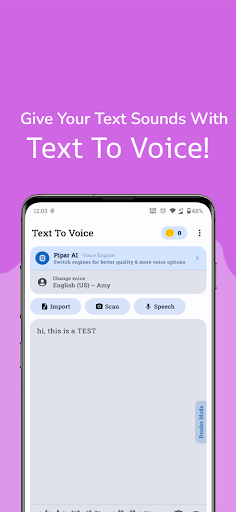
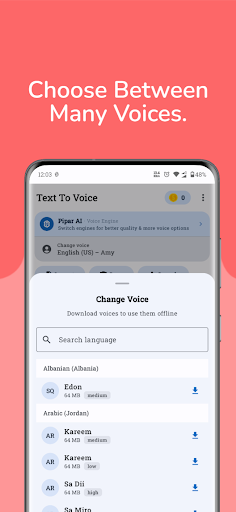
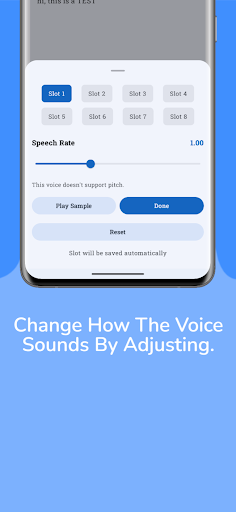
Text to Speech - AI Voices turns any text into natural, human-like audio. Type, paste, scan, import, or speak your text, then listen, save, and share it as an audio file.
NATURAL AI VOICES
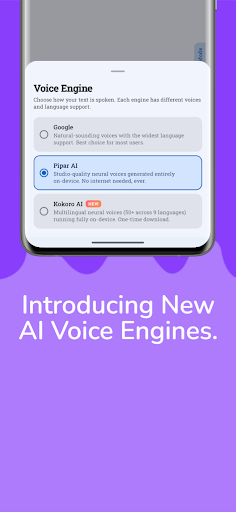
Choose from multiple text-to-speech engines, including on-device neural voices (Piper, Kokoro, Melo) for realistic, offline speech in dozens of languages, plus full support for your phone's built-in Google, Samsung, and other system engines. Preview any voice before picking it, and switch languages or voices without losing your place.
SCAN, IMPORT, OR DICTATE
- OCR scanner: turn photos of documents, books, or screenshots into readable text
- Document reader: import PDF, EPUB, DOC, DOCX, RTF, TXT, and HTML files
- Speech to text: dictate with your microphone in 27+ languages
- Share-to-speak: send text from any app straight into the reader
- URL import: paste a link and we'll pull the readable article text
▶ SMART PLAYBACK
Follow along with live word-by-word highlighting, pause and resume from the exact sentence you left off on, and switch to full-screen distraction-free reading mode.
RELIABLE SAVE & EXPORT
Save your narration as an M4A or WAV file in the background, even if you close the app — it keeps working and notifies you when it's done, with automatic retry so you never lose progress. Every file lands in your built-in library, ready to play, share, or open in any audio app.
VOICEOVER STUDIO
Build multi-section scripts with a different voice, speed, and pitch for each part. Add background music, use ready-made templates for promos and lessons, import subtitle files, and export as one merged file or separate clips per section — great for video creators.
FULL CONTROL
Fine-tune speech rate and pitch, save your favorite combinations as presets, and choose accents and genders for each language.
YOUR AUDIO LIBRARY
All your saved narrations live in one place — play, share, or open them in any audio app, swipe to delete, or select multiple files to share or remove at once.
PRESETS & FINE-TUNING
Save up to 8 named presets combining your favorite speed and pitch settings, so you can switch between reading styles instantly.
WIDE LANGUAGE SUPPORT
Neural voices cover dozens of languages, system engines add even more, and speech-to-text dictation works in 27+ languages — great for language learners and multilingual readers.
Free to use for reading, editing, importing, and OCR scanning. Upgrade to Pro to remove ads, unlock longer saves (up to 50,000 characters), and save without spending coins.
Perfect for reading articles and ebooks aloud, converting PDFs and documents to audio, creating voiceovers for videos, language learning, and making content accessible for low-vision or dyslexic readers.
Also great as: a text to speech reader, PDF to audio converter, TTS voice generator, read-aloud app, audiobook and podcast narration tool, and accessibility reader for dyslexia and low vision.
Pokaż więcej

1. Pobierz instalator MEmu i zakończ instalację

2. Uruchom MEmu, a następnie otwórz Google Play na pulpicie

3. Wyszukaj Text to voice - convert & save w Google Play
Install
4. Pobierz i zainstaluj Text to voice - convert & save
5. Po zakończeniu instalacji kliknij ikonę, aby rozpocząć

6. Użyj MEmu, aby doświadczyć Text to voice - convert & save na swoim komputerze
MEmu Play to najlepszy emulator Androida, z którego korzysta ponad 100 milionów użytkowników, ciesząc się wyjątkowym doświadczeniem aplikacji na Androida. Technologia wirtualizacji MEmu pozwala na płynne uruchamianie tysięcy aplikacji Androida na komputerze, nawet tych najbardziej wymagających.
Większy ekran z lepszą grafiką; Długi czas, bez ograniczeń baterii lub danych mobilnych.
Pełna obsługa mapowania klawiszy dla precyzyjnego sterowania klawiaturą i myszą lub gamepadem.
Wiele kont gier lub zadań na jednym komputerze jednocześnie z menedżerem wielu instancji.
Use Text to voice - convert & save on PC by following steps: