Yuz Voice Recorder
Zaktualizowano
Aktualna wersja
1.0.1
Sprzedawca

Przestań martwić się nadmiernymi opłatami podczas korzystania z Yuz Voice Recorder na telefonie komórkowym, uwolnij się od małego ekranu i ciesz się korzystaniem z aplikacji na znacznie większym wyświetlaczu. Od teraz korzystaj z aplikacji na pełnym ekranie za pomocą klawiatury i myszy. MEmu oferuje wszystkie zaskakujące funkcje, których się spodziewałeś: szybką instalację i łatwą konfigurację, intuicyjne sterowanie, koniec z ograniczeniami baterii, danych mobilnych i niepokojących połączeń. Zupełnie nowy MEmu 9 to najlepszy wybór do używania Yuz Voice Recorder na twoim komputerze. Zakodowany przez naszą absorpcję, menedżer wielu instancji umożliwia otwarcie 2 lub więcej kont w tym samym czasie. A co najważniejsze, nasz ekskluzywny emulator może uwolnić pełny potencjał twojego komputera, sprawić, że wszystko będzie płynne i przyjemne.
Pokaż więcej
Ciesz się wspaniałym doświadczeniem podczas grania w Yuz Voice Recorder na komputerze z aplikacją MEMU App Player. Jest to potężny darmowy emulator Androida Umożliwia korzystanie z tysięcy aplikacji Androida. Yuz Voice Recorder is a simple, powerful, and reliable Android voice recording app designed to help you capture important moments anytime and anywhere.

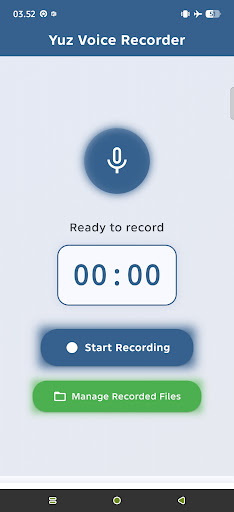
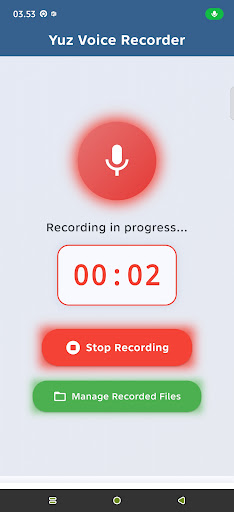
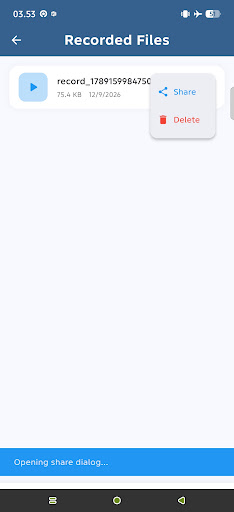
Yuz Voice Recorder is a simple, powerful, and reliable Android voice recording app designed to help you capture important moments anytime and anywhere. Whether you want to record meetings, lectures, interviews, voice notes, music ideas, podcasts, or personal memos, Yuz Voice Recorder provides a smooth and easy recording experience.
One of the best features of Yuz Voice Recorder is its ability to continue recording in the background, even when your phone screen is turned off. You can lock your device, use other apps, or keep the recorder running silently without interruptions.
Key Features
High-quality audio recording
Record clear and crisp sound with stable audio performance.
Background recording support
Continue recording while using other apps or when the screen is off.
Screen-off recording
The recording process keeps running even after locking your phone.
Simple and modern interface
Easy-to-use design suitable for everyone.
Fast recording access
Start recording quickly with just one tap.
Lightweight and efficient
Optimized for smooth performance without draining your battery excessively.
Perfect For
Students recording lectures
Journalists and interviewers
Meeting and conference recordings
Personal voice notes
Music practice and song ideas
Podcast and content creation
Daily reminders and memos
Yuz Voice Recorder is built to deliver a reliable recording experience with simplicity and convenience. No complicated setup — just open the app and start recording instantly.
Download Yuz Voice Recorder now and never miss an important sound again!
Pokaż więcej

1. Pobierz instalator MEmu i zakończ instalację

2. Uruchom MEmu, a następnie otwórz Google Play na pulpicie

3. Wyszukaj Yuz Voice Recorder w Google Play
Install
4. Pobierz i zainstaluj Yuz Voice Recorder
5. Po zakończeniu instalacji kliknij ikonę, aby rozpocząć

6. Użyj MEmu, aby doświadczyć Yuz Voice Recorder na swoim komputerze
MEmu Play to najlepszy emulator Androida, z którego korzysta ponad 100 milionów użytkowników, ciesząc się wyjątkowym doświadczeniem aplikacji na Androida. Technologia wirtualizacji MEmu pozwala na płynne uruchamianie tysięcy aplikacji Androida na komputerze, nawet tych najbardziej wymagających.
Większy ekran z lepszą grafiką; Długi czas, bez ograniczeń baterii lub danych mobilnych.
Pełna obsługa mapowania klawiszy dla precyzyjnego sterowania klawiaturą i myszą lub gamepadem.
Wiele kont gier lub zadań na jednym komputerze jednocześnie z menedżerem wielu instancji.
Use Yuz Voice Recorder on PC by following steps: