Bugjaeger Mobile ADB - USB OTG
Atualizada
Versão atual
8.0
Oferecido por

Pare de se preocupar com sobrecargas ao usar Bugjaeger Mobile ADB - USB OTG no seu celular, liberte-se da pequena tela e aproveite o uso do aplicativo numa tela muito maior. A partir de agora, obtenha uma experiência em tela cheia do seu aplicativo com teclado e mouse. O MEmu oferece-lhe todos os recursos surpreendentes que você esperava: instalação rápida e configuração fácil, controles intuitivos, sem mais limitações de bateria, dados móveis e chamadas perturbadoras. O novíssimo MEmu 9 é a melhor opção para usar Bugjaeger Mobile ADB - USB OTG no seu computador. Codificado com a nossa absorção, o gerenciador de multi-instâncias possibilita a abertura de 2 ou mais contas ao mesmo tempo. E o mais importante, nosso mecanismo de emulação exclusivo pode liberar todo o potencial do seu PC, tornando tudo suave e agradável.
Mostre mais
Download do Bugjaeger Mobile ADB - USB OTG no PC com MEmu Android Emulador: Divirta-se jogando na tela grande. Antes de postar perguntas ou comentários ruins, consulte o FAQ.
Antes de postar perguntas ou comentários ruins, consulte o FAQ
https://sisik.eu/bugjaeger_faq
Se você deseja um novo recurso ou algo não está funcionando, escreva diretamente para meu e-mail roman@sisik.eu
O Bugjaeger tenta fornecer a você as ferramentas especializadas usadas pelos desenvolvedores Android para melhor controle e compreensão profunda dos componentes internos do seu dispositivo Android.
Multiferramenta que pode poupar o incômodo de carregar um laptop.
Se você é um usuário avançado, desenvolvedor, geek ou hacker do Android, este aplicativo deve estar em seu kit de ferramentas.
Como usar
1.) Ative as opções do desenvolvedor e a depuração USB no seu dispositivo de destino (https://developer.android.com/studio/debug/dev-options)
2.) Conecte o dispositivo onde você instalou este aplicativo ao dispositivo de destino via cabo USB OTG
3.) Permita que o aplicativo acesse o dispositivo USB e certifique-se de que o dispositivo de destino autorize a depuração USB
Inspecionar partes internas do dispositivo, executar shell scripts, verificar logs, fazer capturas de tela, sideload e muitas outras tarefas que normalmente são feitas em seu laptop agora podem ser executadas diretamente entre 2 dispositivos móveis.
Este aplicativo funciona como uma espécie de Android para Android ADB (Android Debug Bridge) - ele oferece alguns recursos semelhantes ao ADB (Android Debug Bridge), mas em vez de rodar em sua máquina de desenvolvimento, ele roda diretamente em seu dispositivo Android.
Você conecta seu dispositivo de destino por meio de cabo USB OTG ou WiFi e poderá brincar com o dispositivo.
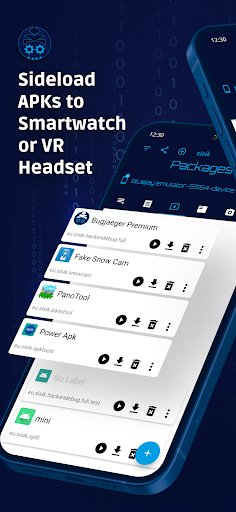
Você pode controlar sua Android TV, relógio Wear OS ou até mesmo Raspberry Pi com Android Things OS e Oculus VR.
Características principais
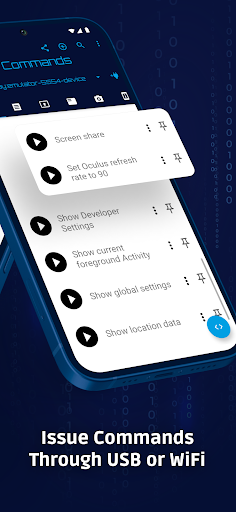
- executando scripts de shell no dispositivo de destino
- sideload de APKs regulares/divididos (por exemplo, para Oculus Quest VR)
- sideload/flash imagens AOSP (por exemplo, Android Preview on Pixel)
- shell interativo remoto
- Controle remoto da televisão
- tela de espelhamento + controle remoto com gesto de toque
- leitura, filtragem e exportação de logs de dispositivos (logcat)
- puxar arquivos APK
- Backups ADB, inspecionando e extraindo conteúdo de arquivos de backup
- capturas de tela
- executando vários comandos ADB para controlar seu dispositivo (reiniciar, ir para o gerenciador de inicialização, girar a tela, eliminar aplicativos em execução, ...)
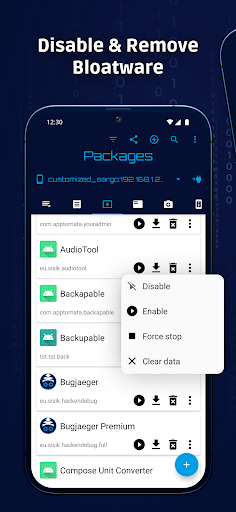
- iniciar, forçar parada, desativar aplicativos
- desinstalar e instalar pacotes, verificando vários detalhes sobre aplicativos instalados
- copiar aplicativos entre telefones
- monitorando os processos, mostrando informações adicionais relacionadas aos processos, eliminando processos
- obter propriedades do sistema
- mostrando vários detalhes sobre a versão do Android (por exemplo, versão do SDK, ID do Android, ..), kernel do Linux, cpu, abi, exibição
- mostrando detalhes da bateria (como, por exemplo, temperatura, saúde, tecnologia, voltagem, ..)
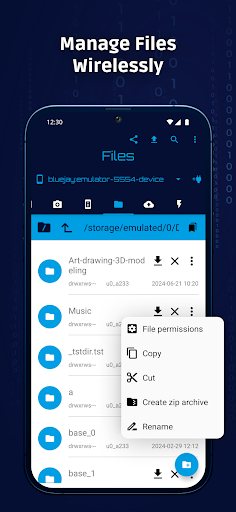
- gerenciamento de arquivos - empurrando e puxando arquivos do dispositivo, navegando no sistema de arquivos
- pesquise e conecte-se a dispositivos Android em sua rede que configuraram o adbd para escutar na porta 5555
- leitura de variáveis e informações do gerenciador de inicialização via protocolo fastboot (por exemplo, despejar algumas informações de hw, estado de segurança ou se o dispositivo foi adulterado)
- Comandos de inicialização rápida do Exec
- mostrar informações extensas do sistema
Para alguns truques e exemplos do que você pode fazer, consulte
https://www.sisik.eu/blog/tag:bugjaeger
Para iniciar um vídeo ou url do youtube no navegador, adicione o seguinte comando personalizado (ou cole-o no shell) na primeira guia
am start -a android.intent.action.VIEW -d "yt_url"
Se você gostou deste aplicativo, confira a versão premium sem anúncios, que também contém recursos adicionais
https://play.google.com/store/apps/details?id=eu. sisik.hackendebug.full
Requisitos
- Depuração USB habilitada nas opções do desenvolvedor e autorizar o dispositivo de desenvolvimento
- Suporte ao protocolo Fastboot
Atenção
Este aplicativo usa a forma normal de comunicação com dispositivos Android que requer autorização.
O aplicativo não ignora os mecanismos de segurança do Android ou algo semelhante!
Isso significa que você não poderá realizar algumas tarefas privilegiadas em dispositivos não rooteados.
Mostre mais

1. Faça o download do instalador do MEmu e conclua a instalação

2. Inicie o MEmu e depois abra o Google Play na página inicial

3. Pesquise Bugjaeger Mobile ADB - USB OTG no Google Play
Install
4. Baixe e Instale Bugjaeger Mobile ADB - USB OTG
5. Na conclusão da instalação, clique no ícone para iniciar

6. º Experimente o Bugjaeger Mobile ADB - USB OTG no PC com o MEmu.
O MEmu Play é o melhor emulador Android gratuito, com 50 milhões de utilizadores a desfrutar da sua experiência superior com aplicações Android. A tecnologia de virtualização do MEmu permite-lhe executar milhares de aplicações Android sem problemas no seu computador, mesmo as mais exigentes.
Tela maior com gráficos melhores; Longa duração e sem limitação de bateria ou dados móveis.
Suporte completo ao Mapaeamento de Teclas para controle preciso do teclado e mouse ou gamepad.
Várias contas de jogos ou tarefas em um único PC de uma só vez com o Gerenciador de várias instâncias.
Use Bugjaeger Mobile ADB - USB OTG on PC by following steps: