Callipeg (Beta) 2D animation
Atualizada
Versão atual
1735322523
Oferecido por

Pare de se preocupar com sobrecargas ao usar Callipeg (Beta) 2D animation no seu celular, liberte-se da pequena tela e aproveite o uso do aplicativo numa tela muito maior. A partir de agora, obtenha uma experiência em tela cheia do seu aplicativo com teclado e mouse. O MEmu oferece-lhe todos os recursos surpreendentes que você esperava: instalação rápida e configuração fácil, controles intuitivos, sem mais limitações de bateria, dados móveis e chamadas perturbadoras. O novíssimo MEmu 9 é a melhor opção para usar Callipeg (Beta) 2D animation no seu computador. Codificado com a nossa absorção, o gerenciador de multi-instâncias possibilita a abertura de 2 ou mais contas ao mesmo tempo. E o mais importante, nosso mecanismo de emulação exclusivo pode liberar todo o potencial do seu PC, tornando tudo suave e agradável.
Mostre mais
Download do Callipeg (Beta) 2D animation no PC com MEmu Android Emulador: Divirta-se jogando na tela grande. Discover Callipeg, your best companion for your animation-making process.
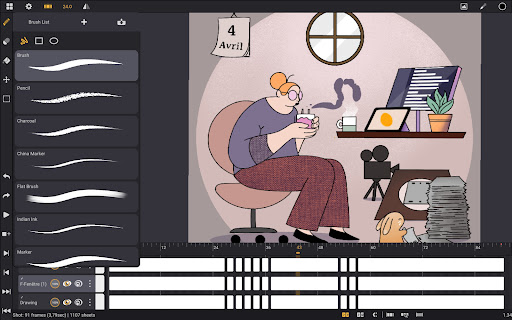
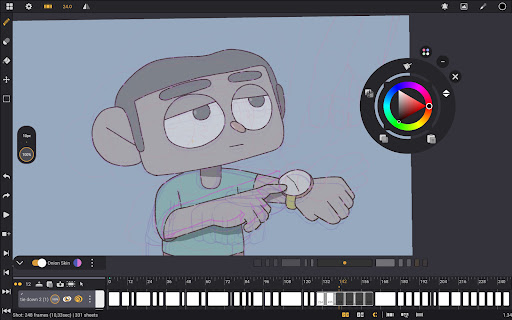
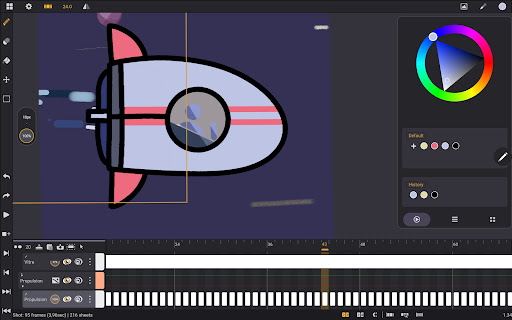
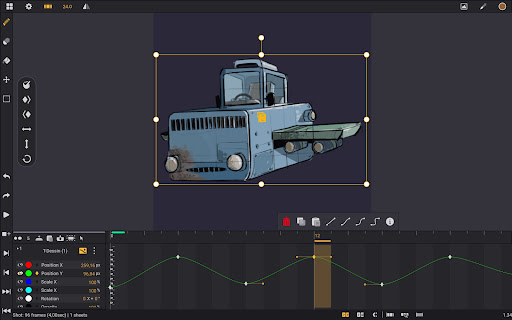
Discover Callipeg, your best companion for your animation-making process. Short or feature film, practice, rotoscoping, hand-drawn effects or simply doodling, everyone can make the best of its numerous features
You will get a fully manageable timeline, within a simple and decluttered interface designed for gestures and pressure-sensitive styluses
• Studio
Order your shots by dragging them, organize them into scenes and folders
Use color tags to sort your assets as well as other filter options
Where is that shot again? Just type the name or number in the search bar to find it
• Interface
Create shots using the frame rate you need: 12, 24, 25, 30, 60 frames per second...
Work up to 4K size
Add as many layers as you need
Switch to left-handed interface
Clear the canvas, copy-paste and have your color palette at your fingertips with the floating menu
• Gestures
Display the floating menu with a long touch with two fingers
Flip your animation with three fingers
Play and Pause your animation with four fingers
Frame your drawing with four fingers to transform it
Slice your sheets with your finger to split them
Tap-tap drag to select and move your drawings around, even through layers
• Tools
Callipeg has a complete brush set including pencil, pencil HB, charcoal, china marker, flat brush, Indian ink, soft pencil,...
And you can create yours with a fully manageable brush settings panel (from smoothing to tip customization and texture)
Choose color with the color wheel, the sliders or create your own palettes for your projects. Enjoy also the color history to never lose a color again
Color your drawings using the fill tool. You can adjust the range by dragging the slider
Set the color and opacity of onion skin. Display up to 8 frames before and after
Move your drawings within the onion skin using the Out of Pegs feature
Select and transform your drawings with the selection tool
• Layer types
Callipeg offers different types of layers that allow you to work with multiple contents:
Drawing layer, where you can add sheets, import pictures to your sheets, set their timing, add inbetweens
Video layer, where you can import video clips, adjust their playing speed and break them into sheets (rasterize)
Transformation layer, where you can create keyframes, nest your drawing layers and animate your drawings easily with our curve system
Audio layer, where you can import soundtracks, record yourself, adjust the volume, create fade-in/out
Group layer, where you can organize your layers by group, even subgroup and keep your layer stack nice and tidy
• Customization
Add colors to your layers and manage them using the color library system
Import reference images, as many as you want
Place the side bar on the right or on the left
Invert the canvas to check the proportion of your drawing
• Import/Export (not available in beta version)
Export your animations to:
.mp4 / .hevc / .gif / .png (including your layers structure if you need it) / .tga / .psd / .peg
Stay flexible with json, xdts and oca formats allowing you to move your work to another program
Import json and xdts files to restore your timing and layer structure
So many features can be quite overwhelming at first, so don't hesitate to check out our tutorials on your YouTube channel
Mostre mais

1. Faça o download do instalador do MEmu e conclua a instalação

2. Inicie o MEmu e depois abra o Google Play na página inicial

3. Pesquise Callipeg (Beta) 2D animation no Google Play
Install
4. Baixe e Instale Callipeg (Beta) 2D animation
5. Na conclusão da instalação, clique no ícone para iniciar

6. º Experimente o Callipeg (Beta) 2D animation no PC com o MEmu.
O MEmu Play é o melhor emulador Android gratuito, com 50 milhões de utilizadores a desfrutar da sua experiência superior com aplicações Android. A tecnologia de virtualização do MEmu permite-lhe executar milhares de aplicações Android sem problemas no seu computador, mesmo as mais exigentes.
Tela maior com gráficos melhores; Longa duração e sem limitação de bateria ou dados móveis.
Suporte completo ao Mapaeamento de Teclas para controle preciso do teclado e mouse ou gamepad.
Várias contas de jogos ou tarefas em um único PC de uma só vez com o Gerenciador de várias instâncias.
Use Callipeg (Beta) 2D animation on PC by following steps: