Beijing VPN: Universal Proxy
Atualizada
Versão atual
2.4
Oferecido por

Pare de se preocupar com sobrecargas ao usar Beijing VPN: Universal Proxy no seu celular, liberte-se da pequena tela e aproveite o uso do aplicativo numa tela muito maior. A partir de agora, obtenha uma experiência em tela cheia do seu aplicativo com teclado e mouse. O MEmu oferece-lhe todos os recursos surpreendentes que você esperava: instalação rápida e configuração fácil, controles intuitivos, sem mais limitações de bateria, dados móveis e chamadas perturbadoras. O novíssimo MEmu 9 é a melhor opção para usar Beijing VPN: Universal Proxy no seu computador. Codificado com a nossa absorção, o gerenciador de multi-instâncias possibilita a abertura de 2 ou mais contas ao mesmo tempo. E o mais importante, nosso mecanismo de emulação exclusivo pode liberar todo o potencial do seu PC, tornando tudo suave e agradável.
Mostre mais
Download do Beijing VPN: Universal Proxy no PC com MEmu Android Emulador: Divirta-se jogando na tela grande. Beijing VPN is a top-notch virtual private network (VPN) application designed to provide you with a fast, secure, and private online experience.
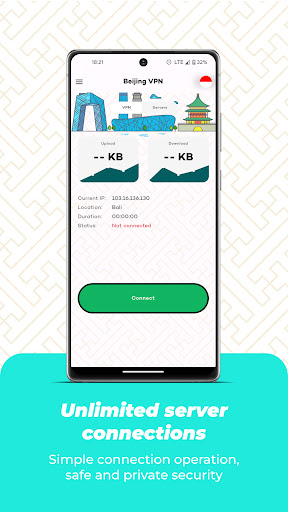
Beijing VPN is a top-notch virtual private network (VPN) application designed to provide you with a fast, secure, and private online experience. With our app, you can enjoy unrestricted access to the internet while ensuring your information remains safe and confidential. No need to worry about registering an account or compromising your data – we've got you covered.
- No Registration Required: Unlike other VPN applications, Beijing VPN eliminates the hassle of creating an account. Simply download the app, tap to connect, and you're ready to explore the internet securely.
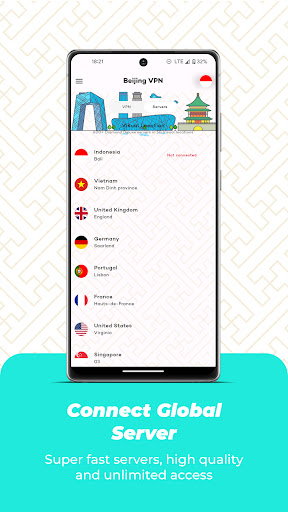
- High-Speed Servers: With a vast network of high-speed servers strategically located worldwide, Beijing VPN ensures lightning-fast connections and optimal performance, regardless of your location. Enjoy seamless browsing, streaming, and downloading without any buffering or lag.
- Robust Information Security: Your privacy is our utmost priority. Beijing VPN employs advanced encryption protocols to safeguard your online activities, ensuring that your data remains completely secure from prying eyes. We have a strict no-logs policy, meaning we do not store or share any of your personal information.
- Wide Server Selection: Our app offers an extensive range of servers across various countries, including Beijing. Choose from our diverse server locations to bypass geo-restrictions, access region-specific content, and enjoy a truly global online experience.
- User-Friendly Interface: Beijing VPN is designed with simplicity in mind. The intuitive user interface allows even novice users to connect to the VPN with just a few taps. Experience hassle-free browsing and enjoy the benefits of enhanced privacy without any technical complications.
Experience the Freedom and Security of Beijing VPN today. Download now and take control of your online presence!
Please note: Beijing VPN is intended for personal use only and may not be used for any illegal activities. Always abide by the laws and regulations of the country you are accessing the internet from.
Mostre mais

1. Faça o download do instalador do MEmu e conclua a instalação

2. Inicie o MEmu e depois abra o Google Play na página inicial

3. Pesquise Beijing VPN: Universal Proxy no Google Play
Install
4. Baixe e Instale Beijing VPN: Universal Proxy
5. Na conclusão da instalação, clique no ícone para iniciar

6. º Experimente o Beijing VPN: Universal Proxy no PC com o MEmu.
O MEmu Play é o melhor emulador Android gratuito, com 50 milhões de utilizadores a desfrutar da sua experiência superior com aplicações Android. A tecnologia de virtualização do MEmu permite-lhe executar milhares de aplicações Android sem problemas no seu computador, mesmo as mais exigentes.
Tela maior com gráficos melhores; Longa duração e sem limitação de bateria ou dados móveis.
Suporte completo ao Mapaeamento de Teclas para controle preciso do teclado e mouse ou gamepad.
Várias contas de jogos ou tarefas em um único PC de uma só vez com o Gerenciador de várias instâncias.
Use Beijing VPN: Universal Proxy on PC by following steps: