Samsung TV Plus
Atualizada
Versão atual
1794185898
Oferecido por

Pare de se preocupar com sobrecargas ao usar Samsung TV Plus no seu celular, liberte-se da pequena tela e aproveite o uso do aplicativo numa tela muito maior. A partir de agora, obtenha uma experiência em tela cheia do seu aplicativo com teclado e mouse. O MEmu oferece-lhe todos os recursos surpreendentes que você esperava: instalação rápida e configuração fácil, controles intuitivos, sem mais limitações de bateria, dados móveis e chamadas perturbadoras. O novíssimo MEmu 9 é a melhor opção para usar Samsung TV Plus no seu computador. Codificado com a nossa absorção, o gerenciador de multi-instâncias possibilita a abertura de 2 ou mais contas ao mesmo tempo. E o mais importante, nosso mecanismo de emulação exclusivo pode liberar todo o potencial do seu PC, tornando tudo suave e agradável.
Mostre mais
Download do 삼성 TV 플러스 no PC com MEmu Android Emulador: Divirta-se jogando na tela grande. Looking for free action&adventure movies, hilarious comedy hits, 24/7 news and more with no strings attached?
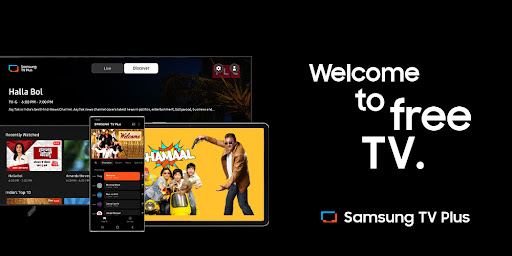



Looking for free action&adventure movies, hilarious comedy hits, 24/7 news and more with no strings attached? Tune into Samsung TV Plus for all the best TV and movies available for free - no subscriptions required.
With over 100+ channels and growing month-on-month, enjoy thousands of live and on-demand movies and TV shows like Planet Earth, Man vs Wild and Undercover Billionaire by Discovery, all available to watch anywhere, anytime.
Whether you're a news buff, sports fan, an aspiring chef, or need something funny to watch with the kids, get all the best TV and movies in one place on Samsung TV Plus.
Movies
Take the big screen on the go with action adventure films, suspenseful dramas and Bollywood hits from The Movie Club all available for free!
News
Keep your finger on the pulse with breaking news and 24/7 coverage from major networks like Aaj Tak, NDTV and Republic TV
Music
Dance along to the latest music videos from the biggest music channels like Mastiii and 9xm
Kids
Keep the kids entertained with hundreds of shows to help them learn, laugh, and grow with Discovery Kids and Toon Googles
With Samsung TV Plus, watch TV on all of your Samsung devices the way it was meant to be, FREE.
For a look at the channel line-up, please visit: https://www.samsung.com/in/tvs/smart-tv/samsung-tv-plus/all-channels/
*Samsung TV Plus is available on 2017–2021 Samsung Smart TV’s and select Galaxy mobile and tablet devices.
Internet required to stream. Initial download required for Galaxy devices.
For more information on Samsung and Samsung TV Plus, please visit: https://www.samsung.com/in/tvs/smart-tv/samsung-tv-plus/
We will update the list of eligible devices as more become available.
* Note
- Supported channels and VODs are differ by country. (supported country : India, US, UK, Germany, Canada, Korea)
- App information including keyscreens provided in Google Play follows the language setting of smartphone.
Eligible Galaxy devices:
Galaxy S7
Galaxy S7 Active
Galaxy S7 Edge
Galaxy S8
Galaxy S8 Active
Galaxy S8+
Galaxy S9
Galaxy S9+
Galaxy S9 Plus
Galaxy S10
Galaxy S10 5G
Galaxy S10 Plus
Galaxy S10e
Galaxy S10 Lite
Galaxy S20 Series
Galaxy S20 FE
Galaxy S20 FE 5G
Galaxy S20
Galaxy S20 5G
Galaxy S20 Ultra 5G
Galaxy S20 Plus
Galaxy S20 Plus 5G
Galaxy S21 series
Galaxy S21 5G
Galaxy S21+5G
Galaxy S21 Ultra 5G
Galaxy Note 7
Galaxy Note 8
Galaxy Note 9
Galaxy Note 10
Galaxy Note 10 5G
Galaxy Note 10 Plus
Galaxy Note 10 Lite
Galaxy Note 10 Plus 5G
Galaxy Note 20 series
Galaxy Note 20
Galaxy Note 20 5G
Galaxy Note 20 Ultra
Galaxy Note 20 Ultra 5G
Galaxy Z Fold2 5G
Galaxy Z Flip
Galaxy Z Flip 5G
Galaxy Xcover Pro
Galaxy A3
Galaxy A5
Galaxy A5 (2017)
Galaxy A6
Galaxy A6+
Galaxy A7 (2017 and 2018)
Galaxy A8
Galaxy A8 (2018)
Galaxy A8+ (2018)
Galaxy A8s
Galaxy A9 (2018)
Galaxy A9 Pro
Galaxy A9 Star
Galaxy A01
Galaxy A02s
Galaxy A10
Galaxy A10e
Galaxy A10s
Galaxy A11
Galaxy A12 5G
Galaxy A20
Galaxy A20e
Galaxy A20s
Galaxy A21
Galaxy A21s
Galaxy A30
Galaxy A30s
Galaxy A31
Galaxy A32 5G
Galaxy A40
Galaxy A41
Galaxy A42 5G
Galaxy A50
Galaxy A51
Galaxy A51 5G
Galaxy A52 5G
Galaxy A70
Galaxy A71
Galaxy A71 5G
Galaxy A80
Galaxy A90 5G
Galaxy J2 Core
Galaxy J3 (2017 and 2018)
Galaxy J3 Pop
Galaxy J4
Galaxy J4 Core
Galaxy J4+
Galaxy J5 (2017)
Galaxy J6
Galaxy J6+
Galaxy J7
Galaxy J7 (2017)
Galaxy J7 Core
Galaxy J7 Duo
Galaxy J7 Pop
Galaxy J7 Top
Galaxy J8
Galaxy M01
Galaxy M01s
Galaxy M10
Galaxy M10s
Galaxy M11
Galaxy M20
Galaxy M21
Galaxy M30
Galaxy M30s
Galaxy M31
Galaxy M31s
Galaxy M40
Galaxy M51
Galaxy Fold
Galaxy Tab S7+
Tab A7 + Lite(LTE)
Tab A7 + Lite (Wi-Fi)
Galaxy Tab A 8.0
Galaxy Tab A 8.0 (2019)
Galaxy Tab A 8.4 (2020)
Galaxy Tab 8.4
Galaxy Tab A 10.1
Galaxy Tab A 10.1 (2019)
Galaxy Tab A S Pen
Galaxy Tab A S Pen (2019)
Galaxy Tab B 8.0
Galaxy Tab S4
Galaxy Tab S5e
Galaxy Tab S6
Galaxy Tab S6 5G
Galaxy Tab S6 Lite
Galaxy Tab S7
Galaxy Tab S7 Plus
Galaxy Tab Active Pro
Galaxy Tab Active 2
----
개발자 연락처 :
삼성전자(주) 대한민국 16677 경기도 수원시
영통구 삼성로 129 (매탄동) 124-81-00998 2000-경기수원-0515 공정거래위원회
Mostre mais

1. Faça o download do instalador do MEmu e conclua a instalação

2. Inicie o MEmu e depois abra o Google Play na página inicial

3. Pesquise Samsung TV Plus no Google Play
Install
4. Baixe e Instale Samsung TV Plus
5. Na conclusão da instalação, clique no ícone para iniciar

6. º Experimente o Samsung TV Plus no PC com o MEmu.
O MEmu Play é o melhor emulador Android gratuito, com 50 milhões de utilizadores a desfrutar da sua experiência superior com aplicações Android. A tecnologia de virtualização do MEmu permite-lhe executar milhares de aplicações Android sem problemas no seu computador, mesmo as mais exigentes.
Tela maior com gráficos melhores; Longa duração e sem limitação de bateria ou dados móveis.
Suporte completo ao Mapaeamento de Teclas para controle preciso do teclado e mouse ou gamepad.
Várias contas de jogos ou tarefas em um único PC de uma só vez com o Gerenciador de várias instâncias.
Use Samsung TV Plus on PC by following steps: