
Fere Fit
Atualizada
Versão atual
V 5.5.88
Oferecido por

Pare de se preocupar com sobrecargas ao usar Fere Fit no seu celular, liberte-se da pequena tela e aproveite o uso do aplicativo numa tela muito maior. A partir de agora, obtenha uma experiência em tela cheia do seu aplicativo com teclado e mouse. O MEmu oferece-lhe todos os recursos surpreendentes que você esperava: instalação rápida e configuração fácil, controles intuitivos, sem mais limitações de bateria, dados móveis e chamadas perturbadoras. O novíssimo MEmu 9 é a melhor opção para usar Fere Fit no seu computador. Codificado com a nossa absorção, o gerenciador de multi-instâncias possibilita a abertura de 2 ou mais contas ao mesmo tempo. E o mais importante, nosso mecanismo de emulação exclusivo pode liberar todo o potencial do seu PC, tornando tudo suave e agradável.
Mostre mais
Download do Fere Fit no PC com MEmu Android Emulador: Divirta-se jogando na tela grande. FereFit is a wearable devices application client software for smart watches and smart bracelet.
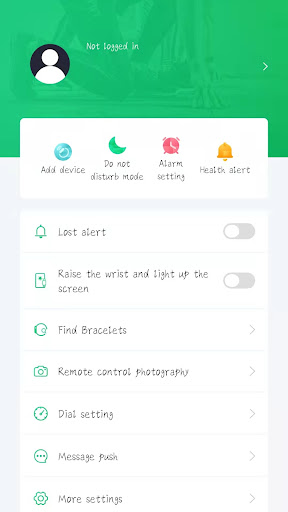
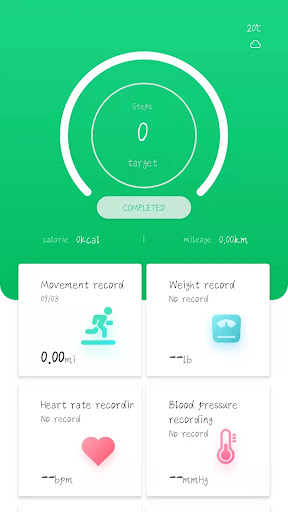
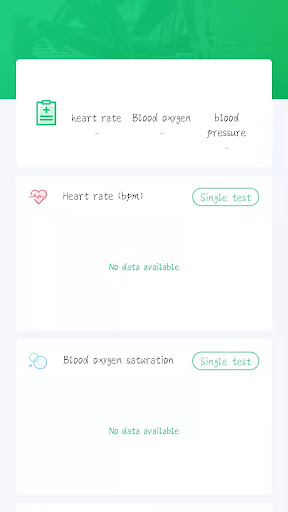
FereFit is a wearable devices application client software for smart watches and smart bracelet. The main functions include as following:
1.Record steps, mileage, calorie consumption, sports track record;
2.Analysis of daily sleep data, monitoring the quality of sleep;
3.Support Messages, WeChat, QQ ,Facebook,Twitter content pushing and reminder;
4.Clock, alarm clock, anti-lost, sedentary reminder, remote camera and the other function;
5.Support sports and health information sharing on the micro-blog, Twitter, Facebook.
6.Support real-time measure heart rate, blood oxy and blood pressure (for smart bracelet and watches with blood pressure and heart rate function.This test result can only be used as a reference and not as a medical certificate);
7.Our app is an essential companion for your smartwatch, designed to provide seamless connectivity and communication. With our app, you can send and receive SMS messages directly from your smartwatch and make phone calls with ease. These features are integral to the app's core functionality, enabling convenient communication without needing to take out your phone.
Key Features:
- **Send and Receive SMS**: Stay connected by sending and receiving SMS messages directly from your smartwatch.
- **Make Phone Calls**: Effortlessly make phone calls using your smartwatch, keeping your phone in your pocket.
- **Real-time Notifications**: Get instant notifications on your smartwatch, ensuring you never miss an important message or call.
Our app ensures that your data is securely managed, and these permissions are strictly used to enhance your smartwatch experience. Your privacy is our top priority.
Models of related equipment: Zhongke Lanxun, Jerry k11 series
Warm Tips: Install this software must be above 7 Android system, The phone must supports Bluetooth 4.0+.
Mostre mais

1. Faça o download do instalador do MEmu e conclua a instalação

2. Inicie o MEmu e depois abra o Google Play na página inicial

3. Pesquise Fere Fit no Google Play
Install
4. Baixe e Instale Fere Fit
5. Na conclusão da instalação, clique no ícone para iniciar

6. º Experimente o Fere Fit no PC com o MEmu.
O MEmu Play é o melhor emulador Android gratuito, com 50 milhões de utilizadores a desfrutar da sua experiência superior com aplicações Android. A tecnologia de virtualização do MEmu permite-lhe executar milhares de aplicações Android sem problemas no seu computador, mesmo as mais exigentes.
Tela maior com gráficos melhores; Longa duração e sem limitação de bateria ou dados móveis.
Suporte completo ao Mapaeamento de Teclas para controle preciso do teclado e mouse ou gamepad.
Várias contas de jogos ou tarefas em um único PC de uma só vez com o Gerenciador de várias instâncias.
Use Fere Fit on PC by following steps: