GSE SMART IPTV
Atualizada
Versão atual
7.4
Oferecido por

Pare de se preocupar com sobrecargas ao usar GSE SMART IPTV no seu celular, liberte-se da pequena tela e aproveite o uso do aplicativo numa tela muito maior. A partir de agora, obtenha uma experiência em tela cheia do seu aplicativo com teclado e mouse. O MEmu oferece-lhe todos os recursos surpreendentes que você esperava: instalação rápida e configuração fácil, controles intuitivos, sem mais limitações de bateria, dados móveis e chamadas perturbadoras. O novíssimo MEmu 9 é a melhor opção para usar GSE SMART IPTV no seu computador. Codificado com a nossa absorção, o gerenciador de multi-instâncias possibilita a abertura de 2 ou mais contas ao mesmo tempo. E o mais importante, nosso mecanismo de emulação exclusivo pode liberar todo o potencial do seu PC, tornando tudo suave e agradável.
Mostre mais
Enjoy superb experience of using GSE SMART IPTV on PC with MEMU App Player. It's a powerful free Android emulator which provides you with thousands of android apps for their desktop version. Enjoy connecting with friends and polishing your work with higher efficiency! Solução avançada IPTV definido pelo usuário para AndroidSupport : CHROMECASTSupport : XTREAM-CODES APIAPI support automatic live and VOD playlist including EPG and movie info.
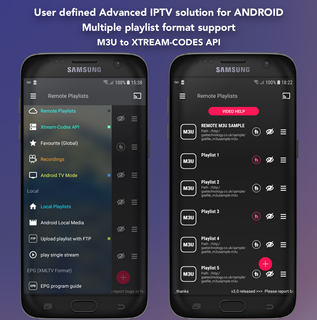
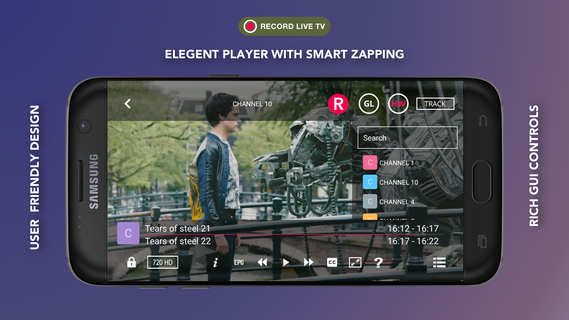
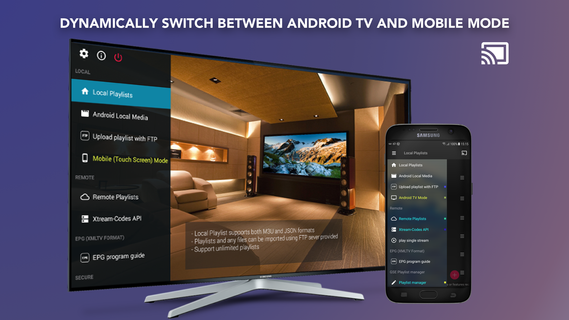
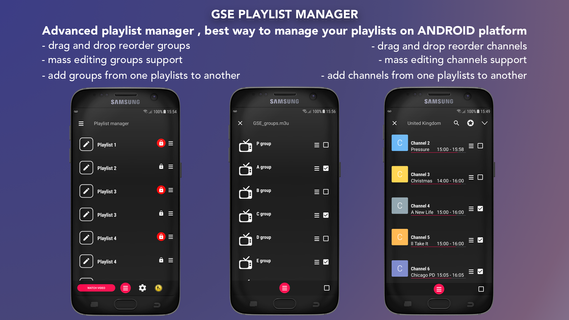
Solução avançada IPTV definido pelo usuário para AndroidSupport : CHROMECASTSupport : XTREAM-CODES APIAPI support automatic live and VOD playlist including EPG and movie info.Support : AUTOMATIC LIVE STREAM RECONNECTIONSupport : EPG XMLTV FORMAT (local and remote file support ,xml , zip , gz formats) Support : Parental controlSupport : Copy and paste M3U contentsSupport : Dynamic language switching (31 LANGUAGE)Support : Multiple themeSupport : built-in player support all popular formats including RTMP tokensSupport : Embedded subtitle and external subtitle (SRT) support(Embedded bimap subtitle support : DVB TELETEXT , dvd subtitle , dvb subtitle , xsub ,hdmv pgs subtitle , ASS , SSA , SUBRIP .... and more ....)****** BUILD-IN PLAYER SUPPORTED DEVICES **********- ARMV7A devices- ARM64 devices- INTEL X86 devices (also work on x86_64 devices)***** Please note this app does not contains any playlists except sample playlists. User must provide their own content. ****** GSE SMART IPTV is a complete user defined Advanced IPTV solutions for live and non-live TV/stream. ★ ★ ★ ★ Built-in Player features ★ ★ ★ ★Video Format Suppported:3g2, 3gp, 3gp2, 3gpp, amv, asf, avi, divx, drc, dv, f4v, flv, gvi, gxf, webm, wm, wmv, wtv, xesc, m1v, m2v, m2t, m2ts, m4v, mkv, mov, mp2, mp2v, mp4, mp4v, mpe, mpeg, mpeg1, mpeg2, mpeg4, mpg, mpv2, rec, rm, rmvb, tod, ts, tts, vob, vro ..... and moreLive stream IPTV support✔ HTTP , HSL , M3U8 , MMS , RTSP and more✔ RTMP support all options including secure tokensDynamic Language support features- Language set to default language , however users can switch between 31 languages without changing device language setting- Supported languageArabic , Czech , Danish , German , Greek , English , Spanish , Finnish , French , Hebrew , Hungarian , Indonesian , Italian , Japanese , Korean , Malay , Dutch , Portuguese , Romanian , Russian , Swedish , Thai , Turkish , Chinese (Simplified) , Chinese (Traditional) , Catalan , Norwegian , Polish , Slovak , Ukrainian , Vietnameseplease report any problems/bugs if you find to [email protected] orhttps://twitter.com/gsetechnologyDisclaimer:- GSE SMART IPTV PRO does not supply or include any media or content except some sample dummy link with Sintel“Sintel” is licensed as Creative Commons Attribution 3.0.© copyright Blender Foundation | durian.blender.orgTears of Steel (MANGO Open Movie) is licensed as Creative Commons Attribution 3.0© copyright Blender Foundation | mango.blender.org - Users must provide their own content- GSE SMART IPTV has no affiliation with any third-part provider what so ever.- We do not endorse the streaming of copyright protected material without permission of the copyright holder.
Mostre mais

1. Faça o download do instalador do MEmu e conclua a instalação

2. Inicie o MEmu e depois abra o Google Play na página inicial

3. Pesquise GSE SMART IPTV no Google Play
Install
4. Baixe e Instale GSE SMART IPTV
5. Na conclusão da instalação, clique no ícone para iniciar

6. º Experimente o GSE SMART IPTV no PC com o MEmu.
O MEmu Play é o melhor emulador Android gratuito, com 50 milhões de utilizadores a desfrutar da sua experiência superior com aplicações Android. A tecnologia de virtualização do MEmu permite-lhe executar milhares de aplicações Android sem problemas no seu computador, mesmo as mais exigentes.
Tela maior com gráficos melhores; Longa duração e sem limitação de bateria ou dados móveis.
Suporte completo ao Mapaeamento de Teclas para controle preciso do teclado e mouse ou gamepad.
Várias contas de jogos ou tarefas em um único PC de uma só vez com o Gerenciador de várias instâncias.
Use GSE SMART IPTV on PC by following steps: