imToken: BTC & ETH Wallet
Atualizada
Versão atual
2.16.1
Oferecido por

Pare de se preocupar com sobrecargas ao usar imToken: BTC & ETH Wallet no seu celular, liberte-se da pequena tela e aproveite o uso do aplicativo numa tela muito maior. A partir de agora, obtenha uma experiência em tela cheia do seu aplicativo com teclado e mouse. O MEmu oferece-lhe todos os recursos surpreendentes que você esperava: instalação rápida e configuração fácil, controles intuitivos, sem mais limitações de bateria, dados móveis e chamadas perturbadoras. O novíssimo MEmu 9 é a melhor opção para usar imToken: BTC & ETH Wallet no seu computador. Codificado com a nossa absorção, o gerenciador de multi-instâncias possibilita a abertura de 2 ou mais contas ao mesmo tempo. E o mais importante, nosso mecanismo de emulação exclusivo pode liberar todo o potencial do seu PC, tornando tudo suave e agradável.
Mostre mais
Download do imToken: BTC & ETH Wallet no PC com MEmu Android Emulador: Divirta-se jogando na tela grande. imToken is a reliable Web3 digital wallet trusted by tens of millions, enabling easy access to 50+ major networks including Bitcoin, Ethereum, and TRON.
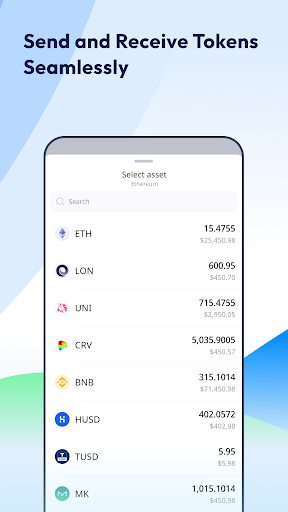
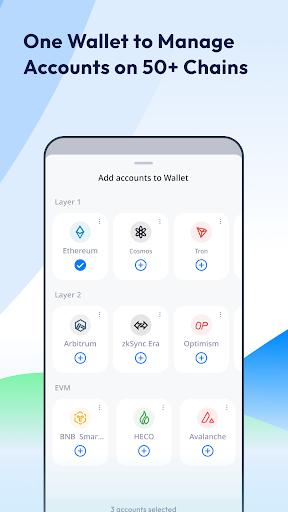
imToken is a reliable Web3 digital wallet trusted by tens of millions, enabling easy access to 50+ major networks including Bitcoin, Ethereum, and TRON.
Confidently Access Your Tokens
● Access 800,000+ tokens across 50+ blockchains - Bitcoin, Ethereum, TRON, Polygon, Base and more.
● Comprehensive security features including offline storage, hardware wallets, pin codes, biometrics and more.
● Conveniently track account balances and token prices powered by CoinGecko and DeBank.
● Understand on-chain information effortlessly with our decoded transaction feature
Explore and Connect to Web3
● Access 10+ Layer 2 networks like Optimism, Arbitrum, Scroll, zkSync, and Linea to enjoy faster and cheaper transactions.
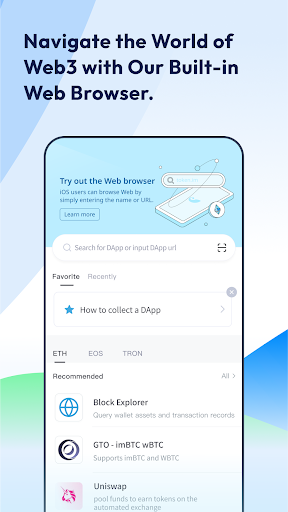
● Discover and use 600+ top DApps like Uniswap, OpenSea, and Compound to maximize token utility with our DApp browser
● Send and receive popular ERC-721 & ERC-1155 NFTs seamlessly.
Diverse Account Management
● Efficiently manage multiple accounts across various networks within a single wallet using a set of mnemonic phrases. Additionally, create multiple independent accounts within the same network.
● Easily generate and manage up to 100 accounts, with the flexibility to add, delete, and customize tags for each account.
● Enjoy direct access to Layer 2s and EVM-compatible chains with one-click switch.
Contact us:
Website: https://token.im
Discord:https://discord.com/invite/imToken
Twitter:https://twitter.com/imTokenOfficial
Mostre mais

1. Faça o download do instalador do MEmu e conclua a instalação

2. Inicie o MEmu e depois abra o Google Play na página inicial

3. Pesquise imToken: BTC & ETH Wallet no Google Play
Install
4. Baixe e Instale imToken: BTC & ETH Wallet
5. Na conclusão da instalação, clique no ícone para iniciar

6. º Experimente o imToken: BTC & ETH Wallet no PC com o MEmu.
O MEmu Play é o melhor emulador Android gratuito, com 50 milhões de utilizadores a desfrutar da sua experiência superior com aplicações Android. A tecnologia de virtualização do MEmu permite-lhe executar milhares de aplicações Android sem problemas no seu computador, mesmo as mais exigentes.
Tela maior com gráficos melhores; Longa duração e sem limitação de bateria ou dados móveis.
Suporte completo ao Mapaeamento de Teclas para controle preciso do teclado e mouse ou gamepad.
Várias contas de jogos ou tarefas em um único PC de uma só vez com o Gerenciador de várias instâncias.
Use imToken: BTC & ETH Wallet on PC by following steps: