Kids police - for parents
Atualizada
Versão atual
1.2.4
Oferecido por

Pare de se preocupar com sobrecargas ao usar Kids police - for parents no seu celular, liberte-se da pequena tela e aproveite o uso do aplicativo numa tela muito maior. A partir de agora, obtenha uma experiência em tela cheia do seu aplicativo com teclado e mouse. O MEmu oferece-lhe todos os recursos surpreendentes que você esperava: instalação rápida e configuração fácil, controles intuitivos, sem mais limitações de bateria, dados móveis e chamadas perturbadoras. O novíssimo MEmu 9 é a melhor opção para usar Kids police - for parents no seu computador. Codificado com a nossa absorção, o gerenciador de multi-instâncias possibilita a abertura de 2 ou mais contas ao mesmo tempo. E o mais importante, nosso mecanismo de emulação exclusivo pode liberar todo o potencial do seu PC, tornando tudo suave e agradável.
Mostre mais
Download do Kids police - for parents no PC com MEmu Android Emulador: Divirta-se jogando na tela grande. Kids police - it is an application that works on helping parents to discipline their kids’ behavior through a fake call with a fake police station.

Kids police - it is an application that works on helping parents to discipline their kids’ behavior through a fake call with a fake police station. The idea of this application is to treat the behavior of the kids who are naughty and don't listen to their parents through some pre-recorded calls that are designed specifically to deal with such problems.
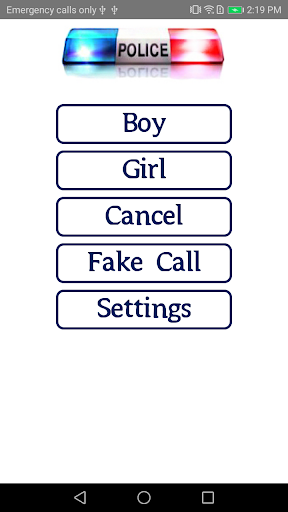
We recorded several and various real-life calls that imitate and represent many daily situations anyone may encounter. To make it even more realistic, we created two different sections; one for boys and another one for girls.
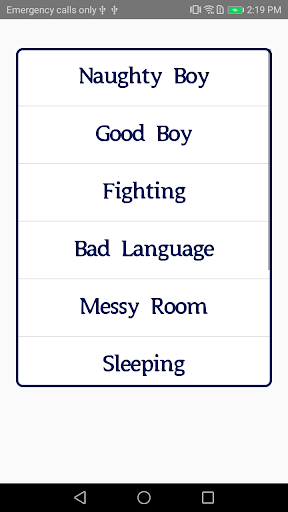
List of actions and behaviors this app handles:
1- Naughty - a call recorded to deal with naughty behavior in general.
2- Good - a call recorded to reward the child for good behavior.
3- Fighting - a call recorded to address the problem of fighting with other kids.
4- Bad language - a call recorded to address the problem of using bad language.
5- Messy room - a call recorded to address the problem of a messy room.
6- Sleep - a call recorded to deal with who is are not committed to sleep at specified times and they give their parents hard time at bedtime.
7- Eating - a call recorded for who is do not eat well.
8- Using devices - a call recorded for who use electronic devices (phone, electronic games, TV… etc.) a lot and for long time.
9- Homework - a call recorded for who do not do their homework.
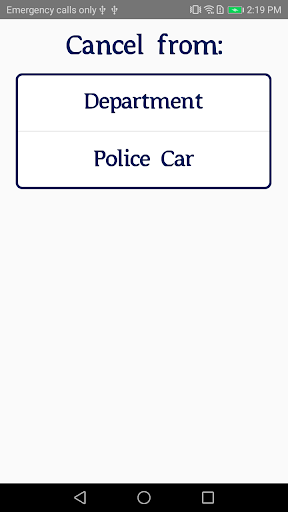
In this new version, the cancel option has been added. This feature gives you the option to call back the police station or police patrol to stop and cancel the operation anytime you want especially if the kid stopped the bad behavior.
Some settings have also been added where you can choose to activate or cancel the “call center” in order to avoid embarrassment if the application is used among people and/or in public places. In addition, we added the ability to modify the name shown in the call screen for any name you want.
We hope that you use the application in a moderate and appropriate way to avoid psychological harm to your children.
Copyright © 2020 Kids Police. All rights reserved.
Mostre mais

1. Faça o download do instalador do MEmu e conclua a instalação

2. Inicie o MEmu e depois abra o Google Play na página inicial

3. Pesquise Kids police - for parents no Google Play
Install
4. Baixe e Instale Kids police - for parents
5. Na conclusão da instalação, clique no ícone para iniciar

6. º Experimente o Kids police - for parents no PC com o MEmu.
O MEmu Play é o melhor emulador Android gratuito, com 50 milhões de utilizadores a desfrutar da sua experiência superior com aplicações Android. A tecnologia de virtualização do MEmu permite-lhe executar milhares de aplicações Android sem problemas no seu computador, mesmo as mais exigentes.
Tela maior com gráficos melhores; Longa duração e sem limitação de bateria ou dados móveis.
Suporte completo ao Mapaeamento de Teclas para controle preciso do teclado e mouse ou gamepad.
Várias contas de jogos ou tarefas em um único PC de uma só vez com o Gerenciador de várias instâncias.
Use Kids police - for parents on PC by following steps: