Lite Launcher
Atualizada
Versão atual
1721845590
Oferecido por

Pare de se preocupar com sobrecargas ao usar Lite Launcher no seu celular, liberte-se da pequena tela e aproveite o uso do aplicativo numa tela muito maior. A partir de agora, obtenha uma experiência em tela cheia do seu aplicativo com teclado e mouse. O MEmu oferece-lhe todos os recursos surpreendentes que você esperava: instalação rápida e configuração fácil, controles intuitivos, sem mais limitações de bateria, dados móveis e chamadas perturbadoras. O novíssimo MEmu 9 é a melhor opção para usar Lite Launcher no seu computador. Codificado com a nossa absorção, o gerenciador de multi-instâncias possibilita a abertura de 2 ou mais contas ao mesmo tempo. E o mais importante, nosso mecanismo de emulação exclusivo pode liberar todo o potencial do seu PC, tornando tudo suave e agradável.
Mostre mais
Download do Lite Launcher no PC com MEmu Android Emulador: Divirta-se jogando na tela grande. Lite Launcher is one of the world's most lightweight launchers available on google play store (Less than 100 Kb).
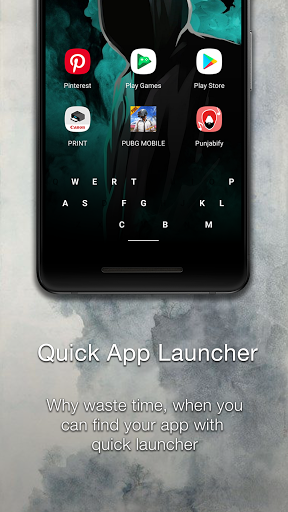
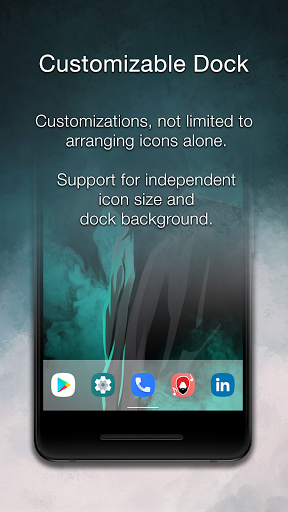
Lite Launcher is one of the world's most lightweight launchers available on google play store (Less than 100 Kb). Unlike any other lightweight launcher, it doesn't compromise on any features despite its size. it has a sliding app drawer, with the ability to change the background color, transparency, icon size, label size, label color, and many more.
Disclaimer: Ment to be used on the devices without gesture Navigation Bar.
1. Super Light and Fast
Due to its small size, Lite Launcher doesn't consume much space. Not only that it uses a caching system to keep your data ready for use when you need it. This helps Lite launcher to give a performance, unlike any other lightweight launcher.
2. Backward Compatibility
Lite Launcher is not built for a modern device rather its build keeping in mind the low-end and aged devices. Lite Launcher provides you backward compatibility up to android 4.1.2. Hence you can use Lite Launcher to pump some life into your old, aged device.
3. Quick App Launcher
Finding an app consumes time, but as the saying goes time is money. So Lite launcher provides you a quick app launcher, with which you can find your app in a sec. Rather than relying on keyboards that are often high memory consuming, Lite launcher uses a combination of text and picture memory to help you find your app as fast as it's possible.
4. Highly Customizable
Having a nice device, nice clothes don't matter, if your device looks the same. So to solve this dilemma, Lite Launcher provides you with an extreme level of customization. Ranging from app drawer background to icon size and even the color and size of the labels.
5. Dock Hiding
If you are one of the guys that love to show off their cool and funky wallpapers, then you are in luck. With the Lite Launcher, you can hide the dock and show the complete elegance of the wallpaper. Even still you can quickly launch your applications using the quick app launcher.
6. System Shortcuts
Having a large device often results in inconvenience while using the device, But with the Lite Launchers system shortcuts, all that problems are a memory of the past.
Mostre mais

1. Faça o download do instalador do MEmu e conclua a instalação

2. Inicie o MEmu e depois abra o Google Play na página inicial

3. Pesquise Lite Launcher no Google Play
Install
4. Baixe e Instale Lite Launcher
5. Na conclusão da instalação, clique no ícone para iniciar

6. º Experimente o Lite Launcher no PC com o MEmu.
O MEmu Play é o melhor emulador Android gratuito, com 50 milhões de utilizadores a desfrutar da sua experiência superior com aplicações Android. A tecnologia de virtualização do MEmu permite-lhe executar milhares de aplicações Android sem problemas no seu computador, mesmo as mais exigentes.
Tela maior com gráficos melhores; Longa duração e sem limitação de bateria ou dados móveis.
Suporte completo ao Mapaeamento de Teclas para controle preciso do teclado e mouse ou gamepad.
Várias contas de jogos ou tarefas em um único PC de uma só vez com o Gerenciador de várias instâncias.
Use Lite Launcher on PC by following steps:


![Color Changer Free [root] para PC](https://dl.memuplay.com/new_market/img/mobi.omegacentauri.red.icon.2024-12-13-07-17-50.png)