Mi Status Bar
Atualizada
Versão atual
3.1
Oferecido por

Pare de se preocupar com sobrecargas ao usar Mi Status Bar no seu celular, liberte-se da pequena tela e aproveite o uso do aplicativo numa tela muito maior. A partir de agora, obtenha uma experiência em tela cheia do seu aplicativo com teclado e mouse. O MEmu oferece-lhe todos os recursos surpreendentes que você esperava: instalação rápida e configuração fácil, controles intuitivos, sem mais limitações de bateria, dados móveis e chamadas perturbadoras. O novíssimo MEmu 9 é a melhor opção para usar Mi Status Bar no seu computador. Codificado com a nossa absorção, o gerenciador de multi-instâncias possibilita a abertura de 2 ou mais contas ao mesmo tempo. E o mais importante, nosso mecanismo de emulação exclusivo pode liberar todo o potencial do seu PC, tornando tudo suave e agradável.
Mostre mais
Download do Mi Status Bar no PC com MEmu Android Emulador: Divirta-se jogando na tela grande. ***About Accessibility Services:.
***About Accessibility Services:
- Mi Status Bar uses Accessibility services are used to start several actions: show Power long press menu, take Screenshot, action to Home, action to Back, show Recents Screen. User can do it by touch, swipe or long press on custom status bar. These actions can help people that need to use their phone with only one hand to start actions that are not easy to do with only one hand. Without Accessibility services, this app can't do it!
Please check out the demo video here:
https://www.youtube.com/watch?v=GYMdBtocg6U
- It uses Accessibility Services to display the custom status bar to be functioned as a shortcut for user selected tasks. No data is collected by this service
- This application update to target Android SDK 33
- This application does not change user settings without their permission.
- This application does not for remote call audio recording.
- This application does not work around Android built-in privacy controls and notifications.
- This application does not change or leverage the user interface in a way that is deceptive.
- This application does not collect or store any data.
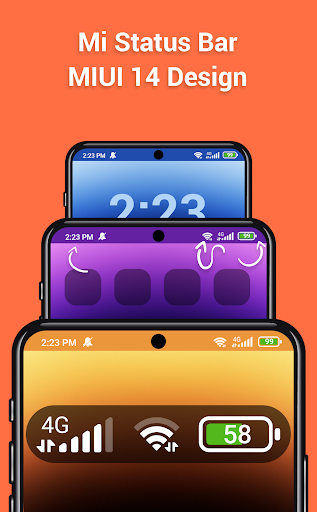
Customize status bar MIUI style & bring Mi Status Bar to your Android phone.
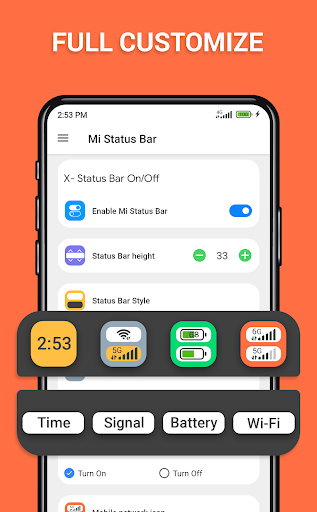
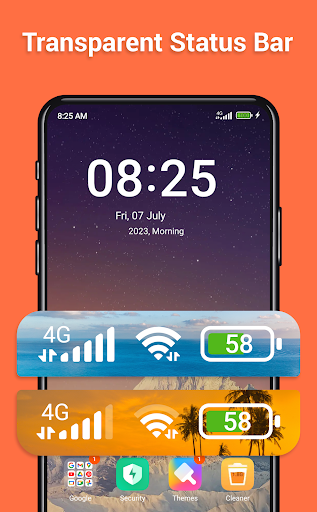
Transform your Android phone's status bar with our app, offering a sleek and customizable MIUI-style experience. Introducing 'Mi Status Bar the ultimate tool to bring the iconic Mi Status Bar to your device. With 'Mi Status Bar' you can personalize every aspect of your status bar, from the clock and notification icons to the battery indicator and signal strength. Embrace the sleek and minimalist design that MIUI users love, enhancing your Android phone's appearance and functionality.
Are you tired of the standard, generic status bar on your Android phone? With 'Customize Status Bar - Mi Style,' you have the power to personalize every aspect of your status bar, elevating its appearance and functionality to new heights. Embrace the minimalistic and elegant design that MIUI users adore, and make your device stand out from the crowd. Experience the true power of personalization with 'Customize Status Bar - Mi Style.' Seamlessly integrate the iconic MIUI-style status bar into your Android phone and transform your device into a reflection of your unique taste and style.
Let's explore the exceptional features of Mi Status Bar:
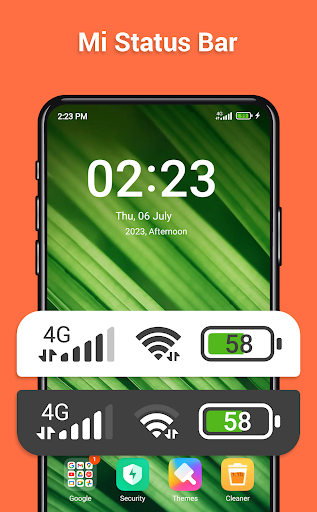
-Clock Customization: Choose from a range of stylish clock formats and fonts to match your preferences.
-Notification Icons: Customize the appearance of notification icons, ensuring a consistent and visually appealing look.
-Silent Mode or Sound Mode: Take control of your device's sound settings with our app. Easily switch between silent mode and sound mode to suit your environment. Whether you're in a meeting or enjoying a movie, quickly toggle the sound settings without hassle.
-Battery Indicator: Display the battery level in a sleek and intuitive way, with various options to suit your style.
-Signal Strength: Enhance the signal indicator to ensure you're always aware of your network strength.
Our app is easy to use, allowing you to effortlessly modify the status bar without any technical knowledge. Unlock a world of personalization and make your Android phone stand out with 'Mi Status Bar'.
PERMISSION REQUIREMENT:
- ACCESSIBILITY PERMISSION : Set up and display the custom Status bar and notch, display and show more information time, battery, connection status. The application commits not to collect or share any user information about this accessibility right. Please open application and grant permission to enable Mi Status Bar.
Thank you!
Note: 'Mi Status Bar' is not affiliated with or endorsed by Xiaomi or MIUI. It aims to provide a similar status bar experience to MIUI for Android users who admire its aesthetics.
Mostre mais

1. Faça o download do instalador do MEmu e conclua a instalação

2. Inicie o MEmu e depois abra o Google Play na página inicial

3. Pesquise Mi Status Bar no Google Play
Install
4. Baixe e Instale Mi Status Bar
5. Na conclusão da instalação, clique no ícone para iniciar

6. º Experimente o Mi Status Bar no PC com o MEmu.
O MEmu Play é o melhor emulador Android gratuito, com 50 milhões de utilizadores a desfrutar da sua experiência superior com aplicações Android. A tecnologia de virtualização do MEmu permite-lhe executar milhares de aplicações Android sem problemas no seu computador, mesmo as mais exigentes.
Tela maior com gráficos melhores; Longa duração e sem limitação de bateria ou dados móveis.
Suporte completo ao Mapaeamento de Teclas para controle preciso do teclado e mouse ou gamepad.
Várias contas de jogos ou tarefas em um único PC de uma só vez com o Gerenciador de várias instâncias.
Use Mi Status Bar on PC by following steps:



![Color Changer Free [root] para PC](https://dl.memuplay.com/new_market/img/mobi.omegacentauri.red.icon.2024-12-13-07-17-50.png)