Mycelium Bitcoin Wallet
Atualizada
Versão atual
3.17.0
Oferecido por

Pare de se preocupar com sobrecargas ao usar Mycelium Bitcoin Wallet no seu celular, liberte-se da pequena tela e aproveite o uso do aplicativo numa tela muito maior. A partir de agora, obtenha uma experiência em tela cheia do seu aplicativo com teclado e mouse. O MEmu oferece-lhe todos os recursos surpreendentes que você esperava: instalação rápida e configuração fácil, controles intuitivos, sem mais limitações de bateria, dados móveis e chamadas perturbadoras. O novíssimo MEmu 9 é a melhor opção para usar Mycelium Bitcoin Wallet no seu computador. Codificado com a nossa absorção, o gerenciador de multi-instâncias possibilita a abertura de 2 ou mais contas ao mesmo tempo. E o mais importante, nosso mecanismo de emulação exclusivo pode liberar todo o potencial do seu PC, tornando tudo suave e agradável.
Mostre mais
Download do Mycelium Bitcoin Wallet no PC com MEmu Android Emulador: Divirta-se jogando na tela grande. With the Mycelium Bitcoin Wallet you can send and receive Bitcoins, Ethereum (ETH) and ERC-20 tokens like Tether USD, USD Coin, HobiToken, Binance USD, Bitfinex LEO, 0x using your mobile phone.
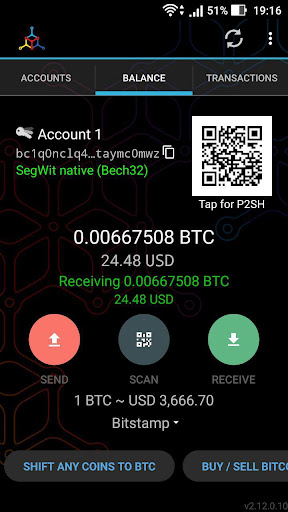
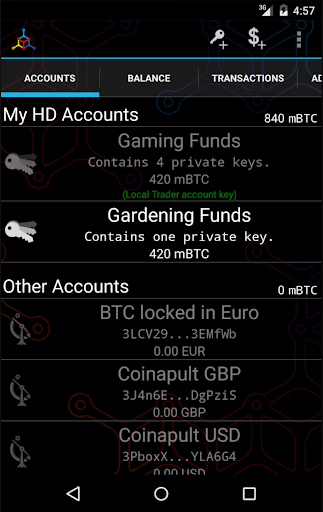
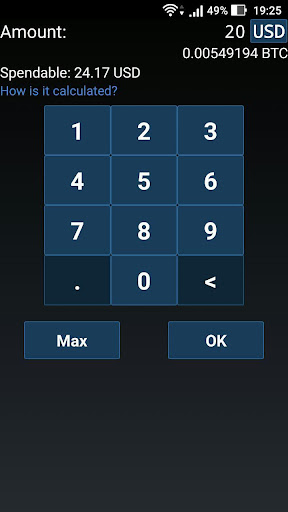
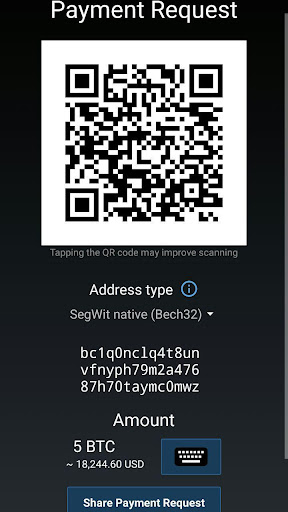
With the Mycelium Bitcoin Wallet you can send and receive Bitcoins, Ethereum (ETH) and ERC-20 tokens like Tether USD, USD Coin, HobiToken, Binance USD, Bitfinex LEO, 0x using your mobile phone.
The unparalleled cold storage functionality allows you to 100% secure your funds until you are ready to spend them;
works for your paper wallets, private keys, master seeds.
See also our promotional video "Mycelia in Wonderland" at https://www.youtube.com/watch?v=2_h9ZZwhwBg
- 100% control over your private keys, they never leave your device unless you export them
- No blockchain download, install and run in seconds
- HD enabled - manage multiple accounts and never reuse addresses (BIP32, BIP44)
- Ultra fast connection to the Bitcoin network through our super nodes
- Watch-only addresses & private key import for secure cold-storage integration
- Secure your wallet with a PIN
- Compatible with other bitcoin services through bitcoin: uri handling
- Support for BIP38 Keys
- Send and receive Ethereum (ETH)
- Send and receive ERC-20 tokens
- Find other people to trade Bitcoins with in person using our Local Trader feature.
Please always make sure you have backups of your private keys!
This application's source is published at https://github.com/mycelium-com/wallet
We need your feedback. If you have a suggestion or a bug to report open an issue at https://github.com/mycelium-com/wallet/issues
More features:
- Master seed based - make one backup and be safe for ever. (BIP39)
- Manage your wallet on multiple devices without giving up control
- For enhanced privacy and availability you can connect to our super nodes via a tor hidden-service ( .onion address)
- dynamic fee handling to ensure timely execution of your transactions by the network, based on blockchain load
- Show fee/byte in transaction details to determine execution time
- Watch-only addresses (single key or HD) for a secure cold-storage integration
- Private key (single or xPriv) import
- Directly spend from paper wallets (single key, xPriv or master seed)
- Hardware Wallet enabled - directly spend from your favorite Hardware wallet:
- Trezor supported √
- Ledger supported √ (Nano, Nano-S, Unplugged, HW.1, Trustlet)
- KeepKey supported √
- Mycelium Entropy compatible Shamir-Secret-Shared 2-out-of-3 keys spending
- Encrypted PDF backup and restore of single key accounts
- Send and receive by specifying an amount in Fiat and switch between fiat and BTC while entering the amount
- Address book for commonly used addresses
- Transaction history with full transaction details.
- Share your bitcoin address using NFC, Twitter, Facebook, email and more.
- BIP70 payment request compatible
- Proof-of-Payment (BIP120/121), thanks Kalle Rosenbaum for the collaboration
- Integration cashila.com to send money via SEPA wires within the European Union
- Integration Glidera.io to buy bitcoin using your bank account in the US or Canada.
- Support for BitID Authentication, securely login on websites using your wallet.
- choose your favorite block explorer
- warn about possible easier to be double spend transactions (RBF) and unconfirmed parent transactions
- Deterministic signatures for Bitcoin transactions (RFC6979)
- cold-spend from BIP38 NFC tags (body implants anyone?)
- compact QR Codes (BIP73)
Explanation for permission requests:
- Location - used to update LocalTrader location - only when user manually updates it.
- Camera/Microphone - Scan QR codes.
Mostre mais

1. Faça o download do instalador do MEmu e conclua a instalação

2. Inicie o MEmu e depois abra o Google Play na página inicial

3. Pesquise Mycelium Bitcoin Wallet no Google Play
Install
4. Baixe e Instale Mycelium Bitcoin Wallet
5. Na conclusão da instalação, clique no ícone para iniciar

6. º Experimente o Mycelium Bitcoin Wallet no PC com o MEmu.
O MEmu Play é o melhor emulador Android gratuito, com 50 milhões de utilizadores a desfrutar da sua experiência superior com aplicações Android. A tecnologia de virtualização do MEmu permite-lhe executar milhares de aplicações Android sem problemas no seu computador, mesmo as mais exigentes.
Tela maior com gráficos melhores; Longa duração e sem limitação de bateria ou dados móveis.
Suporte completo ao Mapaeamento de Teclas para controle preciso do teclado e mouse ou gamepad.
Várias contas de jogos ou tarefas em um único PC de uma só vez com o Gerenciador de várias instâncias.
Use Mycelium Bitcoin Wallet on PC by following steps: