Quick Settings Lite
Atualizada
Versão atual
2.6.6
Oferecido por

Pare de se preocupar com sobrecargas ao usar Quick Settings Lite no seu celular, liberte-se da pequena tela e aproveite o uso do aplicativo numa tela muito maior. A partir de agora, obtenha uma experiência em tela cheia do seu aplicativo com teclado e mouse. O MEmu oferece-lhe todos os recursos surpreendentes que você esperava: instalação rápida e configuração fácil, controles intuitivos, sem mais limitações de bateria, dados móveis e chamadas perturbadoras. O novíssimo MEmu 9 é a melhor opção para usar Quick Settings Lite no seu computador. Codificado com a nossa absorção, o gerenciador de multi-instâncias possibilita a abertura de 2 ou mais contas ao mesmo tempo. E o mais importante, nosso mecanismo de emulação exclusivo pode liberar todo o potencial do seu PC, tornando tudo suave e agradável.
Mostre mais
Download do Quick Settings Lite no PC com MEmu Android Emulador: Divirta-se jogando na tela grande. Quickly access useful apps and control your phone's settings with ease!
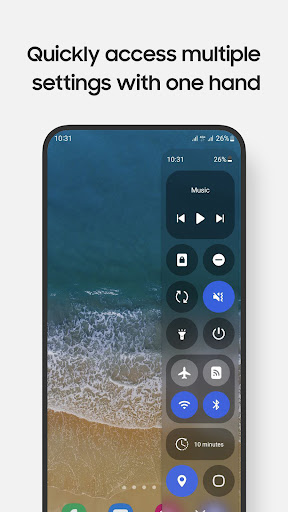
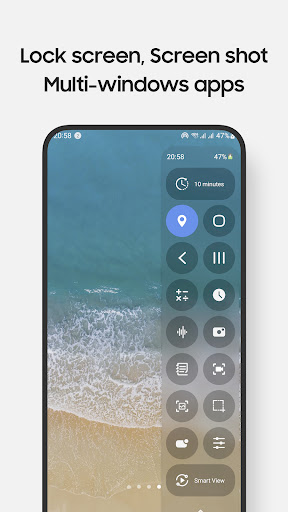
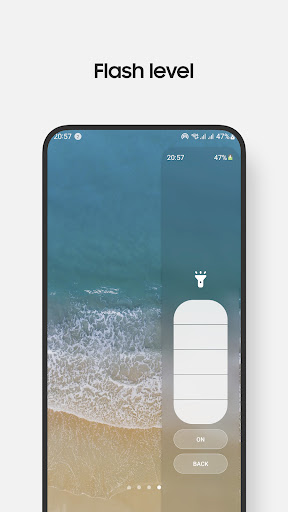
Quickly access useful apps and control your phone's settings with ease! Manage screen recording, take screenshots, and more—right from your Edge Panel.
** Main features
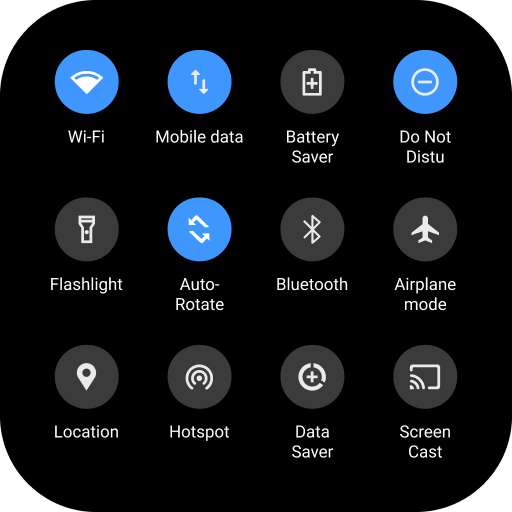
• Toggle settings like Wi-Fi, Bluetooth, Do Not Disturb, Mobile Data, and more.
• Open frequently used apps like Camera, Calculator, and Clock in full-screen or pop-up views.
• Control music playback easily.
• Screen recording with customizable options.
• Take screenshots of specific portions of the screen.
• Adjust sound and brightness levels.
• Lock screen with a single tap.
• Access multiple flashlight levels.
• Pull down the notification bar with one hand.
• Multiple screen timeout options.
• Navigation buttons: Home, Back, and Recents.
• QR code scanning.
• Screen mirroring through Smart View.
• Customizable control panel design and layout.
• Supports Night Mode.
** Notes:
• Certain controls are limited in the Lite version.
• Long press on items to bring up control's setting. For example, long press on Lock screen to access the power dialog
• Due to Edge Panel limitations, volume and brightness adjustments are controlled by taps instead of sliders
• Some system-level controls, such as Airplane Mode and Mobile Data,... need to be toggled manually for user protection
• Lock screen feature:
- For devices running operating system 9 (Pie) or later, the Lock screen feature functions normally.
- For devices running versions earlier, a pattern or password will be required, as fingerprint and iris unlock methods are not supported due to system policies.
• The app currently supports phones with Edge Panels and is not designed for tablets or foldable devices (except Z Flip series)
** Supported devices:
• Compatible with Galaxy devices that feature Edge Panels, including models from Note series, S series, A series, and Z Flip series.
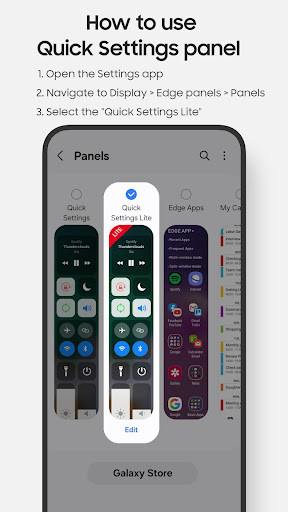
** How to use:
• Setting app > Display > Edge panels > enable Quick Settings Lite panel
• After updates, uncheck and recheck the Quick Settings Lite Panel if needed
** Permission
This app requires permissions for certain features, all of which are clearly explained while using them:
• Accessibility permission: this permission is required for the app to perform some controls. To disable this permission , turn off Quick Settings Lite in Settings app > Accessibility > Installed apps. How this permission is used to handle some controls, please refer to official developer documentation: https://developer.android.com/reference/android/accessibilityservice/AccessibilityService. And using this permission in the app: https://www.youtube.com/watch?v=jfOCPhcmrDQ
- Lock Screen: lock the screen or open the power long-press dialog
- Screenshot: take a screenshot
- Home: go to the Home screen
- Recents: view recent apps
- Back: go back
- Notifications: open the notifications in Notification Bar
- Quick Setting Tiles: open the Quick Settings
- Lock automatically: Auto-lock the screen after a period of time
• android.permission.RECORD_AUDIO: allows the app to record audio, this permission is for Screen Recording control.
• android.permission.CAMERA: required to be able to access the camera device, this permission is for Scan QR Code, Flash Light controls.
• android.permission.READ_PHONE_STATE: allows read only access to phone state, this permission is for Wi-fi, Mobile Data controls.
...
** Contact us:
• Let us know your thoughts here: edge.pro.team@gmail.com
** App originality
• This app is independently developed for use on Galaxy devices and is not affiliated with or endorsed by other platforms or brands.
EdgePro team.
Mostre mais

1. Faça o download do instalador do MEmu e conclua a instalação

2. Inicie o MEmu e depois abra o Google Play na página inicial

3. Pesquise Quick Settings Lite no Google Play
Install
4. Baixe e Instale Quick Settings Lite
5. Na conclusão da instalação, clique no ícone para iniciar

6. º Experimente o Quick Settings Lite no PC com o MEmu.
O MEmu Play é o melhor emulador Android gratuito, com 50 milhões de utilizadores a desfrutar da sua experiência superior com aplicações Android. A tecnologia de virtualização do MEmu permite-lhe executar milhares de aplicações Android sem problemas no seu computador, mesmo as mais exigentes.
Tela maior com gráficos melhores; Longa duração e sem limitação de bateria ou dados móveis.
Suporte completo ao Mapaeamento de Teclas para controle preciso do teclado e mouse ou gamepad.
Várias contas de jogos ou tarefas em um único PC de uma só vez com o Gerenciador de várias instâncias.
Use Quick Settings Lite on PC by following steps:



![Color Changer Free [root] para PC](https://dl.memuplay.com/new_market/img/mobi.omegacentauri.red.icon.2024-12-13-07-17-50.png)