Simple Moon Phase Calendar
Atualizada
Versão atual
1.4.04
Oferecido por

Pare de se preocupar com sobrecargas ao usar Simple Moon Phase Calendar no seu celular, liberte-se da pequena tela e aproveite o uso do aplicativo numa tela muito maior. A partir de agora, obtenha uma experiência em tela cheia do seu aplicativo com teclado e mouse. O MEmu oferece-lhe todos os recursos surpreendentes que você esperava: instalação rápida e configuração fácil, controles intuitivos, sem mais limitações de bateria, dados móveis e chamadas perturbadoras. O novíssimo MEmu 9 é a melhor opção para usar Simple Moon Phase Calendar no seu computador. Codificado com a nossa absorção, o gerenciador de multi-instâncias possibilita a abertura de 2 ou mais contas ao mesmo tempo. E o mais importante, nosso mecanismo de emulação exclusivo pode liberar todo o potencial do seu PC, tornando tudo suave e agradável.
Mostre mais
Download do Simple Moon Phase Calendar no PC com MEmu Android Emulador: Divirta-se jogando na tela grande. It is the succeeding app that renewed "Simple Moon Phase Widget".
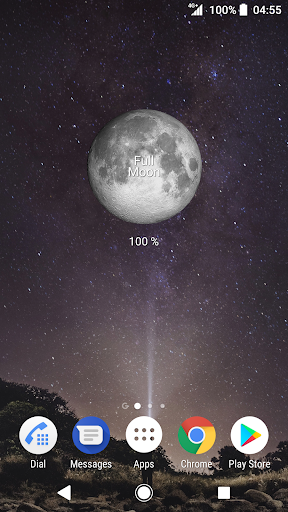
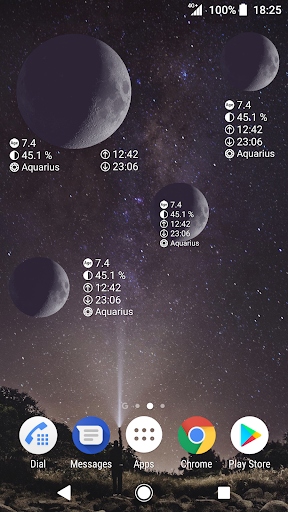
It is the succeeding app that renewed "Simple Moon Phase Widget".
Improved point:
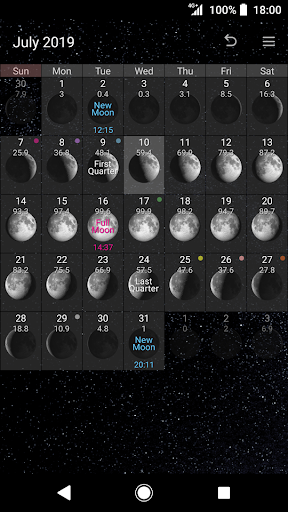
- Upgraded calendar (Variations of the background, Additional data, MoonSign and Mercury retrograde, etc.)
- Lightweighting of app capacity
- Notification is possible without setting the widget to the home screen
- Change of the moon color of the widget is possible in trial
Function:
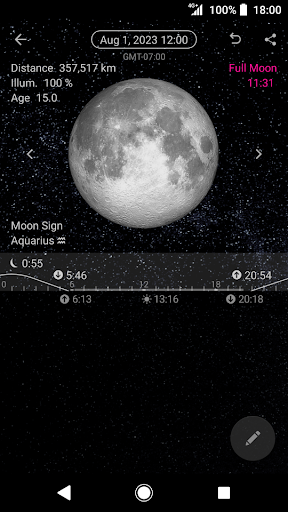
- When you tap the date on the calendar to migrate to the detail screen that to display the large moon image.
- Detailed data is age of the moon, the distance to the moon, percent illuminated, time of the moonset/moonrise, Moon sign, Mercury retrograde.
- Notify full moon and new moon, first quarter, last quarter in the status bar.
- Full moon and new moon, first quarter, last quarter will be announced in the widget.
- Widget is resizable.
- There is also a memo function on the calendar.
★ There is a paid function to change the color of the moon.
Notice:
* Need permission of Storage and Location.
* This app does not change the wallpaper. Please prepare wallpaper by yourself.
* This app is not provided image to completely reproduce the libration of the moon.
The position of the pattern of the moon phase, such as craters, shifts from a fact a little periodically.
What is Libration:
'In astronomy, libration is an oscillating motion of orbiting bodies relative to each other, notably including the motion of the Moon relative to Earth, or of Trojan asteroids relative to planets.'
In Wikipedia: The Free Encyclopedia.
Retrieved from http://en.wikipedia.org/wiki/Libration
Mostre mais

1. Faça o download do instalador do MEmu e conclua a instalação

2. Inicie o MEmu e depois abra o Google Play na página inicial

3. Pesquise Simple Moon Phase Calendar no Google Play
Install
4. Baixe e Instale Simple Moon Phase Calendar
5. Na conclusão da instalação, clique no ícone para iniciar

6. º Experimente o Simple Moon Phase Calendar no PC com o MEmu.
O MEmu Play é o melhor emulador Android gratuito, com 50 milhões de utilizadores a desfrutar da sua experiência superior com aplicações Android. A tecnologia de virtualização do MEmu permite-lhe executar milhares de aplicações Android sem problemas no seu computador, mesmo as mais exigentes.
Tela maior com gráficos melhores; Longa duração e sem limitação de bateria ou dados móveis.
Suporte completo ao Mapaeamento de Teclas para controle preciso do teclado e mouse ou gamepad.
Várias contas de jogos ou tarefas em um único PC de uma só vez com o Gerenciador de várias instâncias.
Use Simple Moon Phase Calendar on PC by following steps: