
testerup - earn money
Atualizada
Versão atual
1.9.997
Oferecido por

Pare de se preocupar com sobrecargas ao usar testerup - earn money no seu celular, liberte-se da pequena tela e aproveite o uso do aplicativo numa tela muito maior. A partir de agora, obtenha uma experiência em tela cheia do seu aplicativo com teclado e mouse. O MEmu oferece-lhe todos os recursos surpreendentes que você esperava: instalação rápida e configuração fácil, controles intuitivos, sem mais limitações de bateria, dados móveis e chamadas perturbadoras. O novíssimo MEmu 9 é a melhor opção para usar testerup - earn money no seu computador. Codificado com a nossa absorção, o gerenciador de multi-instâncias possibilita a abertura de 2 ou mais contas ao mesmo tempo. E o mais importante, nosso mecanismo de emulação exclusivo pode liberar todo o potencial do seu PC, tornando tudo suave e agradável.
Mostre mais
Download do testerup - earn money no PC com MEmu Android Emulador: Divirta-se jogando na tela grande. Earn money as an online tester?
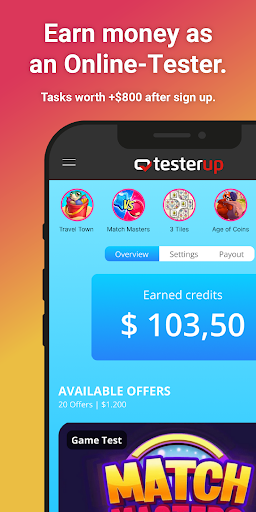



Earn money as an online tester? As often and whenever you want?
Join Germany's largest platform for paid online jobs and join over 3,000,000 online testers.
After signing up for free, you'll immediately have access to countless app tests, game tests, online surveys, and other product tests.
- Earn over $100 by playing games, whether on the go or from the comfort of your home, maximum flexibility guaranteed.
- Choose from the largest assortment in the US area, orders that fit you exactly.
- You will be regularly invited to the latest product, website, and app tests.
- Orders with multi goals allow you to achieve higher earnings through continuous testing.
- Fast and secure payout: Get paid within 24 hours.
- Upgrade to a premium tester and earn exclusive access to higher-paying assignments.
- Tested, Verified, Recommended! We value authenticity and trustworthiness. Not for nothing we are recommended by Verbraucherschutz.de. In addition, testerup is certified with the TÜV - eKomi rating of 4.3/5.
Mostre mais

1. Faça o download do instalador do MEmu e conclua a instalação

2. Inicie o MEmu e depois abra o Google Play na página inicial

3. Pesquise testerup - earn money no Google Play
Install
4. Baixe e Instale testerup - earn money
5. Na conclusão da instalação, clique no ícone para iniciar

6. º Experimente o testerup - earn money no PC com o MEmu.
O MEmu Play é o melhor emulador Android gratuito, com 50 milhões de utilizadores a desfrutar da sua experiência superior com aplicações Android. A tecnologia de virtualização do MEmu permite-lhe executar milhares de aplicações Android sem problemas no seu computador, mesmo as mais exigentes.
Tela maior com gráficos melhores; Longa duração e sem limitação de bateria ou dados móveis.
Suporte completo ao Mapaeamento de Teclas para controle preciso do teclado e mouse ou gamepad.
Várias contas de jogos ou tarefas em um único PC de uma só vez com o Gerenciador de várias instâncias.
Use testerup - earn money on PC by following steps: