
Tonebridge Guitar Effects
Atualizada
Versão atual
1.4.6
Oferecido por

Pare de se preocupar com sobrecargas ao usar Tonebridge Guitar Effects no seu celular, liberte-se da pequena tela e aproveite o uso do aplicativo numa tela muito maior. A partir de agora, obtenha uma experiência em tela cheia do seu aplicativo com teclado e mouse. O MEmu oferece-lhe todos os recursos surpreendentes que você esperava: instalação rápida e configuração fácil, controles intuitivos, sem mais limitações de bateria, dados móveis e chamadas perturbadoras. O novíssimo MEmu 9 é a melhor opção para usar Tonebridge Guitar Effects no seu computador. Codificado com a nossa absorção, o gerenciador de multi-instâncias possibilita a abertura de 2 ou mais contas ao mesmo tempo. E o mais importante, nosso mecanismo de emulação exclusivo pode liberar todo o potencial do seu PC, tornando tudo suave e agradável.
Mostre mais
Download do Tonebridge Guitar Effects no PC com MEmu Android Emulador: Divirta-se jogando na tela grande. Play your favorite songs in their original sound using your phone or tablet!
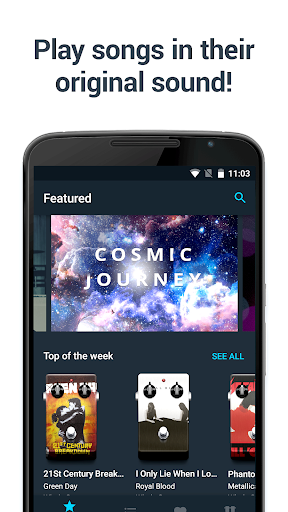
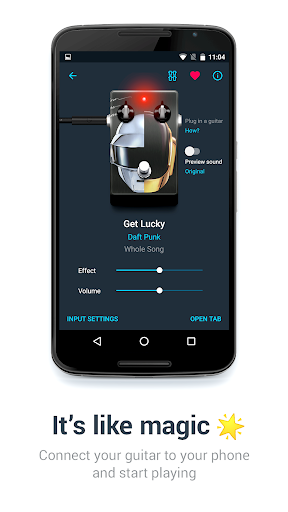
Play your favorite songs in their original sound using your phone or tablet! It's a whole new experience in learning songs.
IT’S LIKE MAGIC
Tonebridge gives you the sound of the original song out of the box. Plug in your guitar* into your phone or tablet and start playing. It’s that simple!
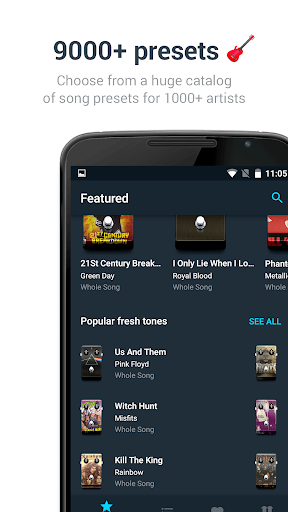
9000+ SONG PRESETS FOR 1000+ ARTISTS
A huge collection of song presets allows you to choose effects from light acoustic sounds of "Come As You Are" to crushing heavy roars of "Master Of Puppets".
WORKS ON EVERY GUITAR
We created presets that sound great on every guitar. Even if you want to play heavy metal on an old Fender, the sound will still be familiar.
Tonebridge features:
• 9000+ presets for popular songs of different genres
• 7500+ demo samples for effect preview
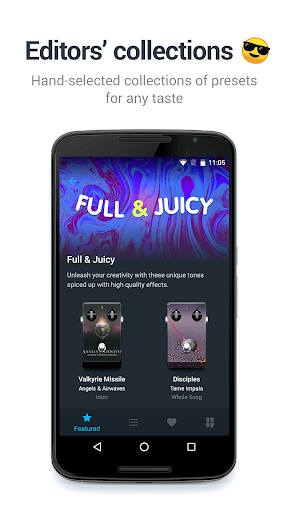
• Collections of presets handpicked by Ultimate Guitar editors
• Intelligent feedback and noise reduction system for clear sound
• Low latency for real-time playing*
• Information about pickup settings
• Preset requests to get a preset that is not already in the app
• Pedalboards to quickly switch between presets
Compatible devices:
• Ampkit Link
• iRig
• iRig 2
Note on USB devices: Tonebridge doesn't support USB connection devices like Behringer UCG102, Guitar Link, iRig UA, HD, HD 2 or iRig Pro. These devices use USB for connection, and Tonebridge currently supports only adaptors that use a headphone port for connection. Sorry for that, we're working hard to make USB connection possible. Stay tuned!
Follow @tonebridgeapp on Twitter to read the latest news and secret tricks in Tonebridge.
Have a suggestion or comment? Shoot us an email at tonebridge@ultimate-guitar.com
Rock'n'roll for everyone!
This app has been Superpowered.
* - due to Android latency issues, some devices may not fully support guitar connection in Tonebridge. If you hear latency or experience other problems with the sound, please contact us at tonebridge@ultimate-guitar.com
By downloading the app you agree to our Terms of Service:
https://www.ultimate-guitar.com/about/tos.htm
Mostre mais

1. Faça o download do instalador do MEmu e conclua a instalação

2. Inicie o MEmu e depois abra o Google Play na página inicial

3. Pesquise Tonebridge Guitar Effects no Google Play
Install
4. Baixe e Instale Tonebridge Guitar Effects
5. Na conclusão da instalação, clique no ícone para iniciar

6. º Experimente o Tonebridge Guitar Effects no PC com o MEmu.
O MEmu Play é o melhor emulador Android gratuito, com 50 milhões de utilizadores a desfrutar da sua experiência superior com aplicações Android. A tecnologia de virtualização do MEmu permite-lhe executar milhares de aplicações Android sem problemas no seu computador, mesmo as mais exigentes.
Tela maior com gráficos melhores; Longa duração e sem limitação de bateria ou dados móveis.
Suporte completo ao Mapaeamento de Teclas para controle preciso do teclado e mouse ou gamepad.
Várias contas de jogos ou tarefas em um único PC de uma só vez com o Gerenciador de várias instâncias.
Use Tonebridge Guitar Effects on PC by following steps: