Torque Lite (OBD2 & Car)
Atualizada
Versão atual
1515835052
Oferecido por

Pare de se preocupar com sobrecargas ao usar Torque Lite (OBD2 & Car) no seu celular, liberte-se da pequena tela e aproveite o uso do aplicativo numa tela muito maior. A partir de agora, obtenha uma experiência em tela cheia do seu aplicativo com teclado e mouse. O MEmu oferece-lhe todos os recursos surpreendentes que você esperava: instalação rápida e configuração fácil, controles intuitivos, sem mais limitações de bateria, dados móveis e chamadas perturbadoras. O novíssimo MEmu 9 é a melhor opção para usar Torque Lite (OBD2 & Car) no seu computador. Codificado com a nossa absorção, o gerenciador de multi-instâncias possibilita a abertura de 2 ou mais contas ao mesmo tempo. E o mais importante, nosso mecanismo de emulação exclusivo pode liberar todo o potencial do seu PC, tornando tudo suave e agradável.
Mostre mais
Download do Torque Lite (OBD2 & Car) no PC com MEmu Android Emulador: Divirta-se jogando na tela grande. See what your car is doing in realtime, get fault codes, sensor data and more!
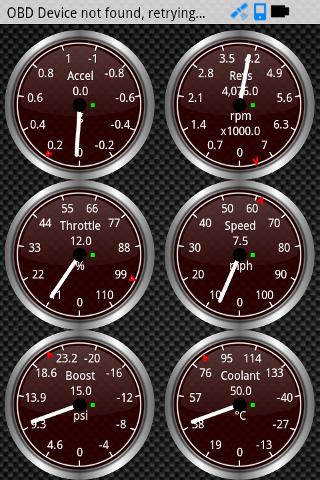
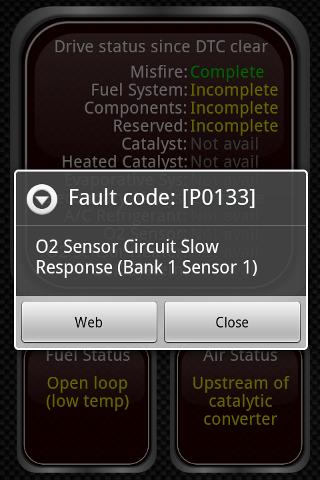
See what your car is doing in realtime, get fault codes, sensor data and more!
An OBD II engine ECU diagnostics tool that uses a cheap bluetooth ELM / OBD adapter to connect to your car OBD2 engine management system
Some features include:
* Shows and Resets engine fault codes / DTC trouble codes stored in your car
* Can export map/track log files to Google Earth KML / CSV
* Engine performance data(0 to 60, 0-100, quarter mile, etc) (full version)
* Head up Display / GPS HUD mode perfect for checking your speed at night
* Data Logging functions including web upload and file logging, you can even upload data to your own web server from sensors you choose
* Customisable dashboard with theme support - setup the dashboard with the gauges and dials that you want
* Can help you fix your car and helps keep car repair costs down!
* Turbo Boost gauge support for VW vehicles (in Pro version only)
* MPG for Petrol/Gasoline vehicles. (Pro version has diesel support)
This is the free/basic version - it lets you get a feel for the application and lets you find out if it works with your vehicle / obd2 adapter combination; but may contain some small bugs including not working on some nissan/chrysler/subaru ECUs. The paid version has support for more vehicles and ECU types, looks a lot nicer, and works with more cars / trucks
The paid version has more features (HorsePower,Torque, 0-60 , quarter mile tests, graph data, map / track views) + no adverts and exra dial/display types! and better ABS / Knock sensor support, Transmission temperature support for some makes of car / trucks (GM / Ford, etc), and Turbo Boost on many more vehicles (including VW)
Works on vehicles made by Ford, GM/Vauxhall/Opel, Chrysler, Mercedes, Volkswagen, Audi, Jaguar, Citroen, Peugoet, Skoda, Kia, Mazda, Lexus, Daewoo, Renault, Mitsubishi, Nissan, Honda, Hyundai, BMW, Toyota, Seat, Dodge, Jeep, Pontiac, Subaru and many more vehicle makes, European, US, Far East, etc. Some vehicle ECUs may support more/less features than others.
**PLEASE NOTE!** Any reports of hanging or freezing after quitting the app is due to a bug in the HTC Evo 4G and Galaxy Tab, this can be triggered by using the Pandora/Vlingo/Aldiko bluetooth enabled apps. Disabling Pandoras new bluetooth settings fixes the problem, but HTC/Samsung need to release a fix. Please contact their support and encourage them to fix, Thanks!
The pro version supports USB ELM adapters which are use 'Prolific' or 'FTDI' chips
* Update: A freeze/hang workaround has been found after a great amount of effort and is available in the full version in the General Preferences settings!
Mostre mais

1. Faça o download do instalador do MEmu e conclua a instalação

2. Inicie o MEmu e depois abra o Google Play na página inicial

3. Pesquise Torque Lite (OBD2 & Car) no Google Play
Install
4. Baixe e Instale Torque Lite (OBD2 & Car)
5. Na conclusão da instalação, clique no ícone para iniciar

6. º Experimente o Torque Lite (OBD2 & Car) no PC com o MEmu.
O MEmu Play é o melhor emulador Android gratuito, com 50 milhões de utilizadores a desfrutar da sua experiência superior com aplicações Android. A tecnologia de virtualização do MEmu permite-lhe executar milhares de aplicações Android sem problemas no seu computador, mesmo as mais exigentes.
Tela maior com gráficos melhores; Longa duração e sem limitação de bateria ou dados móveis.
Suporte completo ao Mapaeamento de Teclas para controle preciso do teclado e mouse ou gamepad.
Várias contas de jogos ou tarefas em um único PC de uma só vez com o Gerenciador de várias instâncias.
Use Torque Lite (OBD2 & Car) on PC by following steps: