Vagina 3D
Atualizada
Versão atual
1.0
Oferecido por

Pare de se preocupar com sobrecargas ao usar Vagina 3D no seu celular, liberte-se da pequena tela e aproveite o uso do aplicativo numa tela muito maior. A partir de agora, obtenha uma experiência em tela cheia do seu aplicativo com teclado e mouse. O MEmu oferece-lhe todos os recursos surpreendentes que você esperava: instalação rápida e configuração fácil, controles intuitivos, sem mais limitações de bateria, dados móveis e chamadas perturbadoras. O novíssimo MEmu 9 é a melhor opção para usar Vagina 3D no seu computador. Codificado com a nossa absorção, o gerenciador de multi-instâncias possibilita a abertura de 2 ou mais contas ao mesmo tempo. E o mais importante, nosso mecanismo de emulação exclusivo pode liberar todo o potencial do seu PC, tornando tudo suave e agradável.
Mostre mais
Download do Vagina 3D no PC com MEmu Android Emulador: Divirta-se jogando na tela grande. Vagina 3D is revolutionary learning that allows you to fly through the Vagina in a real-time virtual reality environment.

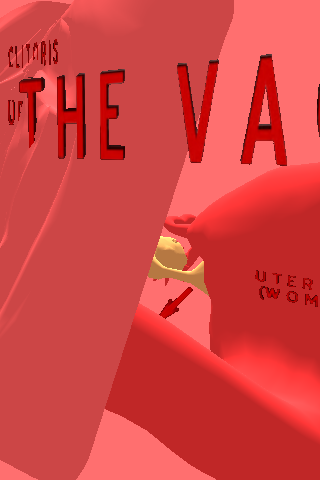


Vagina 3D is revolutionary learning that allows you to fly through the Vagina in a real-time virtual reality environment.
Key Learning Concepts in the App:
Vagina
Uterus
Cervix
Labia
Clitoris
Human Anatomy
Movement
Use the Right joystick to move
Use the Left joystick to rotate and look around
Touch any sign for information
For ease of travel you can go through most objects including the ground
About Virtual Reality
Virtual Reality (VR) is a technology that allows us to step into 3D interactive environments where everything is possible: visiting New York, exploring the human cell, flying through the Solar System, or traveling back in time to Ancient Egypt. From a PC, Tablet, phone, or headset users have a first person, self-guided experience with concepts. We step inside of a molecule to understand its structure. We travel through an iPhone to learn how it operates. We become a part of a subject; this is the magic of VR.
For the complete list of 200+ VR learning programs in Science, Anatomy, World Landmarks, Astronomy, History, Technology, Art & Culture, Current Events, Geography, and Natural Features, please go to http://www.sunrisevr.com/programs
Lesson Plans
Lesson Plans for virtual learning programs are available at http://www.sunrisevr.com/programs
Teachers: Classroom 3D Direct
Imagine a classroom where the world's most advanced learning is delivered to teachers every week, hours after it was completed. Free. This is instant access 3D, virtual learning programs based on the most important topics of the week that you can share with your students. Classroom 3D Direct delivers weekly programs straight to your email inbox complete with lesson plans, videos, and topical links to help you easily integrate 3D into your class. One click takes your students into the virtual world. To sign up for the free Classroom 3D Direct, simply enter your email address at http://www.sunrisevr.com/classroom-3d-direct
About this App
SUNRISE Virtual Reality takes learning into 3D. SUNRISE (www.sunrisevr.com) is the world leader in virtual learning, providing easily accessed programs that feature learning through 3D graphics and personal interaction. Click. Smile. Explore. It’s that easy. Anyone can use programs free of charge. SUNRISE takes learning seriously: American children have numerous and well-documented deficiencies in many subject areas, especially science, technology, engineering, and math (STEM). The company sees virtual learning as an important part of the national effort to improve education and help students “Understand Everything.” Learning can be more.
Mostre mais

1. Faça o download do instalador do MEmu e conclua a instalação

2. Inicie o MEmu e depois abra o Google Play na página inicial

3. Pesquise Vagina 3D no Google Play
Install
4. Baixe e Instale Vagina 3D
5. Na conclusão da instalação, clique no ícone para iniciar

6. º Experimente o Vagina 3D no PC com o MEmu.
O MEmu Play é o melhor emulador Android gratuito, com 50 milhões de utilizadores a desfrutar da sua experiência superior com aplicações Android. A tecnologia de virtualização do MEmu permite-lhe executar milhares de aplicações Android sem problemas no seu computador, mesmo as mais exigentes.
Tela maior com gráficos melhores; Longa duração e sem limitação de bateria ou dados móveis.
Suporte completo ao Mapaeamento de Teclas para controle preciso do teclado e mouse ou gamepad.
Várias contas de jogos ou tarefas em um único PC de uma só vez com o Gerenciador de várias instâncias.
Use Vagina 3D on PC by following steps: