Zaply: IPTV Player Live TV
Atualizada
Versão atual
0.0.21
Oferecido por

Pare de se preocupar com sobrecargas ao usar Zaply: IPTV Player Live TV no seu celular, liberte-se da pequena tela e aproveite o uso do aplicativo numa tela muito maior. A partir de agora, obtenha uma experiência em tela cheia do seu aplicativo com teclado e mouse. O MEmu oferece-lhe todos os recursos surpreendentes que você esperava: instalação rápida e configuração fácil, controles intuitivos, sem mais limitações de bateria, dados móveis e chamadas perturbadoras. O novíssimo MEmu 9 é a melhor opção para usar Zaply: IPTV Player Live TV no seu computador. Codificado com a nossa absorção, o gerenciador de multi-instâncias possibilita a abertura de 2 ou mais contas ao mesmo tempo. E o mais importante, nosso mecanismo de emulação exclusivo pode liberar todo o potencial do seu PC, tornando tudo suave e agradável.
Mostre mais
Desfrute de uma experiência incrível utilizando o Zaply: IPTV Player Live TV no PC com o MEmu Play. É um poderoso emulador Android gratuito que oferece milhares de aplicações Android nas suas versões para desktop. Estabeleça ligação com amigos e aprimore o seu trabalho com mais eficiência! Zaply: IPTV Player Live TV.
Zaply: IPTV Player Live TV
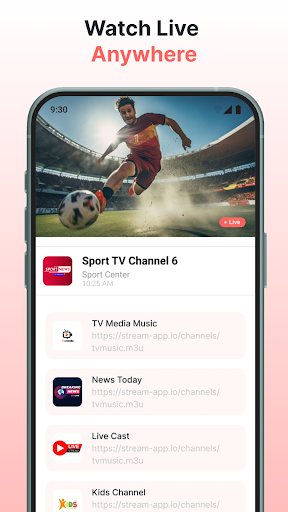
Zaply is a powerful IPTV player for Android, built to deliver smooth,
reliable live TV streaming right to your device. Watch live channels,
movies, and TV shows using M3U/M3U8 playlists or Xtream Codes — on
your phone, tablet, or Android TV, anytime, anywhere.
Whether you're a casual viewer or a dedicated IPTV user, Zaply makes
it effortless to manage your playlists and enjoy high-quality live TV
playback with zero hassle.
KEY FEATURES
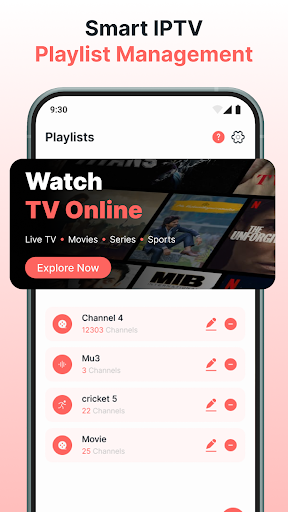
▶ M3U / M3U8 Playlist Support
Add unlimited IPTV playlists with a simple URL. Stream live TV
channels, movies, and series from any M3U or M3U8 source worldwide.
No limits — add as many playlists as you need.
▶ Xtream Codes IPTV Player
Connect your Xtream Codes account and instantly access live TV
channels, VOD movies, and TV series — fast, smooth, and seamless.
Full Xtream IPTV support built in from day one.
▶ Local Media Player
Zaply isn't just a live TV app. It also works as a local media
player — play videos, images, and files stored directly on your
Android device, all in one app.
▶ Cast & Screen Mirror to Big Screen
Stream your IPTV content to any larger screen with mirror-cast
support. Turn your phone or tablet into a portable entertainment
hub and enjoy a cinematic experience on your TV.
▶ Picture-in-Picture Mode
Keep watching your IPTV stream in a floating window while
multitasking. Stay on top of live TV — even when switching between
apps on your device.
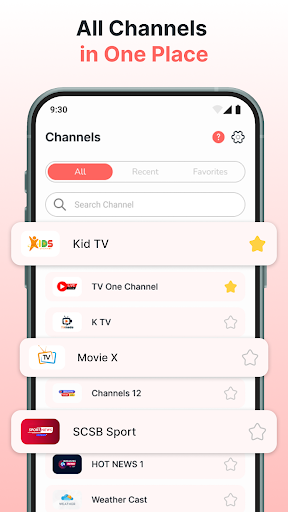
▶ Fast Channel Search
Find any live TV channel in seconds with Zaply's built-in search
function. Spend less time browsing and more time watching the
content you love.
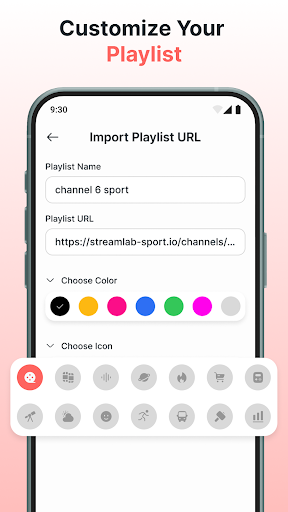
▶ Playlist Import & Favorites Management
Import your IPTV playlists with a single URL. Mark favorite channels
with one tap for instant access. Managing your live TV content has
never been simpler.
▶ Recently Viewed History
Zaply automatically tracks your viewing history so you can quickly
jump back to the live TV channels or shows you were watching before.
▶ Advanced Playback Controls
Built-in sleep timer, volume controls, and a screen lock to prevent
accidental touches — everything you need for a distraction-free
IPTV streaming experience.
▶ Works on Phone, Tablet & Android TV
Use Zaply on all your Android devices — smartphones, tablets, and
Android TV. One IPTV player app for every screen you own.
▶ Smooth, Stable IPTV Streaming
Zaply's integrated IPTV engine is optimized for fast buffering and
stable playback performance — even on slower connections. No
interruptions, just smooth live TV.
WHY CHOOSE ZAPLY?
Clean, intuitive interface — start streaming in minutes
Full M3U, M3U8, and Xtream Codes support
Works on Android phones, tablets, and Android TV
Picture-in-Picture for effortless multitasking
Unlimited IPTV playlist support — no channel limits
Local file playback + live TV streaming in one app
Fast search to find live channels instantly
Stable HD streaming with minimal buffering
Favorites, history & easy playlist management
GET STARTED IN 3 STEPS
1⃣ Download Zaply: IPTV Player Live TV
2⃣ Add your M3U/M3U8 playlist URL or Xtream Codes
3⃣ Start watching live TV channels instantly — it's that simple
Download Zaply now and enjoy live TV, movies, and series wherever
you are — your IPTV player, always ready.
DISCLAIMER
Zaply does not host, provide, or include any media content, playlists,
or live TV channels. Zaply is a media player application only — users
must supply their own playlist URLs and content sources. Zaply is not
affiliated with any third-party content providers and does not support
or endorse the streaming of copyrighted content without proper
authorization.
Mostre mais

1. Faça o download do instalador do MEmu e conclua a instalação

2. Inicie o MEmu e depois abra o Google Play na página inicial

3. Pesquise Zaply: IPTV Player Live TV no Google Play
Install
4. Baixe e Instale Zaply: IPTV Player Live TV
5. Na conclusão da instalação, clique no ícone para iniciar

6. º Experimente o Zaply: IPTV Player Live TV no PC com o MEmu.
O MEmu Play é o melhor emulador Android gratuito, com 50 milhões de utilizadores a desfrutar da sua experiência superior com aplicações Android. A tecnologia de virtualização do MEmu permite-lhe executar milhares de aplicações Android sem problemas no seu computador, mesmo as mais exigentes.
Tela maior com gráficos melhores; Longa duração e sem limitação de bateria ou dados móveis.
Suporte completo ao Mapaeamento de Teclas para controle preciso do teclado e mouse ou gamepad.
Várias contas de jogos ou tarefas em um único PC de uma só vez com o Gerenciador de várias instâncias.
Use Zaply: IPTV Player Live TV on PC by following steps: