3D EARTH PRO - local forecast
Обновлено
Текущая версия
1.1.54
Продавец

Перестаньте беспокоиться о быстром разряде батареи при использовании 3D EARTH PRO - local forecast на вашем телефоне. Освободитесь от крошечного экрана и наслаждайтесь приложением на гораздо большем экране. Теперь вы можете работать с приложением в полноэкранном режиме с удобством клавиатуры и мыши. MEmu предлагает вам все ожидаемые удивительные функции: быструю установку и простую настройку, интуитивно понятное управление и больше никаких забот о времени автономной работы, мобильном трафике или неожиданных звонках. Совершенно новый MEmu 9 — идеальный выбор для использования 3D EARTH PRO - local forecast на вашем компьютере. С помощью менеджера нескольких экземпляров MEmu вы можете одновременно использовать два или более аккаунтов. И самое главное, наш эксклюзивный движок эмуляции раскрывает весь потенциал вашего ПК, обеспечивая плавную и приятную работу.
Показать больше
Скачайте 3D EARTH PRO - local forecast на ПК с помощью Андроид эмулятора MEmu. Наслаждайтесь на большом экране. Meet the wonderful 3D Earth.
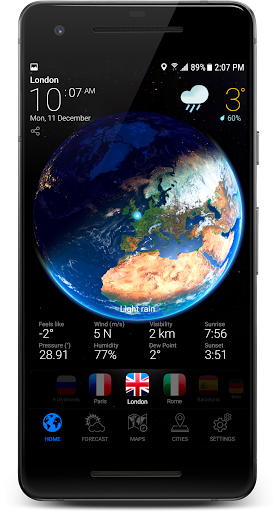
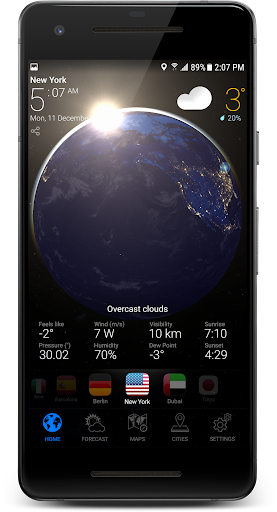
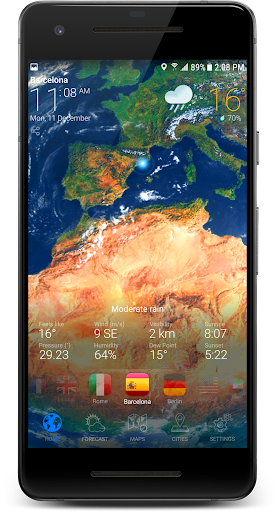
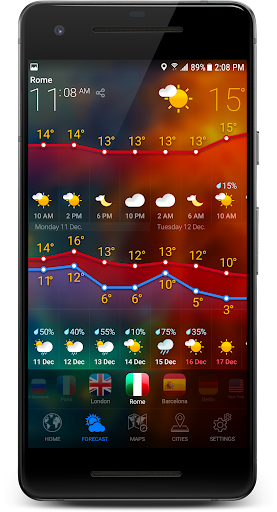
Meet the wonderful 3D Earth. The most beautiful app, ever!
This unique application combining: weather forecast, clocks, widgets and a beautiful view from the space to our Earth.
Accurate weather conditions and forecast is the main feature of this app.
The unique weather forecast algorithm has access to thousands of weather stations. It allows making a mostly accurate forecast for each location around the world!
Current weather condition has a detailed description, air temperature, wind direction and force, humidity, dew point, pressure, visibility, as well as comfort index with reference to current weather conditions.
Weather forecast information has a detailed description, day and night air temperature, wind direction and force, humidity, UV index, air quality, ozone, geomagnetic storms, the probability of precipitation, and comfort index with reference to current weather conditions.
FEATURES:
- Real-time 3D rendered Earth
- Rain Radar provided by Rain Viewer
- The world clock for each location
- Weather condition for more than 150 000 locations around the world with 15 days and hourly forecasts
- Beautiful charts for 15 days and 48 hours forecast
- Sunrise and Sunset time
- Accurate 15 day weather forecast
- Weather widgets with weather forecast
- Weather notifications and weather alerts
- Weather forecast for multiple locations all around the world
- Fabulous animated wallpaper with 3D Earth
- Local time in 12 or 24-hour format
- "Feels Like" temperature and weather bug forecast too
- Humidity and precipitation forecast information, pressure in inches, mm or mbar
- Fahrenheit or Celsius and Miles or Kilometers
- Easy navigation between cities
- Barometer and pressure forecast for you
- UV index and forecast
- Precipitation probability forecast
- Visibility on the roads
- Space weather forecast
- Dew point in forecast weather channel
- Share forecast, alerts, by e-mail, Twitter, Facebook, WhatsApp, Telegram, SMS and other ways
- Live Weather notification indicators in the status bar
Paris, London, New York, Berlin, Rome, Madrid, Barcelona, Prague, Moscow, Sydney, Los Angeles, Tokyo or any other location worldwide – get accurate weather forecasts wherever you go.
For assistance, please contact us.
support@3dearthapp.com
Показать больше

1. Скачать инсталлятор MEmu и завершайте установку

2. Запускайте MEmu, затем откройте Google Play на главной странице

3. Ищите 3D EARTH PRO - local forecast в Google Play
Install
4. Скачайте и установите 3D EARTH PRO - local forecast
5. При завершении установки, нажмите на значок для старта

6. Наслаждайтесь 3D EARTH PRO - local forecast на своем компьютере с помощью MEmu.
MEmu Play — лучший бесплатный эмулятор Android, превосходный опыт работы с которым оценили 50 миллионов пользователей. Технология виртуализации MEmu позволяет без проблем запускать тысячи Android-приложений на вашем компьютере, даже самые требовательные.
Большой экран с лучшей графикой; Большая продолжительность, без ограничения батареи или мобильных данных.
Полная поддержка установки клавиш для точного управления клавиатурой и мышью или геймпадом.
Несколько игровых учетных записей или задач на одном компьютере одновременно с менеджером нескольких экземпляров.
Use 3D EARTH PRO - local forecast on PC by following steps: