
acba digital
Обновлено
Текущая версия
3.9.3
Продавец

Перестаньте беспокоиться о быстром разряде батареи при использовании acba digital на вашем телефоне. Освободитесь от крошечного экрана и наслаждайтесь приложением на гораздо большем экране. Теперь вы можете работать с приложением в полноэкранном режиме с удобством клавиатуры и мыши. MEmu предлагает вам все ожидаемые удивительные функции: быструю установку и простую настройку, интуитивно понятное управление и больше никаких забот о времени автономной работы, мобильном трафике или неожиданных звонках. Совершенно новый MEmu 9 — идеальный выбор для использования acba digital на вашем компьютере. С помощью менеджера нескольких экземпляров MEmu вы можете одновременно использовать два или более аккаунтов. И самое главное, наш эксклюзивный движок эмуляции раскрывает весь потенциал вашего ПК, обеспечивая плавную и приятную работу.
Показать больше
Скачайте acba digital на ПК с помощью Андроид эмулятора MEmu. Наслаждайтесь на большом экране. acba digital is the mobile banking application of Acba bank OJSC.
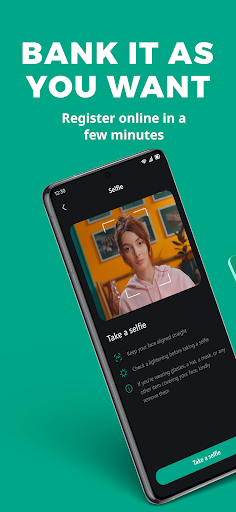


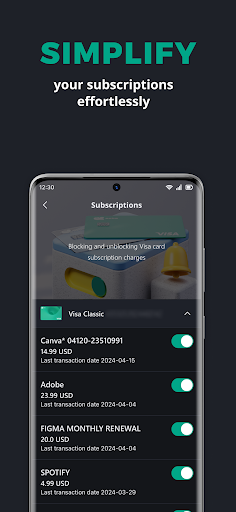
acba digital is the mobile banking application of Acba bank OJSC. It is a secure and convenient tool for everyday remote banking. The brand new app was designed and created to make your banking simple and fast. You just need to download the app, become a user via online registration and gain the benefits of the provided services. acba digital allows you to manage your finances whenever and wherever it is convenient for you. The application will give you access to the following features:
• Become a customer via online onboarding process (some services are limited)
• Get access to your banking products via online registration process
• Log on quickly and securely with your fingerprint or facial recognition
• Check your account balances and pending payments
• View individual transaction details
• Transfer money between accounts, and make transfer within Republic of Armenia
• Pay utility bills and make utility payment groups
• Pay Road Police fines, property taxes, parking bills and much more
• Pay your loan or credit card bill
• Apply for loans, savings, cards and more
• Block card transactions, close cards, activate SMS service and more
• Reset your password
• Update your contact details
• Get Visa digital card in your application and make payments via Apple Pay/Google Pay
• Make card to card transfers within Armenia and worldwide
• Order Bank to make periodic transfers and payments instead of you
• Track your pension program balance anytime
• Purchase car, travel and other insurances
• Invest your money buying securities
• Send or receive money via Contact, QR and Link and ATM
• And much more
KEEPING YOU SAFE ONLINE
We use the latest online security measures to protect your money, your personal information and your privacy. acba digital is protected by Thales Gemalto Mobile Protector SDK. Gemalto Mobile Protector makes wise and privacy-friendly use of biometrics: no biometric data is stored in data centers or servers. It all stays within the user's mobile securely. Gemalto Mobile Protector integrates a combination of proven security mechanisms – such as code obfuscation, encryption, key protection mechanisms with appropriate key management, device binding, and root and jailbreaking detection.
This solution helps to comply with the requirements of the revised PSD2's Regulatory Technical Standard (RTS).
https://www.thalesgroup.com/en/markets/digital-identity-and-security/banking-payment/digital-banking/sdk/mobile-protector
CONTACTING YOU
We won't contact you any more than normal if you use the app. But please stay alert to email, text messages or phone calls that appear to be from us. Criminals may try to trick you into giving them sensitive personal or account information. We'll never contact you to ask for these details. Any emails from us will always greet you personally using your title and surname. Any text messages we send you will come from Acba bank.
Показать больше

1. Скачать инсталлятор MEmu и завершайте установку

2. Запускайте MEmu, затем откройте Google Play на главной странице

3. Ищите acba digital в Google Play
Install
4. Скачайте и установите acba digital
5. При завершении установки, нажмите на значок для старта

6. Наслаждайтесь acba digital на своем компьютере с помощью MEmu.
MEmu Play — лучший бесплатный эмулятор Android, превосходный опыт работы с которым оценили 50 миллионов пользователей. Технология виртуализации MEmu позволяет без проблем запускать тысячи Android-приложений на вашем компьютере, даже самые требовательные.
Большой экран с лучшей графикой; Большая продолжительность, без ограничения батареи или мобильных данных.
Полная поддержка установки клавиш для точного управления клавиатурой и мышью или геймпадом.
Несколько игровых учетных записей или задач на одном компьютере одновременно с менеджером нескольких экземпляров.
Use acba digital on PC by following steps: