BeautyPro Symmetry App Interna
Обновлено
Текущая версия
1.1.10
Продавец

Перестаньте беспокоиться о быстром разряде батареи при использовании BeautyPro Symmetry App Interna на вашем телефоне. Освободитесь от крошечного экрана и наслаждайтесь приложением на гораздо большем экране. Теперь вы можете работать с приложением в полноэкранном режиме с удобством клавиатуры и мыши. MEmu предлагает вам все ожидаемые удивительные функции: быструю установку и простую настройку, интуитивно понятное управление и больше никаких забот о времени автономной работы, мобильном трафике или неожиданных звонках. Совершенно новый MEmu 9 — идеальный выбор для использования BeautyPro Symmetry App Interna на вашем компьютере. С помощью менеджера нескольких экземпляров MEmu вы можете одновременно использовать два или более аккаунтов. И самое главное, наш эксклюзивный движок эмуляции раскрывает весь потенциал вашего ПК, обеспечивая плавную и приятную работу.
Показать больше
Скачайте BeautyPro Symmetry App Interna на ПК с помощью Андроид эмулятора MEmu. Наслаждайтесь на большом экране. Designed for the use of microblading and micropigmentation artists.
Designed for the use of microblading and micropigmentation artists.
This application is used in a very easy way, it only requires 6 simple steps:
Step 1: Open the application.
To open the application you must press the BeautyPro Symmetry App International On the display of the device you downloaded it to.
Step 2: Align the client's face on the screen.
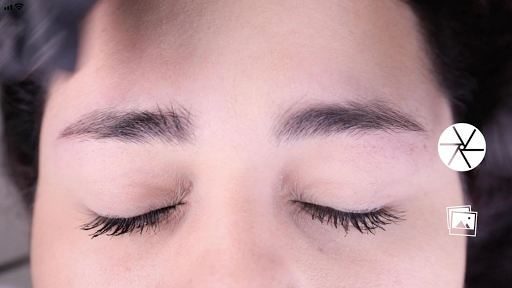
The first thing to do is to position the screen of the phone horizontally and frame the face using the two horizontal lines, positioning them on the upper arches of the eyebrows (point 2), and the central vertical line position it on the line Vertical previously plotted to the center of the Nose Bridge.
Step 3: Capture the picture.
Once the face is centered as shown in step 2, take the picture with the button located on the center and on the right side of the screen.
Step 4: Using the "Grid" function.
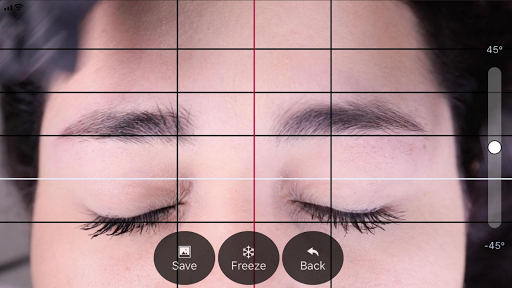
Immediately after capturing the image will appear the newly taken picture with 4 horizontal lines of black color and one more white, these lines can be adjusted and frozen activating the function "Grid", touching the button with that name.
Step 5: Adjusting the vertical lines.
In the same way the vertical lines of the "Grid" can be adjusted, these lines consist of a central line of red and two other sides of black color, the position of these two lines depends directly on the position of the red vertical line, this centerline We position it on the centerline of the bridge of the nose previously marked, and with the black lines define the separation between the beginnings of the eyebrows.
Step 6: Adjust Level and Zoom.
If necessary, you can adjust the picture taken in two ways, one of which is by turning it to adjust the level of the image, sliding up or down the adjustment control positioned on the right side of the screen, and another to amplify it using 2 Fingers.
Step 7: Once the lines are correctly positioned at the points mentioned, we will be able to save the image in the photo reel of our device (phone, Tablet, etc....) by pressing the "SAVE" button or if you want to delete the captured image and Taking a new picture you must press the "BACK" button to start again.
Показать больше

1. Скачать инсталлятор MEmu и завершайте установку

2. Запускайте MEmu, затем откройте Google Play на главной странице

3. Ищите BeautyPro Symmetry App Interna в Google Play
Install
4. Скачайте и установите BeautyPro Symmetry App Interna
5. При завершении установки, нажмите на значок для старта

6. Наслаждайтесь BeautyPro Symmetry App Interna на своем компьютере с помощью MEmu.
MEmu Play — лучший бесплатный эмулятор Android, превосходный опыт работы с которым оценили 50 миллионов пользователей. Технология виртуализации MEmu позволяет без проблем запускать тысячи Android-приложений на вашем компьютере, даже самые требовательные.
Большой экран с лучшей графикой; Большая продолжительность, без ограничения батареи или мобильных данных.
Полная поддержка установки клавиш для точного управления клавиатурой и мышью или геймпадом.
Несколько игровых учетных записей или задач на одном компьютере одновременно с менеджером нескольких экземпляров.
Use BeautyPro Symmetry App Interna on PC by following steps: