Deezer: Music & Podcast Player
Обновлено
Текущая версия
1734600601
Продавец

Перестаньте беспокоиться о быстром разряде батареи при использовании Deezer: Music & Podcast Player на вашем телефоне. Освободитесь от крошечного экрана и наслаждайтесь приложением на гораздо большем экране. Теперь вы можете работать с приложением в полноэкранном режиме с удобством клавиатуры и мыши. MEmu предлагает вам все ожидаемые удивительные функции: быструю установку и простую настройку, интуитивно понятное управление и больше никаких забот о времени автономной работы, мобильном трафике или неожиданных звонках. Совершенно новый MEmu 9 — идеальный выбор для использования Deezer: Music & Podcast Player на вашем компьютере. С помощью менеджера нескольких экземпляров MEmu вы можете одновременно использовать два или более аккаунтов. И самое главное, наш эксклюзивный движок эмуляции раскрывает весь потенциал вашего ПК, обеспечивая плавную и приятную работу.
Показать больше
Скачайте Deezer: Music & Podcast Player на ПК с помощью Андроид эмулятора MEmu. Наслаждайтесь на большом экране. Deezer is more than a music streaming platform.
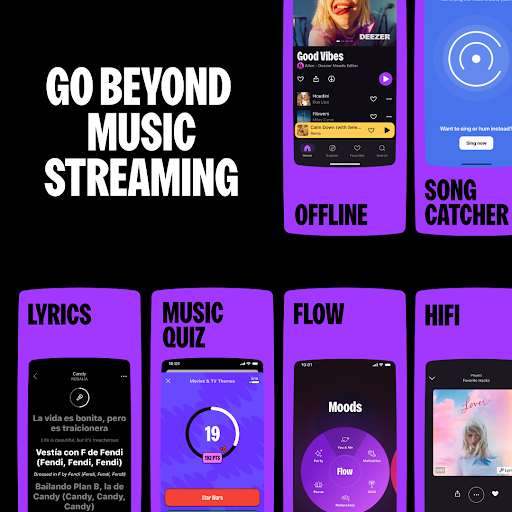
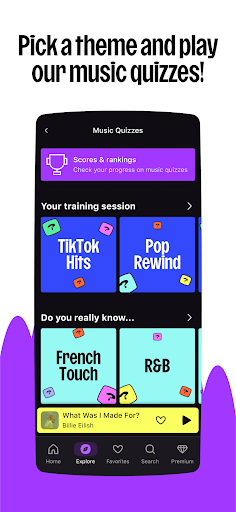
Deezer is more than a music streaming platform. Elevate your listening experience and Live the Music.
Enjoy a massive music catalog that has everything and more with in-built algorithms that learn what you like and recommend more of it.
Discover and create playlists in your favorite genres: hip hop, rap, rock, lofi.
No WiFi needed — download songs and enjoy offline music — perfect for when at home or on the go.
A personalized listening experience like no other, Deezer is where you can embrace your tastes, raise your voice, BE and BELONG.
With Deezer Free*, you'll get all you need in one app:
• Explore tab, to stay on trend with hot music of the moment, editor picks, concerts, podcasts, audiobooks, music quizzes and more
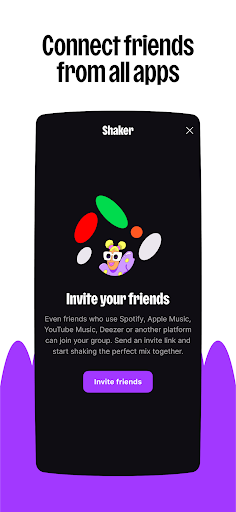
• Shaker, to create the perfect mix for any mood or group and check compatibility levels, even if your friends aren't Team Deezer
• SongCatcher, for identifying any song playing around you (try singing or humming for magic results)
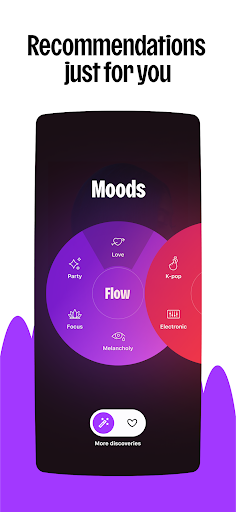
• Flow, our feature for infinite personalized mixes (on-point recommendations every time)
• The freedom to play music based on moods, niche genres and scenes
• Personal and collaborative playlists, favorites, radio* and more
• Dive deeper into the music with the Lyrics feature and translated lyrics
• Sleep timer function (for those beauty Zzzzzz)
• Sharing function for spreading the love on socials
Looking for a level up? Switch to Deezer Premium**, Deezer Family** or Deezer Student** and you'll benefit from these added perks:
• No ads, ever!
• Offline listening (just cause the signal cuts doesn't mean the music has to)
• Unlimited skips, unlimited listening
• HiFi sound (High Fidelity, lossless quality at 1,411 kbps)
• FLAC-standard quality on millions of tracks
• High-end sound system compatibility
Compatible devices:
Get Deezer on all your connected devices — Google Nest, HomePod Mini, Amazon Alexa, Sonos, Wear OS and more.
Deezer Family:
Get up to 6 Deezer Premium accounts with High Fidelity sound* on the family plan.
Give your loved ones the gift of unlimited listening or join forces and split the price.
Set up kid's profiles for family-friendly content only.
Deezer Student:
All the benefits of Deezer Premium like ad free, downloads and offline music, plus High Fidelity sound*, for half the price.
PS: try our lofi playlist when cramming to keep the work flowing and the stress to a minimum.
Automotive OS
Experience Deezer Premium from your car with all our music from our vast catalog.
Stream your Flow and Flow moods, always ad-free, and listen to any playlist with unlimited skips, plus stream with lossless audio in FLAC quality.
Only available for Deezer Premium, Deezer Family, or Deezer Student users.
Wear OS
With tiles and complications, launch your Deezer app or your favorite tracks on Wear OS in one click
Want more from Deezer?
Follow us on:
Instagram: instagram.com/deezer
Facebook: facebook.com/Deezer
Or Twitter: twitter.com/Deezer
Privacy policy: http://www.deezer.com/legal/personal-datas.php
Terms of use: http://www.deezer.com/legal/cgu.php
*Only available in certain countries.
**Plan may differ depending on your country of origin.
Показать больше

1. Скачать инсталлятор MEmu и завершайте установку

2. Запускайте MEmu, затем откройте Google Play на главной странице

3. Ищите Deezer: Music & Podcast Player в Google Play
Install
4. Скачайте и установите Deezer: Music & Podcast Player
5. При завершении установки, нажмите на значок для старта

6. Наслаждайтесь Deezer: Music & Podcast Player на своем компьютере с помощью MEmu.
MEmu Play — лучший бесплатный эмулятор Android, превосходный опыт работы с которым оценили 50 миллионов пользователей. Технология виртуализации MEmu позволяет без проблем запускать тысячи Android-приложений на вашем компьютере, даже самые требовательные.
Большой экран с лучшей графикой; Большая продолжительность, без ограничения батареи или мобильных данных.
Полная поддержка установки клавиш для точного управления клавиатурой и мышью или геймпадом.
Несколько игровых учетных записей или задач на одном компьютере одновременно с менеджером нескольких экземпляров.
Use Deezer: Music & Podcast Player on PC by following steps: