Deezer: Music & Podcast Player
Güncellendi
Mevcut Sürüm
1735642607
Sunan

Cep telefonunda Deezer: Music & Podcast Player kullanırken fazla şarjlardan endişelenme, kendini küçük ekrandan kurtar ve uygulamayı çok daha büyük bir ekranda kullanmanın tadını çıkar. Şu andan itibaren, klavye ve fare ile uygulamayı tam ekran da kullanmayı dene. MEmu, beklediğin tüm şaşırtıcı özellikleri sunar: hızlı ve kolay kurulum, sezgisel kontroller, bunun dışında pil sınırı, mobil veri ve rahatsız edici aramalar artık yok. Yepyeni MEmu 9, bilgisayarında Deezer: Music & Podcast Player kullanmanın en iyi seçimidir. Emilimimizle kodlanan çok örnekli yönetici, aynı anda 2 veya daha fazla hesap açmayı mümkün kılar. Ve en önemlisi, özel emülasyon motorumuz PC'nin tüm potansiyelini serbest bırakabilir, her şeyi pürüzsüz ve eğlenceli hale getirebilir.
Daha fazla göster
Deezer: Music & Podcast Player’i MEmu Android Emülatör ile PC’ye indirin. Büyük ekranda oynamanın keyfini çıkarın. Deezer is more than a music streaming platform.
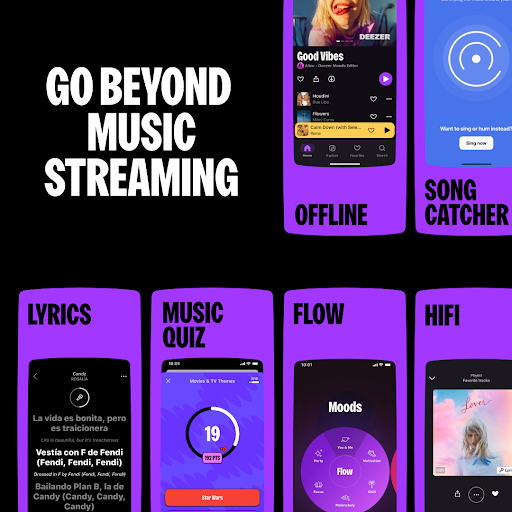
Deezer is more than a music streaming platform. Elevate your listening experience and Live the Music.
Enjoy a massive music catalog that has everything and more with in-built algorithms that learn what you like and recommend more of it.
Discover and create playlists in your favorite genres: hip hop, rap, rock, lofi.
No WiFi needed — download songs and enjoy offline music — perfect for when at home or on the go.
A personalized listening experience like no other, Deezer is where you can embrace your tastes, raise your voice, BE and BELONG.
With Deezer Free*, you'll get all you need in one app:
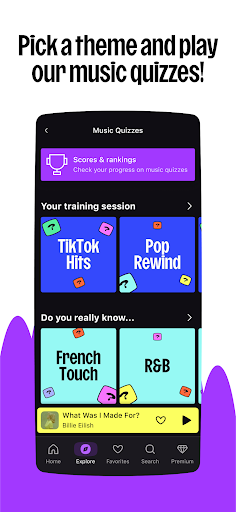
• Explore tab, to stay on trend with hot music of the moment, editor picks, concerts, podcasts, audiobooks, music quizzes and more
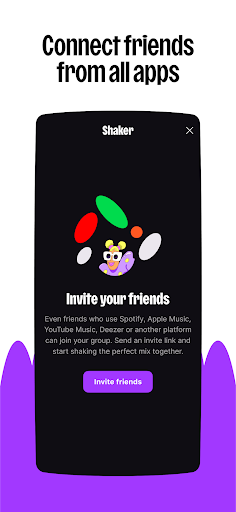
• Shaker, to create the perfect mix for any mood or group and check compatibility levels, even if your friends aren't Team Deezer
• SongCatcher, for identifying any song playing around you (try singing or humming for magic results)
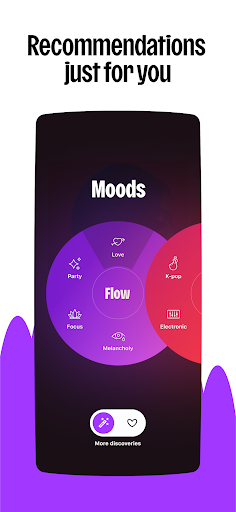
• Flow, our feature for infinite personalized mixes (on-point recommendations every time)
• The freedom to play music based on moods, niche genres and scenes
• Personal and collaborative playlists, favorites, radio* and more
• Dive deeper into the music with the Lyrics feature and translated lyrics
• Sleep timer function (for those beauty Zzzzzz)
• Sharing function for spreading the love on socials
Looking for a level up? Switch to Deezer Premium**, Deezer Family** or Deezer Student** and you'll benefit from these added perks:
• No ads, ever!
• Offline listening (just cause the signal cuts doesn't mean the music has to)
• Unlimited skips, unlimited listening
• HiFi sound (High Fidelity, lossless quality at 1,411 kbps)
• FLAC-standard quality on millions of tracks
• High-end sound system compatibility
Compatible devices:
Get Deezer on all your connected devices — Google Nest, HomePod Mini, Amazon Alexa, Sonos, Wear OS and more.
Deezer Family:
Get up to 6 Deezer Premium accounts with High Fidelity sound* on the family plan.
Give your loved ones the gift of unlimited listening or join forces and split the price.
Set up kid's profiles for family-friendly content only.
Deezer Student:
All the benefits of Deezer Premium like ad free, downloads and offline music, plus High Fidelity sound*, for half the price.
PS: try our lofi playlist when cramming to keep the work flowing and the stress to a minimum.
Automotive OS
Experience Deezer Premium from your car with all our music from our vast catalog.
Stream your Flow and Flow moods, always ad-free, and listen to any playlist with unlimited skips, plus stream with lossless audio in FLAC quality.
Only available for Deezer Premium, Deezer Family, or Deezer Student users.
Wear OS
With tiles and complications, launch your Deezer app or your favorite tracks on Wear OS in one click
Want more from Deezer?
Follow us on:
Instagram: instagram.com/deezer
Facebook: facebook.com/Deezer
Or Twitter: twitter.com/Deezer
Privacy policy: http://www.deezer.com/legal/personal-datas.php
Terms of use: http://www.deezer.com/legal/cgu.php
*Only available in certain countries.
**Plan may differ depending on your country of origin.
Daha fazla göster

1. MEmu yükleyicisini indirin ve kurulumu tamamlayın

2. MEmu'yu başlatın ve ana sayfada Google Play'i açın

3. Google Play'de Deezer: Music & Podcast Player arayın
Install
4. Deezer: Music & Podcast Player indirin ve yükleyin
5. Kurulum tamamlandığında başlamak için simgeye tıklayın

6. Deezer: Music & Podcast Player'i PC'de için MEmu'yu kullanın
MEmu Play, 50 milyon kullanıcısıyla en iyi ücretsiz Android emülatörüdür ve en üst düzey Android uygulama deneyiminin keyfini çıkarır. MEmu'nun sanallaştırma teknolojisi, en zorlu uygulamalar da dahil olmak üzere binlerce uygulamayı bilgisayarınızda sorunsuz bir şekilde çalıştırmanızı sağlar.
Daha büyük ekranla daha iyi grafiklere sahip; Pil veya mobil veri sınırlaması olmaksızın uzun süre.
Keymapping klavye ve fare veya gamepad'in hassas kontrolü için destek verir.
Multi-Instance yöneticisi ile tek bir bilgisayarda aynı anda birden fazla oyun hesabı veya görev gerçekleşilebilir.
Use Deezer: Music & Podcast Player on PC by following steps: