iPhone Control Center iOS 16
Обновлено
Текущая версия
1.6
Продавец

Перестаньте беспокоиться о быстром разряде батареи при использовании iPhone Control Center iOS 16 на вашем телефоне. Освободитесь от крошечного экрана и наслаждайтесь приложением на гораздо большем экране. Теперь вы можете работать с приложением в полноэкранном режиме с удобством клавиатуры и мыши. MEmu предлагает вам все ожидаемые удивительные функции: быструю установку и простую настройку, интуитивно понятное управление и больше никаких забот о времени автономной работы, мобильном трафике или неожиданных звонках. Совершенно новый MEmu 9 — идеальный выбор для использования iPhone Control Center iOS 16 на вашем компьютере. С помощью менеджера нескольких экземпляров MEmu вы можете одновременно использовать два или более аккаунтов. И самое главное, наш эксклюзивный движок эмуляции раскрывает весь потенциал вашего ПК, обеспечивая плавную и приятную работу.
Показать больше
Скачайте iPhone Control Center iOS 16 на ПК с помощью Андроид эмулятора MEmu. Наслаждайтесь на большом экране. Control Center IOS 16 Style:-.
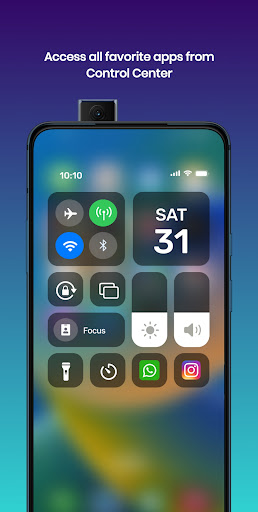
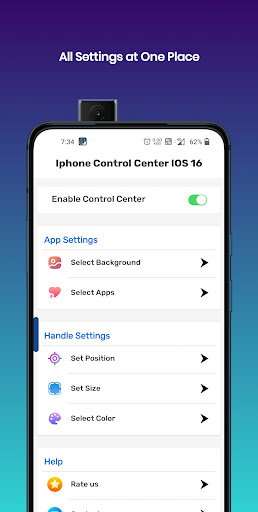
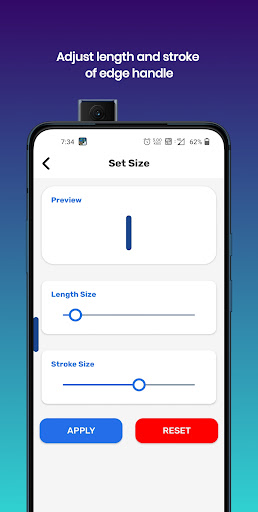
Control Center IOS 16 Style:-
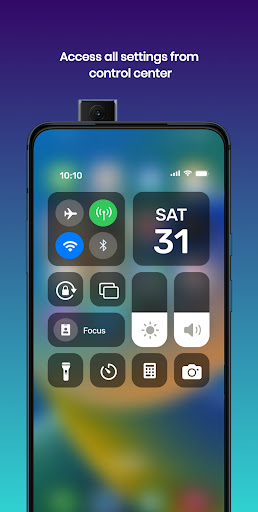
The Iphone Control Center IOS 16 has an easy-to-use, speedy and more customizable menus. You can have an experience of IOS 16 style in your Android Device. It also has wonderful Iphone 14 max style wallpapers.
Experience Iphone Control Center in the style of iOS 16. You can use Control Center IOS 16 in your device from swiping from Edge which are situated at top, right, bottom and left. You can have the experience of the IOS 16 Style Control Center with this Control Center IOS 16.
Main Features:-
- You can set different IOS 16 Style Wallpaper with this Iphone Control Center IOS 16.
- Iphone Control Center IOS 16 allows you to Modify Settings on your fingertips.
- Toggle Wifi, Bluetooth, Airplane mode from anywhere with an IOS 16 Control Center.
- Iphone Control Center IOS 16 provides to toggle or set Screen rotation, Location, Flashlight, and Volume controls.
- Add Favorite Apps in Iphone Control Center IOS 16.
- Choose your wallpaper from a large list of IOS 16 Wallpapers, Transparent or even your Default Home wallpaper.
- You can have an access to quick apps like calculator, camera, Alarm & Time from Iphone Control Center.
- Iphone Control Center provides feature to adjust Brightness and Volume Slider.
- You can open Battery Optimizations from IOS 16 Control Center.
Customize Edge Features:-
- Modify Edge Size and Stroke.
- Customize Position of Edge like top, right, bottom or left.
- Change color and alpha of Edge in Iphone Control Center IOS 16.
- Open Settings from Iphone Control Center.
- Organize Apps list in Iphone Control Center IOS 16.
Permissions:-
- We don't collect your personal data. We need some permission to do some actions. We don't collect your data with these permissions.
- We need ACCESSIBILITY_SERVICE permission is necessary and used only to perform global actions like Screenshots, Display app over Home Screen and etc. You need to grant this permission to use that action. The application commits not to collect or share any user information about this accessibility right.
- We need QUERY_ALL_PACKAGES permission to let you select your favorite apps to add in Control Center.
- We need OVERLAY permission to allow this app to show over other apps, change position, drag and drop.
Disclaimer:-
All company, service and product names used in this app are for identification purposes only. Use of these names, brands and trademarks does not imply endorsement.
All product names, brands, logos, trademarks and registered trademarks, which are not owned by us, are property of their respective owners.
The Iphone Control Center IOS 16 application is owned by us and is not an official Apple, iOS or iPhone application. We are not authorized, affiliated, associated, endorsed by, or in any way officially connected with Apple, iOS and iPhone.
This Control Center app is a very feature-rich, easy and fast to use.
Показать больше

1. Скачать инсталлятор MEmu и завершайте установку

2. Запускайте MEmu, затем откройте Google Play на главной странице

3. Ищите iPhone Control Center iOS 16 в Google Play
Install
4. Скачайте и установите iPhone Control Center iOS 16
5. При завершении установки, нажмите на значок для старта

6. Наслаждайтесь iPhone Control Center iOS 16 на своем компьютере с помощью MEmu.
MEmu Play — лучший бесплатный эмулятор Android, превосходный опыт работы с которым оценили 50 миллионов пользователей. Технология виртуализации MEmu позволяет без проблем запускать тысячи Android-приложений на вашем компьютере, даже самые требовательные.
Большой экран с лучшей графикой; Большая продолжительность, без ограничения батареи или мобильных данных.
Полная поддержка установки клавиш для точного управления клавиатурой и мышью или геймпадом.
Несколько игровых учетных записей или задач на одном компьютере одновременно с менеджером нескольких экземпляров.
Use iPhone Control Center iOS 16 on PC by following steps: