OBD Auto Doctor scanner
Обновлено
Текущая версия
1734693618
Продавец

Перестаньте беспокоиться о быстром разряде батареи при использовании OBD Auto Doctor scanner на вашем телефоне. Освободитесь от крошечного экрана и наслаждайтесь приложением на гораздо большем экране. Теперь вы можете работать с приложением в полноэкранном режиме с удобством клавиатуры и мыши. MEmu предлагает вам все ожидаемые удивительные функции: быструю установку и простую настройку, интуитивно понятное управление и больше никаких забот о времени автономной работы, мобильном трафике или неожиданных звонках. Совершенно новый MEmu 9 — идеальный выбор для использования OBD Auto Doctor scanner на вашем компьютере. С помощью менеджера нескольких экземпляров MEmu вы можете одновременно использовать два или более аккаунтов. И самое главное, наш эксклюзивный движок эмуляции раскрывает весь потенциал вашего ПК, обеспечивая плавную и приятную работу.
Показать больше
Скачайте OBD Auto Doctor scanner на ПК с помощью Андроид эмулятора MEmu. Наслаждайтесь на большом экране. With this OBD2 car diagnostic app for ELM 327, you can quickly and easily communicate with your car's OBDII system and turn your mobile into an automotive car scanner.
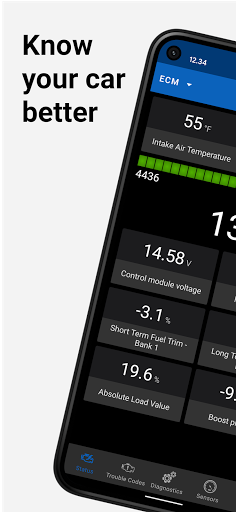
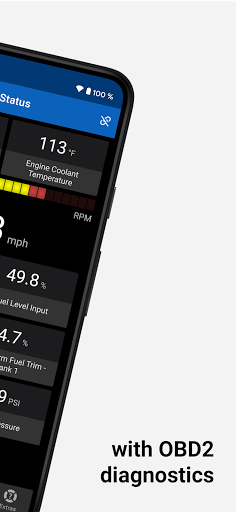
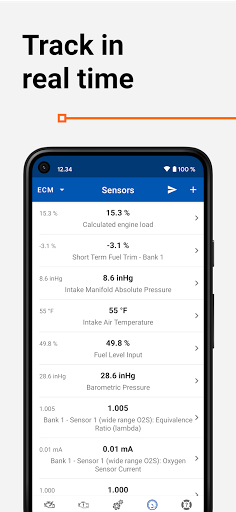
With this OBD2 car diagnostic app for ELM 327, you can quickly and easily communicate with your car's OBDII system and turn your mobile into an automotive car scanner.
▸ This OBD 2 car scanner app is the ideal tool for everyone interested in knowing their car better. Whether you want to monitor vehicle data in real time or track car performance, this is a must-have OBD2 tool!
Capabilities and benefits:
• Read readiness monitor status to make sure your car is ready for emissions testing
• Read On-Board Diagnostic Monitors for advanced diagnostics
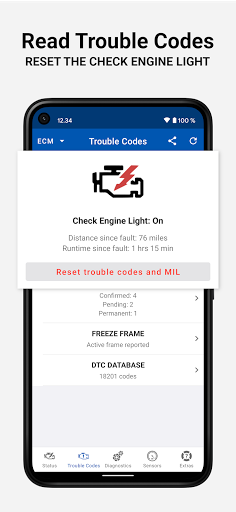
• Read OBD 2 Diagnostic Trouble Codes (DTC) and Freeze Frame
• Clear the trouble codes and reset the Check Engine Light
• Select PIDs on the dashboard to track them in live
• Initiate Service Routines (evaporative system leak test, particulate filter regeneration, inducement system reinitialization)
• Monitor fuel consumption while you drive and save money on fuel (gasoline/diesel)
• View OBD parameter and sensor data (such as engine coolant temperature or torque) in real-time to detect abnormalities
• Monitor OBD-II sensor data in numerical or graphical presentation
• Support for multiple electronic control units such as engine or transmission
Some additional features of this OBD app:
• Send OBD 2 diagnostic data via email
• Record and send sensor data via email in .csv format
• Read Vehicle Identification Number (VIN), Calibration Identifications, and Calibration Verification Numbers of ECU
• Build-in DTC database with over 18000 trouble codes, including thousands of manufacturer-specific codes
OBD Auto Doctor supports all cars sold worldwide compatible with OBD2 or EOBD. Please see https://www.obdautodoctor.com/help/articles/obd2-compatible-cars/ for the compatibility info.
The app requires a separate OBD adapter using Bluetooth, BLE, or Wifi. Plug the ELM 327 compatible scan tool into the car's diagnostics port, and make sure you are ready for car inspection. We recommend avoiding the cheap clone ELM devices and using genuine ELM327 adapters.
NOTE: Most app features require your car to support them. This app can't show information that your vehicle doesn't provide.
▸ This app is free, but a subscription is available to unlock all the features. Check the app website for more information and the differences between the versions.
Under no circumstances will the application developer be held responsible for incidents resulting from the use and/or interpretation of the data in the application. We reserve the right to anonymously track and report a user's activity inside this app.
If you have any issues or concerns, we are happy to help you out. Just send us an e-mail at support@obdautodoctor.com or visit https://www.obdautodoctor.com/ for more information.
Показать больше

1. Скачать инсталлятор MEmu и завершайте установку

2. Запускайте MEmu, затем откройте Google Play на главной странице

3. Ищите OBD Auto Doctor scanner в Google Play
Install
4. Скачайте и установите OBD Auto Doctor scanner
5. При завершении установки, нажмите на значок для старта

6. Наслаждайтесь OBD Auto Doctor scanner на своем компьютере с помощью MEmu.
MEmu Play — лучший бесплатный эмулятор Android, превосходный опыт работы с которым оценили 50 миллионов пользователей. Технология виртуализации MEmu позволяет без проблем запускать тысячи Android-приложений на вашем компьютере, даже самые требовательные.
Большой экран с лучшей графикой; Большая продолжительность, без ограничения батареи или мобильных данных.
Полная поддержка установки клавиш для точного управления клавиатурой и мышью или геймпадом.
Несколько игровых учетных записей или задач на одном компьютере одновременно с менеджером нескольких экземпляров.
Use OBD Auto Doctor scanner on PC by following steps: