OBD Auto Doctor scanner
Updated
Current Version
1734693618
Offered By

Stop worrying about high battery drain when using OBD Auto Doctor scanner on your phone. Free yourself from the tiny screen and enjoy the app on a much larger display. From now on, get a full-screen experience of your app with the convenience of a keyboard and mouse. MEmu offers you all the surprising features you’d expect: quick installation and easy setup, intuitive controls, and no more worries about battery life, mobile data, or unexpected calls. The all-new MEmu 9 is the choice for using OBD Auto Doctor scanner on your computer. With the MEmu multi-instance manager, you can run two or more accounts at the same time. Most importantly, our exclusive emulation engine unlocks your PC’s full potential, delivering smooth and enjoyable performance.
Show more
Enjoy superb experience of using OBD Auto Doctor scanner on PC with MEMU App Player. It's a powerful free Android emulator which provides you with thousands of android apps for their desktop version. Enjoy connecting with friends and polishing your work with higher efficiency! With this OBD2 car diagnostic app for ELM 327, you can quickly and easily communicate with your car's OBDII system and turn your mobile into an automotive car scanner.
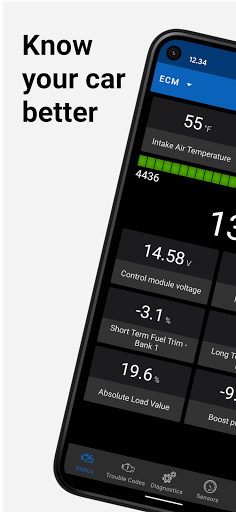
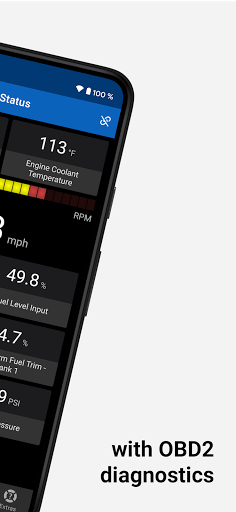
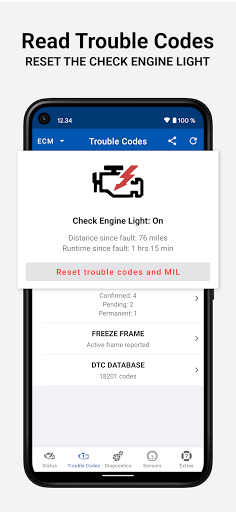
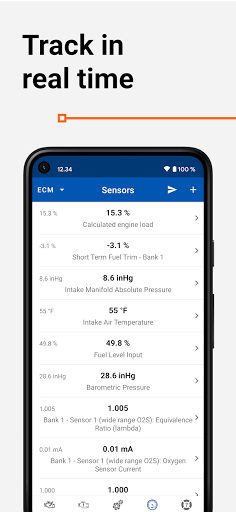
With this OBD2 car diagnostic app for ELM 327, you can quickly and easily communicate with your car's OBDII system and turn your mobile into an automotive car scanner.
▸ This OBD 2 car scanner app is the ideal tool for everyone interested in knowing their car better. Whether you want to monitor vehicle data in real time or track car performance, this is a must-have OBD2 tool!
Capabilities and benefits:
• Read readiness monitor status to make sure your car is ready for emissions testing
• Read On-Board Diagnostic Monitors for advanced diagnostics
• Read OBD 2 Diagnostic Trouble Codes (DTC) and Freeze Frame
• Clear the trouble codes and reset the Check Engine Light
• Select PIDs on the dashboard to track them in live
• Initiate Service Routines (evaporative system leak test, particulate filter regeneration, inducement system reinitialization)
• Monitor fuel consumption while you drive and save money on fuel (gasoline/diesel)
• View OBD parameter and sensor data (such as engine coolant temperature or torque) in real-time to detect abnormalities
• Monitor OBD-II sensor data in numerical or graphical presentation
• Support for multiple electronic control units such as engine or transmission
Some additional features of this OBD app:
• Send OBD 2 diagnostic data via email
• Record and send sensor data via email in .csv format
• Read Vehicle Identification Number (VIN), Calibration Identifications, and Calibration Verification Numbers of ECU
• Build-in DTC database with over 18000 trouble codes, including thousands of manufacturer-specific codes
OBD Auto Doctor supports all cars sold worldwide compatible with OBD2 or EOBD. Please see https://www.obdautodoctor.com/help/articles/obd2-compatible-cars/ for the compatibility info.
The app requires a separate OBD adapter using Bluetooth, BLE, or Wifi. Plug the ELM 327 compatible scan tool into the car's diagnostics port, and make sure you are ready for car inspection. We recommend avoiding the cheap clone ELM devices and using genuine ELM327 adapters.
NOTE: Most app features require your car to support them. This app can't show information that your vehicle doesn't provide.
▸ This app is free, but a subscription is available to unlock all the features. Check the app website for more information and the differences between the versions.
Under no circumstances will the application developer be held responsible for incidents resulting from the use and/or interpretation of the data in the application. We reserve the right to anonymously track and report a user's activity inside this app.
If you have any issues or concerns, we are happy to help you out. Just send us an e-mail at support@obdautodoctor.com or visit https://www.obdautodoctor.com/ for more information.
Show more

1. Download MEmu installer and finish the setup

2. Start MEmu then open Google Play on the desktop

3. Search OBD Auto Doctor scanner in Google Play
Install
4. Download and Install OBD Auto Doctor scanner
5. On install completion click the icon to start

6. Enjoy using OBD Auto Doctor scanner on PC with MEmu
MEmu Play is the best Android emulator, and 100 million users already enjoy its superb Android app experience. Powered by advanced virtualization technology, it lets you enjoy thousands of Android apps smoothly on your PC—including the most graphics-intensive ones.
Bigger screen with better graphics; Long duration, without limitation of battery or mobile data.
Full Keymapping support for precise control of keyboard and mouse or gamepad.
Multiple game accounts or tasks on single PC at one time with Multi-Instance manager.
Use OBD Auto Doctor scanner on PC by following steps: