Pinwheel Caregiver
Обновлено
Текущая версия
1.5.1
Продавец

Перестаньте беспокоиться о быстром разряде батареи при использовании Pinwheel Caregiver на вашем телефоне. Освободитесь от крошечного экрана и наслаждайтесь приложением на гораздо большем экране. Теперь вы можете работать с приложением в полноэкранном режиме с удобством клавиатуры и мыши. MEmu предлагает вам все ожидаемые удивительные функции: быструю установку и простую настройку, интуитивно понятное управление и больше никаких забот о времени автономной работы, мобильном трафике или неожиданных звонках. Совершенно новый MEmu 9 — идеальный выбор для использования Pinwheel Caregiver на вашем компьютере. С помощью менеджера нескольких экземпляров MEmu вы можете одновременно использовать два или более аккаунтов. И самое главное, наш эксклюзивный движок эмуляции раскрывает весь потенциал вашего ПК, обеспечивая плавную и приятную работу.
Показать больше
Скачайте Pinwheel Caregiver на ПК с помощью Андроид эмулятора MEmu. Наслаждайтесь на большом экране. Solve the kid/phone problem with Pinwheel.
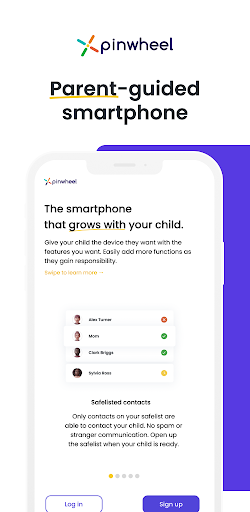
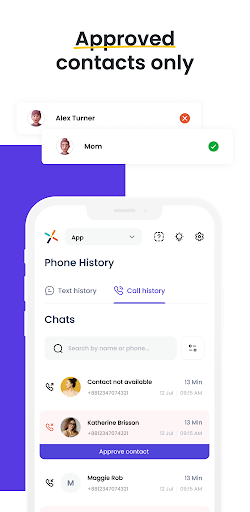
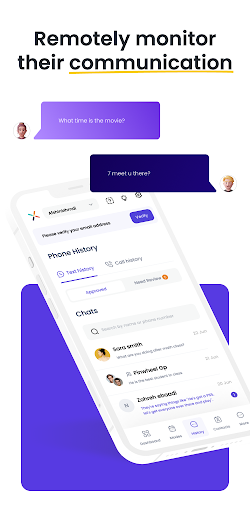
Solve the kid/phone problem with Pinwheel. No need to figure out which parental controls manage which device best! Pinwheel custom-built a system to give you the proper tool to teach your child healthy tech habits from day one.
This Pinwheel app provides access to our Caregiver Portal. The Caregiver Portal is designed to let you configure and control a Pinwheel smartphone for your child. The phone and the app work hand-in-hand to give your kid a healthy, safe first phone.
In this app, you can:
- **Safelist contacts.** A Pinwheel phone can only call and text with numbers approved by you. No strangers, no spam calls.
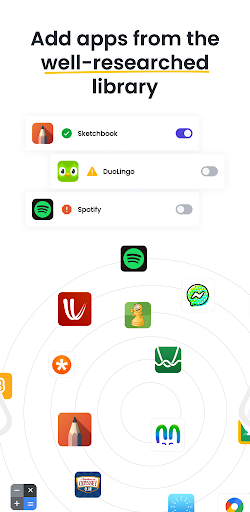
- **Enable apps.** No app store on the Pinwheel phone **keeps app choices in your hands**, not your child's. The curated app boutique makes it easy to choose useful, healthy, safe apps for your child. No social media, no addictive games, no mindless consumption.
- **Schedule Permissions.** Our Days/Modes calendar lets you choose which contacts and apps are available at what times of day. No texting friends during school, no staying up late using apps. You choose what they can do during different times of day. No need to constantly remind them what is and isn't ok. **Pinwheel helps them develop healthy boundaries around technology use, without the drama**.
- **Create Routines.** Help your child learn to be more independent and responsible with Pinwheel's fully-customizable checklists. A morning routine to make sure they're ready for school on time, with teeth brushed and backpack in hand. A bedtime routine for evening peace. Routines for chores, for music practice, for anything you'd like your kid to do without you telling them for the millionth time. Gold stars and confetti help them celebrate their daily wins and nurture good habits as they *ask* to stay on track.
- **Parent Them Well.** Live Status shows you the location of the phone. Text history and a Bark subscription allow you to monitor and coach them on appropriate communication.
"Waiting as long as possible" for a phone isn't a plan. Giving them a phone designed for adults and hoping you set up all the controls correctly is a recipe for stress. Pinwheel solves the kid phone problem, with a phone designed to work for both of you.
You get a tool to teach them how to use technology well. They get a phone that helps them live their best life.
Download the Caregiver Portal app today to explore the parental controls for free! Visit our website to purchase a phone for your child, and put the controls to use.
————
**Pinwheel Subscription Pricing**
The Pinwheel Caregiver Portal app is a companion app to Pinwheel phones. Phones can be purchased, and the monthly subscription can be set up, through our website: http://pinwheel.com
Pinwheel Subscriptions
- FREE 30 Day Trial
- $14.99 USD/month
**Cellular Plans**
Pinwheel phones are unlocked devices, which allow you to choose your cellular plan from many major networks and providers. The cost for cellular service depends on which carrier and plan you choose. Our website has recommendations and information on those. For your convenience, we can even help you set up service.
————
**Need Help?**
If you have any questions, need help with Pinwheel, or want to provide feedback, please contact our Customer Care Team: support@pinwheel.com or click the LiveChat icon on our website: http://pinwheel.com
Показать больше

1. Скачать инсталлятор MEmu и завершайте установку

2. Запускайте MEmu, затем откройте Google Play на главной странице

3. Ищите Pinwheel Caregiver в Google Play
Install
4. Скачайте и установите Pinwheel Caregiver
5. При завершении установки, нажмите на значок для старта

6. Наслаждайтесь Pinwheel Caregiver на своем компьютере с помощью MEmu.
MEmu Play — лучший бесплатный эмулятор Android, превосходный опыт работы с которым оценили 50 миллионов пользователей. Технология виртуализации MEmu позволяет без проблем запускать тысячи Android-приложений на вашем компьютере, даже самые требовательные.
Большой экран с лучшей графикой; Большая продолжительность, без ограничения батареи или мобильных данных.
Полная поддержка установки клавиш для точного управления клавиатурой и мышью или геймпадом.
Несколько игровых учетных записей или задач на одном компьютере одновременно с менеджером нескольких экземпляров.
Use Pinwheel Caregiver on PC by following steps: