Reampo: PDF Converter & Maker ПК

Скачать Reampo: PDF Converter & Maker на ПК

Reampo: PDF Converter & Maker ПК

Reampo: PDF Converter & Maker

  • Обновлено

  • Текущая версия

    1.0.4

  • Продавец

    Reampo: PDF Converter & Maker ПК

Reampo: PDF Converter & Maker Особенности на ПК

Перестаньте беспокоиться о быстром разряде батареи при использовании Reampo: PDF Converter & Maker на вашем телефоне. Освободитесь от крошечного экрана и наслаждайтесь приложением на гораздо большем экране. Теперь вы можете работать с приложением в полноэкранном режиме с удобством клавиатуры и мыши. MEmu предлагает вам все ожидаемые удивительные функции: быструю установку и простую настройку, интуитивно понятное управление и больше никаких забот о времени автономной работы, мобильном трафике или неожиданных звонках. Совершенно новый MEmu 9 — идеальный выбор для использования Reampo: PDF Converter & Maker на вашем компьютере. С помощью менеджера нескольких экземпляров MEmu вы можете одновременно использовать два или более аккаунтов. И самое главное, наш эксклюзивный движок эмуляции раскрывает весь потенциал вашего ПК, обеспечивая плавную и приятную работу.

Показать больше

Скриншоты и Видео Reampo: PDF Converter & Maker на ПК

Наслаждайтесь превосходным опытом использования Reampo: PDF Converter & Maker на ПК с MEmu Play. Это мощный бесплатный эмулятор Android, который предлагает тысячи приложений для настольных компьютеров. Наслаждайтесь общением с друзьями и совершенствуйте свою работу ещё эффективнее! Reampo: PDF Converter & Maker is a PDF converter and PDF maker that turns photos, scans and office files into clean PDFs in a few taps.
Информация о приложении

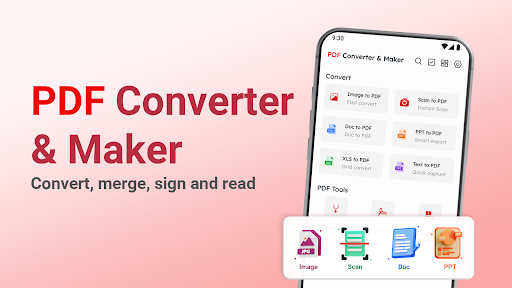
Reampo: PDF Converter & Maker is a PDF converter and PDF maker that turns photos, scans and office files into clean PDFs in a few taps. Merge files, sign documents and read everything in one simple app.
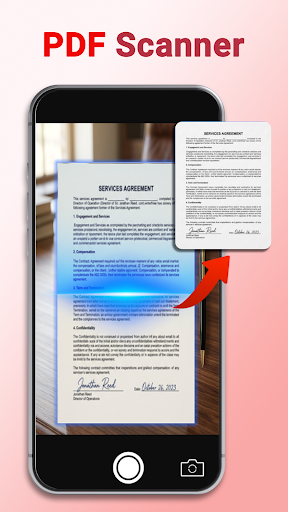
Photo to PDF Converter


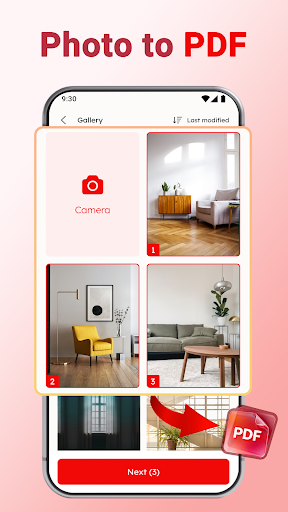
Pick one photo or several and save them as a single PDF file. Convert photo to PDF for receipts, class notes and ID copies with a simple PDF maker.
Image to PDF from any photo on your phone
Photos to PDF in the order you pick them

How to Convert Photo to PDF


Open the PDF converter app and pick your photos.
Tap Next.
The PDF maker saves one file, ready to share.

Scan to PDF


Scan documents with your camera and save them as PDF with the built-in PDF scanner.

Convert to PDF


Reampo is also a PDF creator for office files. Convert a document to PDF so it keeps the same layout on every phone and computer.
DOC to PDF
XLS to PDF
PPT to PDF
TXT to PDF

Merge PDF and Reorder Pages


Combine PDF files into one document, then move pages into the order you need before you save it.

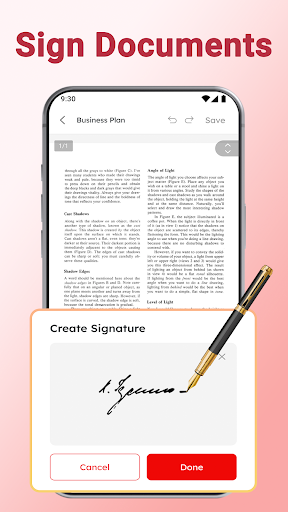
Sign PDF


Create a PDF signature and place it on contracts, forms and letters. Sign documents on your phone without printing.

Protect PDF with a Password


Add a PDF password to lock PDF files before you share them. Only people who have the password can open the document.

Read All Your Documents


Read PDF, DOC, XLS, PPT and TXT files in one document reader. Search files and add the files you use most to Favorites.

Annotate PDF


Draw with a pencil, mark lines with a highlight pen and hide details with a cover pen. Highlight, underline and strike through text, add a stamp, or copy text to use somewhere else.

Add Text


Type new text on any page and put it exactly where you need it.

Simple File Manager


Find recent files at a glance. Rename, share, print or delete a file and check its details.

Made for Everyday Paperwork


Students turning lecture photos into one PDF. Professionals signing an offer letter on the go. Parents scanning school forms. Reampo keeps each task short and clear.

Enjoy Reampo and convert your next image to PDF in seconds!

Permission Required
All files access (MANAGE_EXTERNAL_STORAGE) on Android 11+: used to open, save, and manage PDF documents on your device. Your files stay on your device.

Privacy Policy: https://sites.google.com/dong.vc/pdf-2-privacy-policy/home
Terms of Use: https://sites.google.com/dong.vc/pdf-2-term-of-uses/home
Questions or feedback? Contact us at vietanh@dong.vc

Показать больше

Скачать Reampo: PDF Converter & Maker на ПК

  • Reampo: PDF Converter & Maker ПК

    1. Скачать инсталлятор MEmu и завершайте установку

  • Reampo: PDF Converter & Maker ПК

    2. Запускайте MEmu, затем откройте Google Play на главной странице

  • Reampo: PDF Converter & Maker ПК

    3. Ищите Reampo: PDF Converter & Maker в Google Play

  • Reampo: PDF Converter & Maker ПК Install

    4. Скачайте и установите Reampo: PDF Converter & Maker

  • Reampo: PDF Converter & Maker ПК

    5. При завершении установки, нажмите на значок для старта

  • Reampo: PDF Converter & Maker ПК
    Reampo: PDF Converter & Maker ПК Reampo: PDF Converter & Maker ПК

    6. Наслаждайтесь Reampo: PDF Converter & Maker на своем компьютере с помощью MEmu.

Почему стоит выбрать MEmu, чтобы испытать Reampo: PDF Converter & Maker

MEmu Play — лучший бесплатный эмулятор Android, превосходный опыт работы с которым оценили 50 миллионов пользователей. Технология виртуализации MEmu позволяет без проблем запускать тысячи Android-приложений на вашем компьютере, даже самые требовательные.

  • Большой экран с лучшей графикой; Большая продолжительность, без ограничения батареи или мобильных данных.

  • Полная поддержка установки клавиш для точного управления клавиатурой и мышью или геймпадом.

  • Несколько игровых учетных записей или задач на одном компьютере одновременно с менеджером нескольких экземпляров.

Готовы начать использовать?

Reampo: PDF Converter & Maker - FAQs

  • How to use Reampo: PDF Converter & Maker on PC?

    Use Reampo: PDF Converter & Maker on PC by following steps:

    • Download MEmu, then install and launch it
    • Login to Google Play Store, install the app
    • Enjoy using the app on PC with MEmu
  • What are the minimum system requirements to run Reampo: PDF Converter & Maker on PC?
    • Intel or AMD Processor
    • Microsoft Windows 7 and above
    • 2GB of memory
    • 5GB of free disk space
    • Hardware Virtualization Technology
lyzs
lyzs