Reampo: PDF Converter & Maker PC

ดาวน์โหลด Reampo: PDF Converter & Maker บน PC

Reampo: PDF Converter & Maker PC
  • อัปเดตเมื่อ

  • เวอร์ชันปัจจุบัน

    1.0.3

  • ให้บริการโดย

    Reampo: PDF Converter & Maker PC

คุณสมบัติของ Reampo: PDF Converter & Maker บน PC

เมื่อใช้ Reampo: PDF Converter & Maker บนโทรศัพท์ของคุณไม่ต้องกังวลกับการชาร์จไฟมากเกินไปปลดปล่อยตัวคุณเองจากหน้าจอขนาดเล็กและสนุกกับการใช้แอพนี้บนหน้าจอขนาดใหญ่ จากนี้ไปรับประสบการณ์เต็มหน้าจอของแอปพลิเคชันของคุณด้วยคีย์บอร์ดและเมาส์ MEmu มีคุณสมบัติที่น่าแปลกใจที่คุณคาดหวัง: การติดตั้งที่รวดเร็วและการตั้งค่าที่ง่ายควบคุมได้ง่ายไม่ จำกัด แบตเตอรี่ข้อมูลมือถือและการโทรที่รบกวน MEmu 9 ใหม่ล่าสุดเป็นตัวเลือกที่ดีที่สุดสำหรับการใช้ Meitu – โปรแกรมแก้ไขภาพแนวธรรมชาติ บนคอมพิวเตอร์ของคุณ ด้วยรหัสการดูดซึมของเราผู้จัดการหลายอินสแตนซ์ทำให้สามารถเปิดบัญชี 2 บัญชีขึ้นไปในเวลาเดียวกันได้ และที่สำคัญที่สุดเอ็นจิ้นจำลองพิเศษของเราสามารถปลดปล่อยศักยภาพของPCของคุณและทำให้ทุกอย่างราบรื่นและสนุกสนาน

แสดงเพิ่มเติม

สกรีนช็อตและ & วีดีโอของ Reampo: PDF Converter & Maker บน PC

สัมผัสประสบการณ์สุดยอดการใช้งาน Reampo: PDF Converter & Maker บนพีซีด้วย MEmu Play นี่คือโปรแกรมจำลอง Android ฟรีที่ทรงพลัง ให้คุณใช้งานแอป Android นับพันบนเดสก์ท็อป สนุกกับการเชื่อมต่อกับเพื่อนๆ และขัดเกลาผลงานของคุณอย่างมีประสิทธิภาพยิ่งขึ้น! Reampo: PDF Converter & Maker is a PDF converter and PDF maker that turns photos, scans and office files into clean PDFs in a few taps.
ข้อมูลการสมัคร

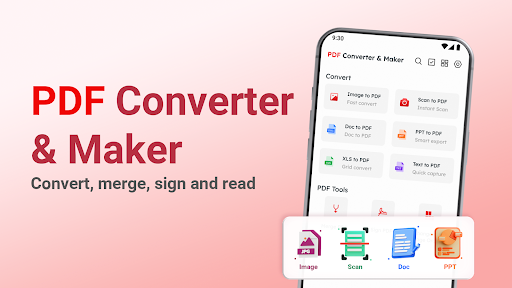
Reampo: PDF Converter & Maker is a PDF converter and PDF maker that turns photos, scans and office files into clean PDFs in a few taps. Merge files, sign documents and read everything in one simple app.
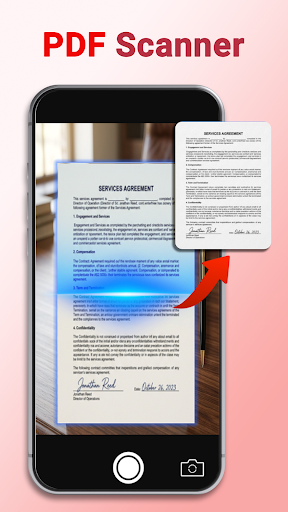
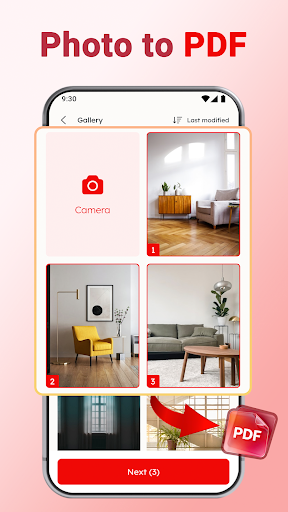
Photo to PDF Converter


Pick one photo or several and save them as a single PDF file. Convert photo to PDF for receipts, class notes and ID copies with a simple PDF maker.
Image to PDF from any photo on your phone
Photos to PDF in the order you pick them

How to Convert Photo to PDF


Open the PDF converter app and pick your photos.
Tap Next.
The PDF maker saves one file, ready to share.

Scan to PDF


Scan documents with your camera and save them as PDF with the built-in PDF scanner.

Convert to PDF


Reampo is also a PDF creator for office files. Convert a document to PDF so it keeps the same layout on every phone and computer.
DOC to PDF
XLS to PDF
PPT to PDF
TXT to PDF

Merge PDF and Reorder Pages


Combine PDF files into one document, then move pages into the order you need before you save it.

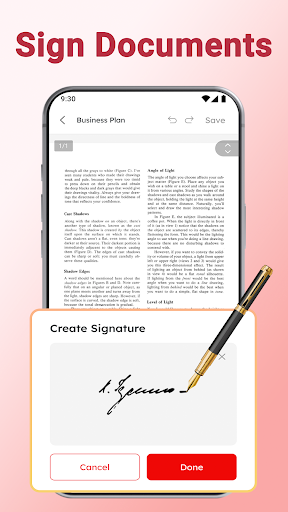
Sign PDF


Create a PDF signature and place it on contracts, forms and letters. Sign documents on your phone without printing.

Protect PDF with a Password


Add a PDF password to lock PDF files before you share them. Only people who have the password can open the document.

Read All Your Documents


Read PDF, DOC, XLS, PPT and TXT files in one document reader. Search files and add the files you use most to Favorites.

Annotate PDF


Draw with a pencil, mark lines with a highlight pen and hide details with a cover pen. Highlight, underline and strike through text, add a stamp, or copy text to use somewhere else.

Add Text


Type new text on any page and put it exactly where you need it.

Simple File Manager


Find recent files at a glance. Rename, share, print or delete a file and check its details.

Made for Everyday Paperwork


Students turning lecture photos into one PDF. Professionals signing an offer letter on the go. Parents scanning school forms. Reampo keeps each task short and clear.

Enjoy Reampo and convert your next image to PDF in seconds!

Permission Required
All files access (MANAGE_EXTERNAL_STORAGE) on Android 11+: used to open, save, and manage PDF documents on your device. Your files stay on your device.

Privacy Policy: https://sites.google.com/dong.vc/pdf-2-privacy-policy/home
Terms of Use: https://sites.google.com/dong.vc/pdf-2-term-of-uses/home
Questions or feedback? Contact us at vietanh@dong.vc

แสดงเพิ่มเติม

ดาวน์โหลด Reampo: PDF Converter & Maker บน PC

  • Reampo: PDF Converter & Maker PC

    1. ดาวน์โหลดตัวติดตั้ง MEmu และสิ้นสุดการติดตั้ง

  • Reampo: PDF Converter & Maker PC

    2. เริ่ม MEmu จากนั้นเปิด Google Play บนหน้าแรก

  • Reampo: PDF Converter & Maker PC

    3. ค้นหา Reampo: PDF Converter & Maker ใน Google Play

  • Reampo: PDF Converter & Maker PC Install

    4. ดาวน์โหลดและติดตั้ง Reampo: PDF Converter & Maker

  • Reampo: PDF Converter & Maker PC

    5. เมื่อติดตั้งเสร็จให้คลิกที่ไอคอนเพื่อเริ่มใช้งาน

  • Reampo: PDF Converter & Maker PC
    Reampo: PDF Converter & Maker PC Reampo: PDF Converter & Maker PC

    6. ใช้ MEmu เพื่อสัมผัสประสบการณ์ Reampo: PDF Converter & Maker บนคอมพิวเตอร์ของคุณ

ทำไมถึงควรใช้ Memu สำหรับ Reampo: PDF Converter & Maker

MEmu Play คือโปรแกรมจำลอง Android ที่ดีที่สุด มีผู้ใช้มากกว่า 50 ล้านคน มอบประสบการณ์การใช้งานแอป Android ขั้นสุดยอดให้กับคุณ เทคโนโลยีจำลองเสมือนของ MEmu ช่วยให้คุณรันแอป Android หลายพันแอปบนคอมพิวเตอร์ได้อย่างราบรื่น แม้แอปที่กินทรัพยากรเครื่องสูงที่สุด

  • จอใหญ่และกราฟฟิกสวยกว่า; เล่นได้นาน, ไม่ต้องใช้แบตเตอรี่โทรศัพท์หรือเน็ตโทรศัพท์.

  • ระบบปรับแต่งปุ่มคีย์บอร์ดและเม้าส์ตามที่คุณเลือก

  • เล่นมากกว่าหนึ่งเกมบน PC ในเวลาเดียวกันด้วยระบบหลายจอหรือ Multi-Instance manager.

พร้อมที่จะเริ่มสัมผัสประสบการณ์นี้หรือยัง?

หัวข้อร้อน

Reampo: PDF Converter & Maker - FAQs

  • วิธีการใช้ Reampo: PDF Converter & Maker บน PC?

    Use Reampo: PDF Converter & Maker on PC by following steps:

    • Download MEmu, then install and launch it
    • Login to Google Play Store, install the app
    • Enjoy using the app on PC with MEmu
  • ข้อกำหนดขั้นต่ำของระบบในการใช้งาน Reampo: PDF Converter & Maker บน PC มีอะไรบ้าง?
    • Intel or AMD Processor
    • Microsoft Windows 7 and above
    • 2GB of memory
    • 5GB of free disk space
    • Hardware Virtualization Technology
lyzs
lyzs