VIVID Car Launcher
Обновлено
Текущая версия
6.4.5
Продавец

Перестаньте беспокоиться о быстром разряде батареи при использовании VIVID Car Launcher на вашем телефоне. Освободитесь от крошечного экрана и наслаждайтесь приложением на гораздо большем экране. Теперь вы можете работать с приложением в полноэкранном режиме с удобством клавиатуры и мыши. MEmu предлагает вам все ожидаемые удивительные функции: быструю установку и простую настройку, интуитивно понятное управление и больше никаких забот о времени автономной работы, мобильном трафике или неожиданных звонках. Совершенно новый MEmu 9 — идеальный выбор для использования VIVID Car Launcher на вашем компьютере. С помощью менеджера нескольких экземпляров MEmu вы можете одновременно использовать два или более аккаунтов. И самое главное, наш эксклюзивный движок эмуляции раскрывает весь потенциал вашего ПК, обеспечивая плавную и приятную работу.
Показать больше
Скачайте VIVID Car Launcher на ПК с помощью Андроид эмулятора MEmu. Наслаждайтесь на большом экране. VIVID is a personalized multi-theme car launcher with handy features for your daily drive.
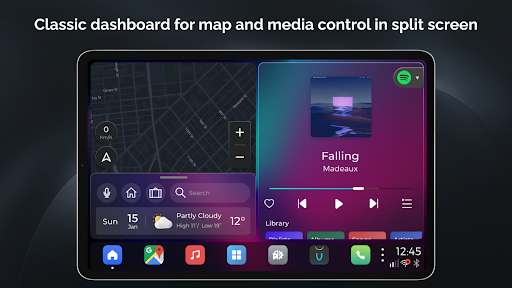
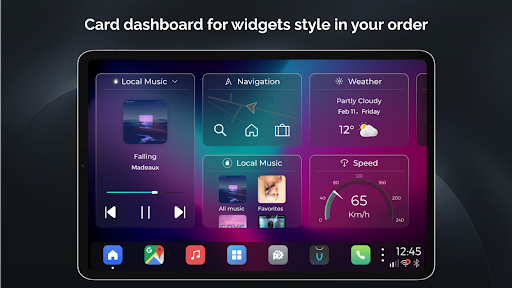
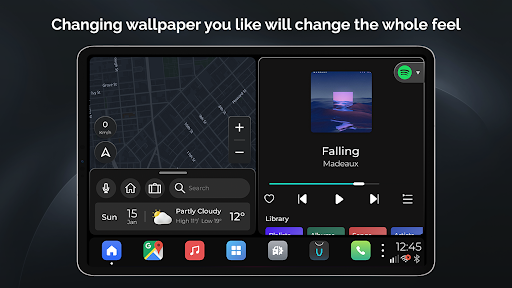
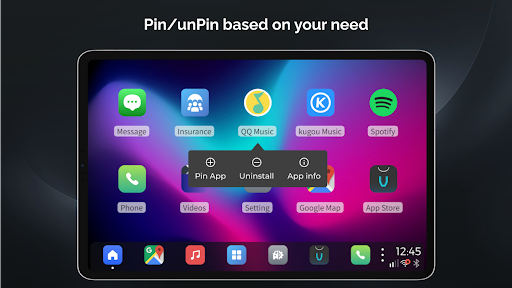
VIVID is a personalized multi-theme car launcher with handy features for your daily drive. It's designed neatly and beautiful, and the most important is very intuitive and easy to use. Here are the major features you're going to find out in VIVID:
* Classic dashboard with split screen - It applies a split home screen for the most important 2 features while you're driving, Maps and Media, so that you don't have to jump back and forth among apps. And you can also easily access to the recent apps from the bottom bar.
* Card dashboard - Show card widgets by your order, most frequent used features available and keep updating by users' request.
* Navigation - Google Maps, Waze, Amigo, iGo, no matter what navigation apps you're using, once you used it, it will stay at the bottom bar as your default Maps app.
* Media - Highly customized UI for in-vehicle scenarios, and it's compatible with any standard media browse services, Spotify, Amazon music, DAB-Z etc.
Auto play when startup also supported as you like in in vivid setting
* Hardware Integration - Integrated with HCT and some of other aftermarket infotainment devices, you can use native radio and Bluetooth call, music, and even SMS
* Phone - Highly customized UI for phone calling, it's simple and just works! Especially while you're in a navigation session.
* Radio - Highly customized UI for Radio app if your headunit hardware is supported, such as PX6, PX5.
* Google voice assistant - Google voice assistant supported and integrated if your device installed Google assistant well.
* Valet lock screen - lock screen with password for you to protect your personal information when in valet time, washing car etc.
* Multiple theme - Multiple dashboard layout for your choices. Fancy dynamic blur UI, changing wallpaper changing all the look and feel.
* Weather support - lock screen with password for you to protect your personal information when in valet time, washing car etc.
* OTA - Frequently update version over the air.
* Android widget support - add android native widgets of the apps you like
* Customize Splash - use any splash images as you like
There are lots of other features for your to find out~ enjoy your drive with VIVID
Показать больше

1. Скачать инсталлятор MEmu и завершайте установку

2. Запускайте MEmu, затем откройте Google Play на главной странице

3. Ищите VIVID Car Launcher в Google Play
Install
4. Скачайте и установите VIVID Car Launcher
5. При завершении установки, нажмите на значок для старта

6. Наслаждайтесь VIVID Car Launcher на своем компьютере с помощью MEmu.
MEmu Play — лучший бесплатный эмулятор Android, превосходный опыт работы с которым оценили 50 миллионов пользователей. Технология виртуализации MEmu позволяет без проблем запускать тысячи Android-приложений на вашем компьютере, даже самые требовательные.
Большой экран с лучшей графикой; Большая продолжительность, без ограничения батареи или мобильных данных.
Полная поддержка установки клавиш для точного управления клавиатурой и мышью или геймпадом.
Несколько игровых учетных записей или задач на одном компьютере одновременно с менеджером нескольких экземпляров.
Use VIVID Car Launcher on PC by following steps: