VIVID Car Launcher
تم التحديث
الإصدار الحالي
6.4.5
تقديم

لا داعي للقلق بشأن الشحن الزائد عند استخدام VIVID Car Launcher على هاتفك. تحرر من قيود الشاشة الصغيرة واستمتع به على شاشة أكبر باستخدام لوحة المفاتيح والفأرة. يوفر MEmu جميع الميزات الرائعة التي تتوقعها: تثبيت سريع، إعداد سهل، أدوات تحكم بديهية، ودون قيود على عمر البطارية، أو استخدام البيانات، أو المكالمات الواردة. يُعد MEmu 9 الجديد الخيار الأمثل لتجربة VIVID Car Launcher على جهاز الكمبيوتر. بفضل تقنية التشفير الفريدة، يتيح لك مدير الحسابات المتعددة تشغيل حسابين أو أكثر في وقت واحد. والأهم من ذلك، أن محرك المحاكاة الفريد يستغل أداء جهاز الكمبيوتر بالكامل، مما يُحسّن تجربة التطبيق ويجعل كل شيء سلسًا للغاية.
أظهر المزيد
قم بتنزيل VIVID Car Launcher على الكمبيوتر بإستخدام جهاز مقلد أندروز MEmu.استمتع بمتعة اللعب على الشاشة الكبيرة. VIVID is a personalized multi-theme car launcher with handy features for your daily drive.
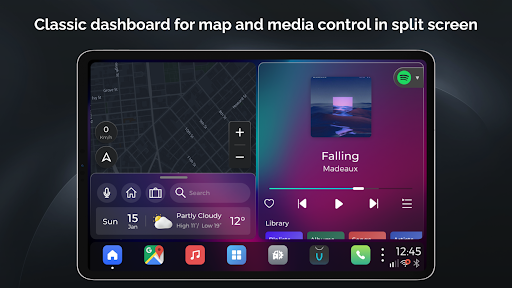
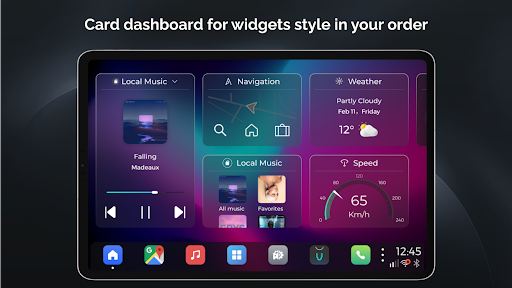
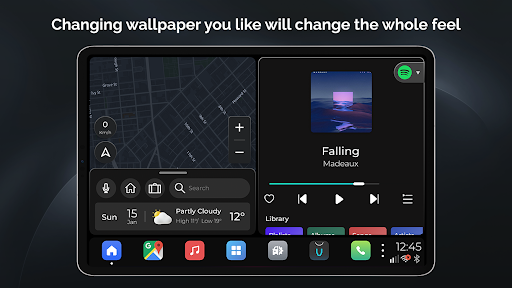
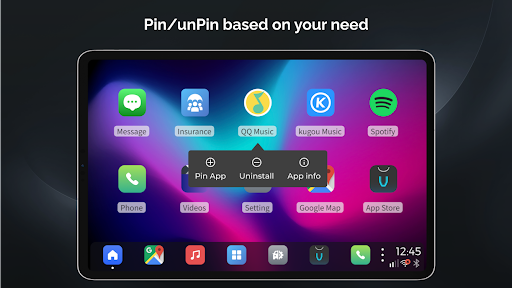
VIVID is a personalized multi-theme car launcher with handy features for your daily drive. It's designed neatly and beautiful, and the most important is very intuitive and easy to use. Here are the major features you're going to find out in VIVID:
* Classic dashboard with split screen - It applies a split home screen for the most important 2 features while you're driving, Maps and Media, so that you don't have to jump back and forth among apps. And you can also easily access to the recent apps from the bottom bar.
* Card dashboard - Show card widgets by your order, most frequent used features available and keep updating by users' request.
* Navigation - Google Maps, Waze, Amigo, iGo, no matter what navigation apps you're using, once you used it, it will stay at the bottom bar as your default Maps app.
* Media - Highly customized UI for in-vehicle scenarios, and it's compatible with any standard media browse services, Spotify, Amazon music, DAB-Z etc.
Auto play when startup also supported as you like in in vivid setting
* Hardware Integration - Integrated with HCT and some of other aftermarket infotainment devices, you can use native radio and Bluetooth call, music, and even SMS
* Phone - Highly customized UI for phone calling, it's simple and just works! Especially while you're in a navigation session.
* Radio - Highly customized UI for Radio app if your headunit hardware is supported, such as PX6, PX5.
* Google voice assistant - Google voice assistant supported and integrated if your device installed Google assistant well.
* Valet lock screen - lock screen with password for you to protect your personal information when in valet time, washing car etc.
* Multiple theme - Multiple dashboard layout for your choices. Fancy dynamic blur UI, changing wallpaper changing all the look and feel.
* Weather support - lock screen with password for you to protect your personal information when in valet time, washing car etc.
* OTA - Frequently update version over the air.
* Android widget support - add android native widgets of the apps you like
* Customize Splash - use any splash images as you like
There are lots of other features for your to find out~ enjoy your drive with VIVID
أظهر المزيد

1. قم بتنزيل برنامج MEmu واكمال تثبيته

2. قم بتشغيل برنامج MEmu وفتح Google Play على الصفحة الرئيسية

3. ابح VIVID Car Launcher في Google Play
Install
4. تنزيل وتثبيت VIVID Car Launcher
5. انقر على الرمز للتشغيل بعد اكتمال التثبيت

6. استخدم MEmu لتجربة VIVID Car Launcher على جهاز الكمبيوتر الخاص بك.
تطبيق MEmuهو افضل محاكى اندرويد مجانى وبالفعل 50 مليون شخص يستمتعون حاليا بتجربه اللعب عليه. تمكّنك تقنية MEmu الافتراضية من تشغيل آلاف ألعاب Android بسلاسة على الكمبيوتر الشخصي ، حتى أكثرها استخدامًا للرسومات.
شاشة أكبر وجرافيك افضل ووقت أطول بدون حدود البطارية وباقة التليفون
لوحة مفاتيح كاملة تدعم تحكم كامل عن طريق لوحة المفاتيح و الفأره وجيم باد
عدة العاب وحسابات ومهمات علي جهاز الكمبيوتر في وقت معين عن طريق Memu متعدد النوافذ
Use VIVID Car Launcher on PC by following steps: