Widget iOS 16 - Color Widgets
Обновлено
Текущая версия
6.5
Продавец

Перестаньте беспокоиться о быстром разряде батареи при использовании Widget iOS 16 - Color Widgets на вашем телефоне. Освободитесь от крошечного экрана и наслаждайтесь приложением на гораздо большем экране. Теперь вы можете работать с приложением в полноэкранном режиме с удобством клавиатуры и мыши. MEmu предлагает вам все ожидаемые удивительные функции: быструю установку и простую настройку, интуитивно понятное управление и больше никаких забот о времени автономной работы, мобильном трафике или неожиданных звонках. Совершенно новый MEmu 9 — идеальный выбор для использования Widget iOS 16 - Color Widgets на вашем компьютере. С помощью менеджера нескольких экземпляров MEmu вы можете одновременно использовать два или более аккаунтов. И самое главное, наш эксклюзивный движок эмуляции раскрывает весь потенциал вашего ПК, обеспечивая плавную и приятную работу.
Показать больше
Скачайте Widget iOS 16 - Color Widgets на ПК с помощью Андроид эмулятора MEmu. Наслаждайтесь на большом экране. Bored with the same old phone?
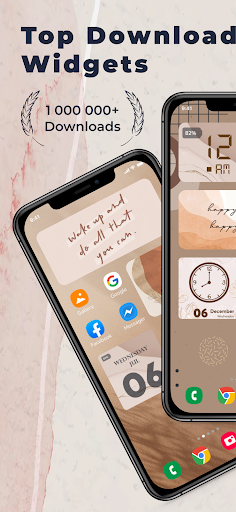
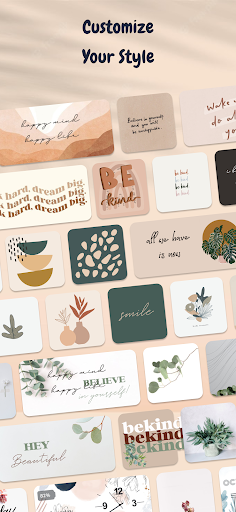
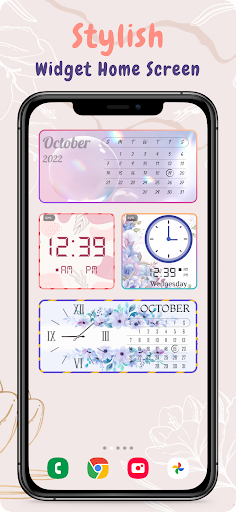
Bored with the same old phone? Meet Color Widgets—the #1 worldwide Home Screen Manager with Lock Screen Widget, one click to satisfy all your fantasies!
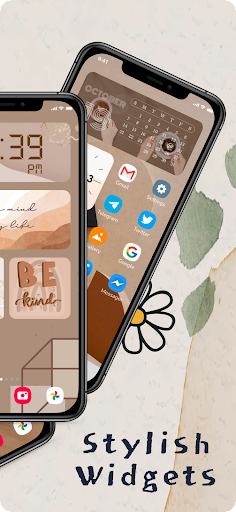
Color Widgets allows you to freely add stylish widgets and customize the home screen! We got cool widgets, themes, keyboards, fonts and charging animations that are really beautiful!
Widget iOS 16 makes adding aesthetic and handy widgets to your home screen easy. Choose from stunning predesigned widgets or, better yet, create your own with the easy-to-use widget editor. Browse dozens of widget types like photo, countdown, date and battery, weather, quotes, and many more.
Widget iOS 16 - Color Widgets allows you to add Widgets with 3 sizes: small, medium and large. Comes with many beautiful fonts, font colors, backgrounds, or you can add your favorite background images in your phone.
Try the new aesthetic refreshing look of iOS 16 on your Android smartphone, with all the widget for iOS 16.
As the organizer of the home screen, Color Widgets can greatly improve the convenience of using iPhone and provides you with all-in-one services!
There are 2000+ icons, 5000+ widgets and 200+ themes including various aesthetic wallpapers as you choose!
With Color Widgets, you can enjoy widgets, icons, wallpapers and exclusive keyboard themes on iOS 16 and decorate your home screen!
WIDGET iOS 16
Customize each widget to perfection. Add pictures to your widgets, edit their font, create your own color-scheme, and so much more. Frequent updates constantly add new widgets you'd love. With Color Widgets, there are no limits to customizing your Home Screen! Here’s a glimpse of our widgets:
● Aesthetic
● Black
● Time, Date & Battery
● Countdown
● Daily, Hourly, & Current Weather
● Music & Playlists
● Calendar
● Analog Clock
● Quotes & Custom Text
● Reminders
● Step Count/Pedometer
● Sunset & Sunrise
● Neon
and more
How to use Color Widget
1. Click on your favorite widget category
2. Click Set Widget
3. Go to your phone screen
4. Press and hold until the widget pops up
5. Go to the widget and select ("2 × 2"), ("4 x 2") or ("4 x 4")
Your favorite widgets will appear on your phone and no more watermarks on each icon
Photo widget is available on your home screen as well. You can decorate your home screen with your favorite photos, such as exciting moments, favorite idols or your cute pet, etc. You can also add your favorite text on the home screen like inspiring sentences. It can also be used as notes, as you can add reminders of important events or even words that are difficult to remember. Use it according to your needs!
Along with many more widgets to discover.
Enjoy WIDGET iOS 16 for free
We are also looking for your feedback, suggestion, or recommendation. Please, feel free to let us hear from you at your review so we can continue to bring you the best experiences and updates these Widget iOS 16 - Color Widgets app.
Note:
If the widgets are not refreshing on your phone, go to Settings in the app > enable the "Allow Apps to run in the background" option.
Показать больше

1. Скачать инсталлятор MEmu и завершайте установку

2. Запускайте MEmu, затем откройте Google Play на главной странице

3. Ищите Widget iOS 16 - Color Widgets в Google Play
Install
4. Скачайте и установите Widget iOS 16 - Color Widgets
5. При завершении установки, нажмите на значок для старта

6. Наслаждайтесь Widget iOS 16 - Color Widgets на своем компьютере с помощью MEmu.
MEmu Play — лучший бесплатный эмулятор Android, превосходный опыт работы с которым оценили 50 миллионов пользователей. Технология виртуализации MEmu позволяет без проблем запускать тысячи Android-приложений на вашем компьютере, даже самые требовательные.
Большой экран с лучшей графикой; Большая продолжительность, без ограничения батареи или мобильных данных.
Полная поддержка установки клавиш для точного управления клавиатурой и мышью или геймпадом.
Несколько игровых учетных записей или задач на одном компьютере одновременно с менеджером нескольких экземпляров.
Use Widget iOS 16 - Color Widgets on PC by following steps: