TrueMoney Wallet PH
อัปเดตเมื่อ
เวอร์ชันปัจจุบัน
0.0.61
ให้บริการโดย

เมื่อใช้ TrueMoney Wallet PH บนโทรศัพท์ของคุณไม่ต้องกังวลกับการชาร์จไฟมากเกินไปปลดปล่อยตัวคุณเองจากหน้าจอขนาดเล็กและสนุกกับการใช้แอพนี้บนหน้าจอขนาดใหญ่ จากนี้ไปรับประสบการณ์เต็มหน้าจอของแอปพลิเคชันของคุณด้วยคีย์บอร์ดและเมาส์ MEmu มีคุณสมบัติที่น่าแปลกใจที่คุณคาดหวัง: การติดตั้งที่รวดเร็วและการตั้งค่าที่ง่ายควบคุมได้ง่ายไม่ จำกัด แบตเตอรี่ข้อมูลมือถือและการโทรที่รบกวน MEmu 9 ใหม่ล่าสุดเป็นตัวเลือกที่ดีที่สุดสำหรับการใช้ Meitu – โปรแกรมแก้ไขภาพแนวธรรมชาติ บนคอมพิวเตอร์ของคุณ ด้วยรหัสการดูดซึมของเราผู้จัดการหลายอินสแตนซ์ทำให้สามารถเปิดบัญชี 2 บัญชีขึ้นไปในเวลาเดียวกันได้ และที่สำคัญที่สุดเอ็นจิ้นจำลองพิเศษของเราสามารถปลดปล่อยศักยภาพของPCของคุณและทำให้ทุกอย่างราบรื่นและสนุกสนาน
แสดงเพิ่มเติม
ดาวน์โหลด TrueMoney Wallet PH บน PC ด้วย MEmu Android Emulator สนุกกับการเล่นบนหน้าจอขนาดใหญ่ Load, Pay Bills, Send Money and Bonuses!
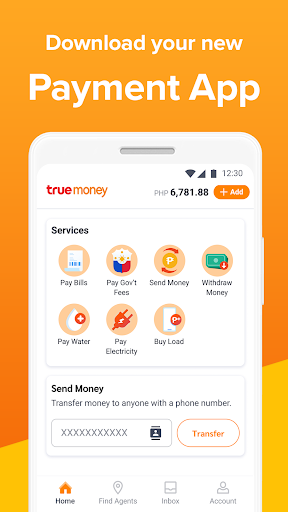
Load, Pay Bills, Send Money and Bonuses!
What is TrueMoney Wallet?
TrueMoney Wallet is a digital wallet from TrueMoney Philippines, backed by Ascend Money, one of the biggest Fintech companies in Southeast Asia. The app will let you securely make cashless payments for mobile load and bills payment. You can also send money to other users and even non-users because the money sent may be claimed at TrueMoney Centers nationwide. Plus, enjoy exclusive bonuses and promotions on transactions done using the app!
Convenient, safe, and secure.
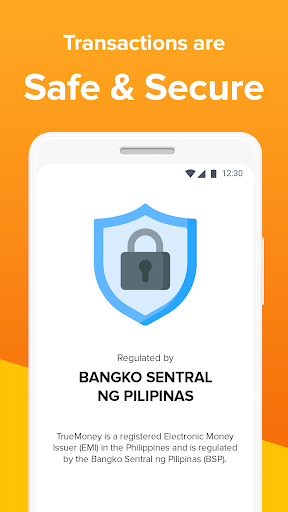
TrueMoney is a registered Electronic Money Issuer in the Philippines and is regulated by the Bangko Sentral ng Pilipinas. You can pay with confidence knowing that your information is fully encrypted and your money is secure and protected.
Instant phone load.
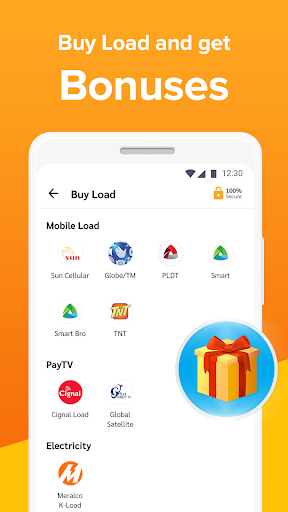
Load for all mobile phone networks is available. You can reload your mobile phone anytime, anywhere. You can also enjoy bonuses with your load purchase!
Hassle-free bills payment.
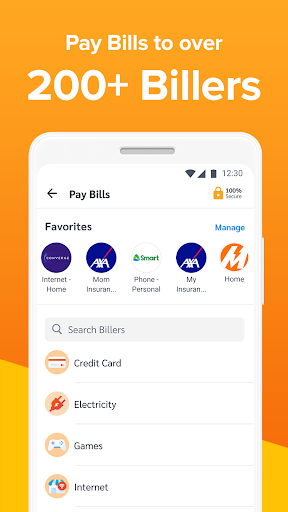
You can easily pay your bills as we have partnered with over 200+ Bayad and ECPay billers. That includes electricity, water, internet, loans, and many more.
Send and receive money with ease.
Securely and instantly transfer money without fees between TrueMoney Wallets! You may also send money to anyone and the money sent may be claimed at TrueMoney Centers across the country.
Easy wallet Cash In.
For now, you may fund your TrueMoney Wallet in all 20,000 TrueMoney Centers nationwide. Just wait for our updates on future Cash In options for your app.
Learn more.
To learn more about TrueMoney Wallet, visit www.truemoney.com.ph or www.facebook.com/TrueMoneyPH.
For questions or concerns, message us on Facebook or call (02)7718-9999, or email support@truemoney.com.ph.
แสดงเพิ่มเติม

1. ดาวน์โหลดตัวติดตั้ง MEmu และสิ้นสุดการติดตั้ง

2. เริ่ม MEmu จากนั้นเปิด Google Play บนหน้าแรก

3. ค้นหา TrueMoney Wallet PH ใน Google Play
Install
4. ดาวน์โหลดและติดตั้ง TrueMoney Wallet PH
5. เมื่อติดตั้งเสร็จให้คลิกที่ไอคอนเพื่อเริ่มใช้งาน

6. ใช้ MEmu เพื่อสัมผัสประสบการณ์ TrueMoney Wallet PH บนคอมพิวเตอร์ของคุณ
MEmu Play คือโปรแกรมจำลอง Android ที่ดีที่สุด มีผู้ใช้มากกว่า 50 ล้านคน มอบประสบการณ์การใช้งานแอป Android ขั้นสุดยอดให้กับคุณ เทคโนโลยีจำลองเสมือนของ MEmu ช่วยให้คุณรันแอป Android หลายพันแอปบนคอมพิวเตอร์ได้อย่างราบรื่น แม้แอปที่กินทรัพยากรเครื่องสูงที่สุด
จอใหญ่และกราฟฟิกสวยกว่า; เล่นได้นาน, ไม่ต้องใช้แบตเตอรี่โทรศัพท์หรือเน็ตโทรศัพท์.
ระบบปรับแต่งปุ่มคีย์บอร์ดและเม้าส์ตามที่คุณเลือก
เล่นมากกว่าหนึ่งเกมบน PC ในเวลาเดียวกันด้วยระบบหลายจอหรือ Multi-Instance manager.
Use TrueMoney Wallet PH on PC by following steps: