Warlord: Awaji
Güncellendi
Mevcut Sürüm
Sunan

Warlord: Awaji oynamak için bu kadar tutkuluyken, ellerin telefonunun küçük ekranıyla sınırlı kalmamalı.Bir profesyonel gibi oyna ve klavye ve fare ile oyununun tüm kontrolü sende olsun.MEmu sana beklediğin her şeyi sunuyor.PC'de Warlord: Awaji indir ve oyna. İstediğin kadar oyna, artık pil sınırlamaları, mobil veri ve rahatsız edici çağrılar yok.Yepyeni MEmu 9, PC'de Warlord: Awaji oynamak için en iyi seçim. Uzmanlığımızla hazırlanan zarif ön ayar tuş eşleme sistemi Warlord: Awaji oyununu gerçek bir PC oyununa dönüştürüyor.MEmu çoklu örnek yöneticisi, aynı cihazda 2 veya daha fazla hesap oynamayı mümkün kılıyor.Ve en önemlisi, özel emülasyon motorumuz PC'nizin tüm potansiyelini ortaya çıkarıyor, her şeyi sorunsuz hale getiriyor.
Daha fazla göster
Warlord: Awaji’i MEmu Android Emülatör ile PC’ye indirin. Büyük ekranda oynamanın keyfini çıkarın. Lead a samurai invasion into the mysterious island of Awaji!
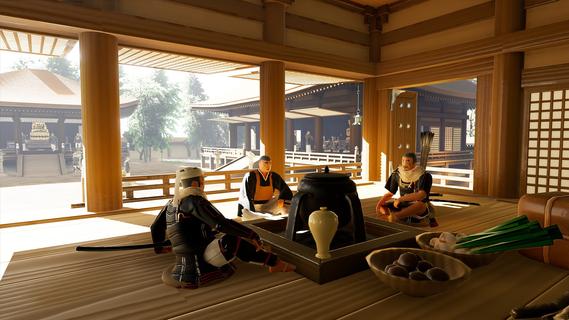
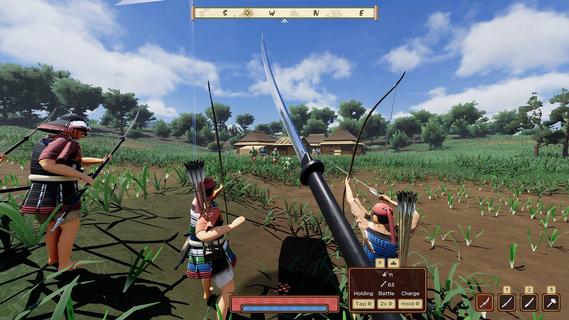
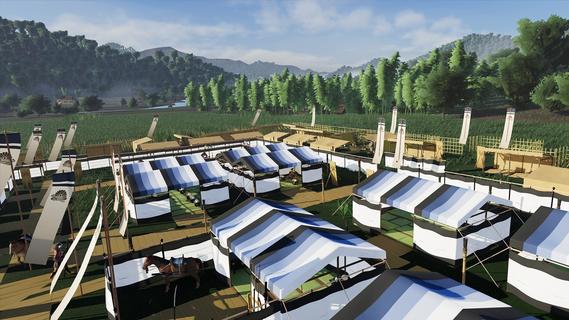
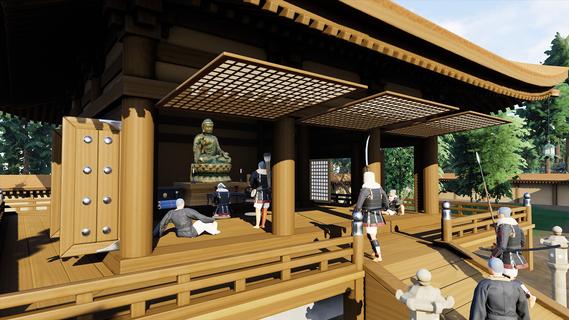
Lead a samurai invasion into the mysterious island of Awaji! Recruit, promote, and upgrade your warriors while navigating the ancient world of feudal Japan. Use samurai weapons and strategies to conquer the entire island and become Warlord!Warlord: Awaji is the second entry in a series of immersive strategy games created by Darkmatter Games. Step into the shoes of a legendary samurai warlord, given special command and orders from the Emperor to conquer an entire island and save a regime teetering on the edge of collapse.Immersive StrategyA unique combination of first-person strategy elements places Warlord: Awaji in a genre of its own. Immersive strategy, pioneered by Darkmatter Games, fixes the player in the shoes of their character, while presenting them with complex strategic gameplay. Lead an army, construct your camp, conquer villages and forts, and disrupt dynamic enemy forces in a sprawling open worldâentirely from this immersive strategy perspective. Turn the tide of battle by engaging directly in the action yourself, fighting alongside your own hand picked warriors fully in real time.Dynamic Open WorldThe world of Warlord: Awaji is a sprawling island created using real heightmap data of its eponymous location, replete with dozens of temples and shrines from real life. Travel the roads cautiously and keep your eyes on the treelines, as civilian convoys and roaming warrior bands criss-cross the open world in real time. The local clans will react aggressively to your exploits, so choose your actions carefully. Strategically target strongpoints to weaken enemy quick-reaction forces. Capture rival clans' shrines to boost your spiritual aura and harm theirs. Work with esoteric warrior monks to curse your enemies and coordinate powerful coalition attacks.Massive BattlesYour warriors are your most important weapon. Recruit and maintain a powerful retinue of samurai. Use conquered land to promote leaders and expand your army's capacity while organizing its battle formation in any way you like using an intuitive drag-and-drop menu. Each individual has a unique name and gains experience over time through heroic action. Give your best warriors advanced weapons and armor to boost their lethality in combat. Form diverse groups of melee, ranged, and cavalry troops. Mix and match to find the best army composition and crush the opposition.Base BuildingConstruct a samurai war camp anywhere in the open world. Pitch tents and provide your troops with a variety of needs, including sleep, rest, and sustenance. Put up screens and fences to establish a perimeter. Set guards to keep watch in the dark hours of the night. At any time, you may pack up and relocate your camp, allowing for complex strategic maneuvers. Decide where and when to set up your base, and which direction to move in as you explore the vast open world.Japanese HistoryAll of the weapons, armor, structures, names, and gameplay elements are inspired directly from extant literary, iconographic, and archeological sources. Darkmatter Games, with the help of world leading experts on samurai warfare, has painstakingly recreated the 14th century world of medieval Japan in unrivaled detail. Historical authenticity is the core element of the Warlord franchise. Prepare to experience the visceral world of the samurai like never before seen.
Daha fazla göster

1. MEmu yükleyicisini indirin ve kurulumu tamamlayın

2. MEmu'yu başlatın ve ana sayfada Google Play'i açın

3. Google Play'de Warlord: Awaji arayın
Install
4. Warlord: Awaji indirin ve yükleyin
5. Kurulum tamamlandığında başlamak için simgeye tıklayın

6. PC’de MEmu ile Warlord: Awaji oyunun keyfini çıkarın
MEmu App Player, en iyi ücretsiz Android emülatörüdür ve 50 milyon insan zaten mükemmel Android oyun deneyimini yaşamaktadır. MEmu sanallaştırma teknolojisi, binlerce grafik oyunu hatta grafikte en yoğun olanları bile sorunsuz bir şekilde bilgisayarınızda oynamanızı sağlar.
Daha büyük ekranla daha iyi grafiklere sahip; Pil veya mobil veri sınırlaması olmaksızın uzun süre.
Keymapping klavye ve fare veya gamepad'in hassas kontrolü için destek verir.
Multi-Instance yöneticisi ile tek bir bilgisayarda aynı anda birden fazla oyun hesabı veya görev gerçekleşilebilir.
Play Warlord: Awaji on PC by following steps: