
Warlord: Awaji
Aktualisiert
Aktuelle Version
Angeboten von

Bei all Ihrer Leidenschaft für das Spielen von Warlord: Awaji sollten Ihre Hände nicht auf einen winzigen Bildschirm Ihres Telefons beschränkt sein. Spielen Sie wie ein Profi und übernehmen Sie die volle Kontrolle über Ihr Spiel mit Tastatur und Maus. MEmu bietet Ihnen all die Dinge, die Sie erwarten. Laden Sie Warlord: Awaji herunter und spielen Sie es auf dem PC. Spielen Sie so lange, wie Sie wollen, ohne Grenzwerte für Akku, mobile Daten und störende Anrufe. Das brandneue MEmu 9 ist die beste Wahl, um Warlord: Awaji auf dem PC zu spielen. Das exquisite voreingestellte Tastaturbelegungssystem, das mit unserem Fachwissen vorbereitet wurde, macht Warlord: Awaji zu einem echten PC-Spiel. Der MEmu Multi-Instanz-Manager ermöglicht das Spielen von 2 oder mehr Konten auf demselben Gerät. Und das Wichtigste: Unsere exklusive Emulations-Engine kann das volle Potenzial Ihres PCs freisetzen und für reibungslose Abläufe sorgen.
Mehr anzeigen
Laden Sie Play Warlord: Awaji auf dem PC mit MEmu Android Emulator. Viel Spaß beim Spielen auf großmundieren. Lead a samurai invasion into the mysterious island of Awaji!
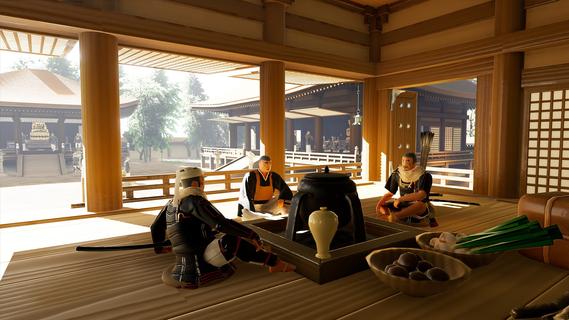
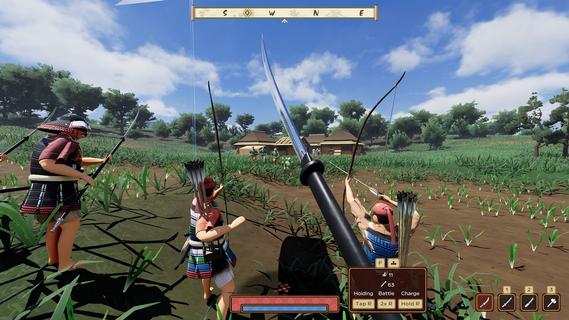
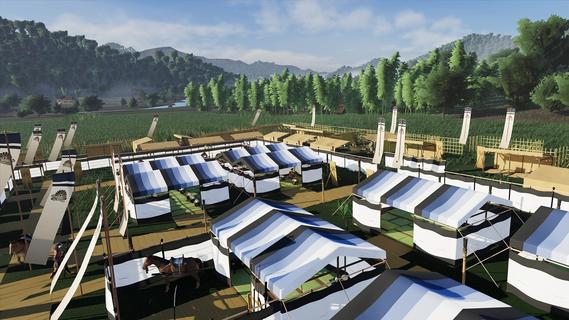
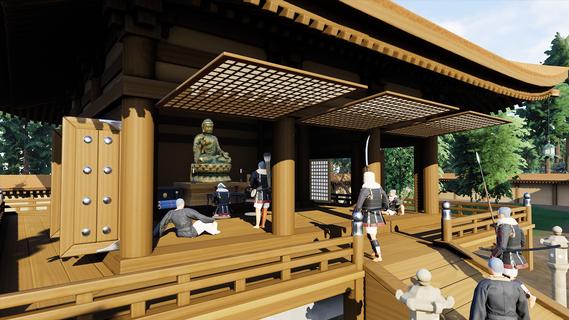
Lead a samurai invasion into the mysterious island of Awaji! Recruit, promote, and upgrade your warriors while navigating the ancient world of feudal Japan. Use samurai weapons and strategies to conquer the entire island and become Warlord!Warlord: Awaji is the second entry in a series of immersive strategy games created by Darkmatter Games. Step into the shoes of a legendary samurai warlord, given special command and orders from the Emperor to conquer an entire island and save a regime teetering on the edge of collapse.Immersive StrategyA unique combination of first-person strategy elements places Warlord: Awaji in a genre of its own. Immersive strategy, pioneered by Darkmatter Games, fixes the player in the shoes of their character, while presenting them with complex strategic gameplay. Lead an army, construct your camp, conquer villages and forts, and disrupt dynamic enemy forces in a sprawling open worldâentirely from this immersive strategy perspective. Turn the tide of battle by engaging directly in the action yourself, fighting alongside your own hand picked warriors fully in real time.Dynamic Open WorldThe world of Warlord: Awaji is a sprawling island created using real heightmap data of its eponymous location, replete with dozens of temples and shrines from real life. Travel the roads cautiously and keep your eyes on the treelines, as civilian convoys and roaming warrior bands criss-cross the open world in real time. The local clans will react aggressively to your exploits, so choose your actions carefully. Strategically target strongpoints to weaken enemy quick-reaction forces. Capture rival clans' shrines to boost your spiritual aura and harm theirs. Work with esoteric warrior monks to curse your enemies and coordinate powerful coalition attacks.Massive BattlesYour warriors are your most important weapon. Recruit and maintain a powerful retinue of samurai. Use conquered land to promote leaders and expand your army's capacity while organizing its battle formation in any way you like using an intuitive drag-and-drop menu. Each individual has a unique name and gains experience over time through heroic action. Give your best warriors advanced weapons and armor to boost their lethality in combat. Form diverse groups of melee, ranged, and cavalry troops. Mix and match to find the best army composition and crush the opposition.Base BuildingConstruct a samurai war camp anywhere in the open world. Pitch tents and provide your troops with a variety of needs, including sleep, rest, and sustenance. Put up screens and fences to establish a perimeter. Set guards to keep watch in the dark hours of the night. At any time, you may pack up and relocate your camp, allowing for complex strategic maneuvers. Decide where and when to set up your base, and which direction to move in as you explore the vast open world.Japanese HistoryAll of the weapons, armor, structures, names, and gameplay elements are inspired directly from extant literary, iconographic, and archeological sources. Darkmatter Games, with the help of world leading experts on samurai warfare, has painstakingly recreated the 14th century world of medieval Japan in unrivaled detail. Historical authenticity is the core element of the Warlord franchise. Prepare to experience the visceral world of the samurai like never before seen.
Mehr anzeigen

1. Laden das MEmu-Installationsprogramm herunter und beenden die Installation

2. MEmu starten und Google Play auf der Homepage öffnen

3. Suchen Warlord: Awaji in Google Play
Install
4. Herunterladen und Installieren Warlord: Awaji
5. Klicken nach Abschluss der Installation auf das Symbol, um es zu starten

6. Viel Spaß beim Spielen von Warlord: Awaji auf dem PC mit MEmu
MEmu App Player ist der beste kostenlose Android-Emulator und 50 Millionen Menschen genießen bereits seine hervorragende Android-Gaming-Erfahrung. Mit der MEmu-Virtualisierungstechnologie können Sie Tausende von Android-Spielen problemlos auf Ihrem PC spielen, selbst bei grafikintensiven Spielen.
BGrößeres Bild mit besserer Grafik; Keine unterbrechungen, keine sorgen um Akku
Komplette Tastenbelegung unterstützt mit Maus und Tastatur oder Controller
Mit dem „Multi-Instance-Manager“ können Sie mehrere Spielkonten oder Spiele gleichzeitig auf einem PC ausführen.
Play Warlord: Awaji on PC by following steps: