Warlord: Awaji
Mise à jour
Version actuelle
Proposée par

Avec toute la passion que vous avez à jouer Warlord: Awaji, vos mains ne sont pas sensées se limiter à l’infime écran de votre téléphone. Jouez comme un pro et ayez le contrôle total de votre jeu à l’aide du clavier et de la souris. MEmu satisfait toutes vos attentes. Téléchargez et jouez Warlord: Awaji sur PC. Jouez aussi longtemps que vous souhaitez sans aucune limitation de batterie, de données mobiles et d’appels embêtants. La toute nouvelle version de MEmu 9 est la meilleure option de jouer Warlord: Awaji sur PC. Réalisé par nos experts, l’e magnifique système d’affectation de touches prédéfini fait de Warlord: Awaji un jeu réaliste sur PC. Le gestionnaire multi-instances de MEmu permet 2 ou plusieurs comptes de jeu sur le même appareil. Et le plus important, le moteur d’émulation exclusif peut libérer le plein potentiel de votre PC, ce qui facilite tout.
Afficher plus
Téléchargez Warlord: Awaji avec le simulateur d’Android MEmu sur votre PC. Profitez de jouer sur un grand écran. Lead a samurai invasion into the mysterious island of Awaji!
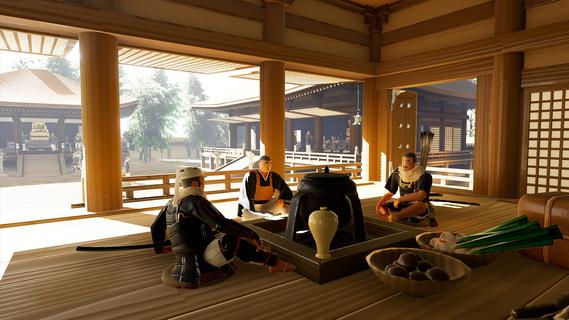
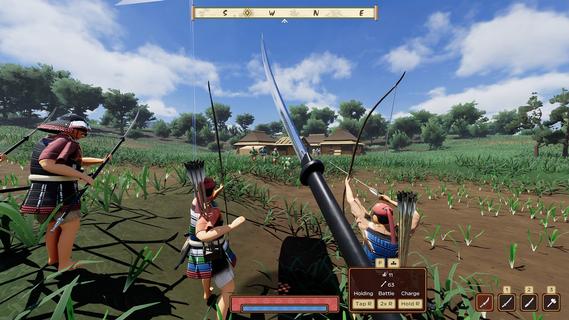
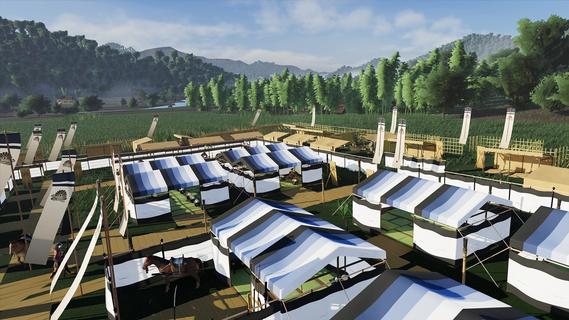
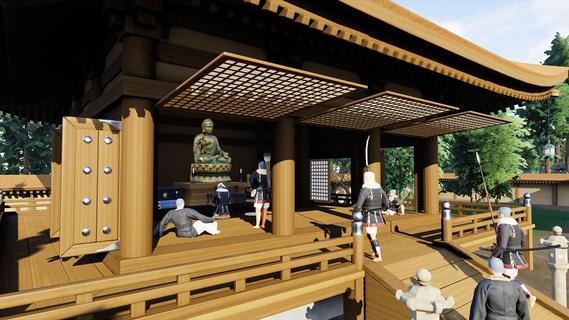
Lead a samurai invasion into the mysterious island of Awaji! Recruit, promote, and upgrade your warriors while navigating the ancient world of feudal Japan. Use samurai weapons and strategies to conquer the entire island and become Warlord!Warlord: Awaji is the second entry in a series of immersive strategy games created by Darkmatter Games. Step into the shoes of a legendary samurai warlord, given special command and orders from the Emperor to conquer an entire island and save a regime teetering on the edge of collapse.Immersive StrategyA unique combination of first-person strategy elements places Warlord: Awaji in a genre of its own. Immersive strategy, pioneered by Darkmatter Games, fixes the player in the shoes of their character, while presenting them with complex strategic gameplay. Lead an army, construct your camp, conquer villages and forts, and disrupt dynamic enemy forces in a sprawling open worldâentirely from this immersive strategy perspective. Turn the tide of battle by engaging directly in the action yourself, fighting alongside your own hand picked warriors fully in real time.Dynamic Open WorldThe world of Warlord: Awaji is a sprawling island created using real heightmap data of its eponymous location, replete with dozens of temples and shrines from real life. Travel the roads cautiously and keep your eyes on the treelines, as civilian convoys and roaming warrior bands criss-cross the open world in real time. The local clans will react aggressively to your exploits, so choose your actions carefully. Strategically target strongpoints to weaken enemy quick-reaction forces. Capture rival clans' shrines to boost your spiritual aura and harm theirs. Work with esoteric warrior monks to curse your enemies and coordinate powerful coalition attacks.Massive BattlesYour warriors are your most important weapon. Recruit and maintain a powerful retinue of samurai. Use conquered land to promote leaders and expand your army's capacity while organizing its battle formation in any way you like using an intuitive drag-and-drop menu. Each individual has a unique name and gains experience over time through heroic action. Give your best warriors advanced weapons and armor to boost their lethality in combat. Form diverse groups of melee, ranged, and cavalry troops. Mix and match to find the best army composition and crush the opposition.Base BuildingConstruct a samurai war camp anywhere in the open world. Pitch tents and provide your troops with a variety of needs, including sleep, rest, and sustenance. Put up screens and fences to establish a perimeter. Set guards to keep watch in the dark hours of the night. At any time, you may pack up and relocate your camp, allowing for complex strategic maneuvers. Decide where and when to set up your base, and which direction to move in as you explore the vast open world.Japanese HistoryAll of the weapons, armor, structures, names, and gameplay elements are inspired directly from extant literary, iconographic, and archeological sources. Darkmatter Games, with the help of world leading experts on samurai warfare, has painstakingly recreated the 14th century world of medieval Japan in unrivaled detail. Historical authenticity is the core element of the Warlord franchise. Prepare to experience the visceral world of the samurai like never before seen.
Afficher plus

1. Téléchargez l'installateur MEmu et terminez l'installation

2. Démarrez MEmu puis ouvrez Google Play sur la page d'accueil

3. Recherchez Warlord: Awaji dans Google Play
Install
4. Téléchargez et installez Warlord: Awaji
5. Une fois l'installation terminée, cliquez sur l'icône pour démarrer

6. Profitez de jouer Warlord: Awaji sur PC avec MEmu
Le lecteur d'application MEmu est le meilleur émulateur Android gratuit, et 50 millions de personnes profitent déjà de sa fantastique expérience de jeu Android. La technologie de virtualisation MEmu vous donne la possibilité de jouer à des milliers de jeux Android sur votre PC sans aucune difficulté, même aux plus gourmands.
L’écran plus grand avec de meilleurs graphismes; Une longue durée, sans limitation de batterie ou de données mobiles.
Soutien du Keymapping pour un contrôle précis du clavier et de la souris ou de la manette de jeu
Plusieurs comptes de jeu ou tâches sur un seul PC en même temps avec le gestionnaire de multi-instance.
Play Warlord: Awaji on PC by following steps: