EndeavorRx® - Kid
Güncellendi
Mevcut Sürüm
4.0.2
Sunan

Cep telefonunda EndeavorRx® - Kid kullanırken fazla şarjlardan endişelenme, kendini küçük ekrandan kurtar ve uygulamayı çok daha büyük bir ekranda kullanmanın tadını çıkar. Şu andan itibaren, klavye ve fare ile uygulamayı tam ekran da kullanmayı dene. MEmu, beklediğin tüm şaşırtıcı özellikleri sunar: hızlı ve kolay kurulum, sezgisel kontroller, bunun dışında pil sınırı, mobil veri ve rahatsız edici aramalar artık yok. Yepyeni MEmu 9, bilgisayarında EndeavorRx® - Kid kullanmanın en iyi seçimidir. Emilimimizle kodlanan çok örnekli yönetici, aynı anda 2 veya daha fazla hesap açmayı mümkün kılar. Ve en önemlisi, özel emülasyon motorumuz PC'nin tüm potansiyelini serbest bırakabilir, her şeyi pürüzsüz ve eğlenceli hale getirebilir.
Daha fazla göster
EndeavorRx® - Kid’i MEmu Android Emülatör ile PC’ye indirin. Büyük ekranda oynamanın keyfini çıkarın. EndeavorRx is the first & only FDA-authorized video game treatment to improve attention for kids 8-17 with primarily inattentive or combined-type ADHD.

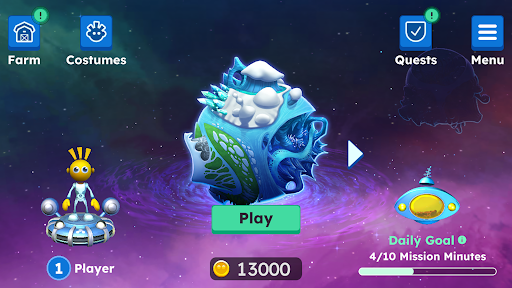
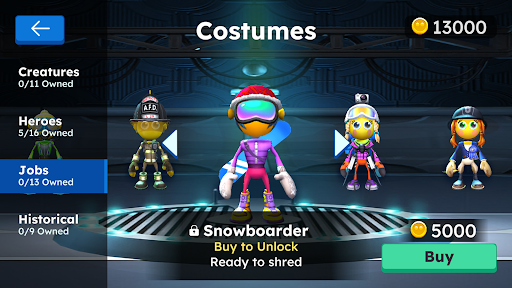
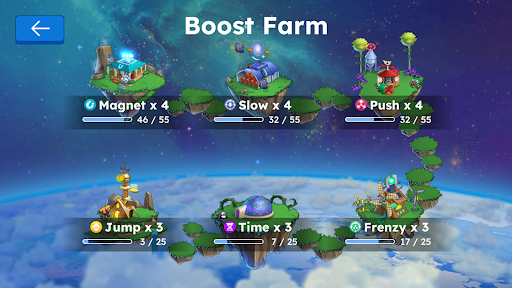
EndeavorRx is the first & only FDA-authorized video game treatment to improve attention for kids 8-17 with primarily inattentive or combined-type ADHD. Access to treatment in the game requires a prescription or order from your child's health care provider. If you receive a prescription for EndeavorRx, you will be sent an email with instructions to complete payment and receive an activation code.
Created by world-class neuroscientists and award-winning game designers, EndeavorRx is powered by Selective Stimulus Management Engine (SSME™) technology that is designed to challenge and target areas of the brain that play a key role in attention function.
When playing the game, the goal is for your child to successfully navigate their character through courses while collecting targets and avoiding obstacles. They’ll chase mystic creatures, race through different worlds, use boosts to problem-solve while building their very own universe — and the difficulty levels adjust in real-time based on each child’s performance.
Follow your child's treatment journey with EndeavorRx Insight®: the official EndeavorRx companion app for caregivers. This free app connects directly to your child’s EndeavorRx treatment, providing a daily snapshot of your child's in-game mission completion and effort score. Download from the app store today!
EndeavorRx is a digital therapeutic indicated to improve attention function as measured by computer-based testing in children ages 8-17 years old with primarily inattentive or combined-type ADHD, who have a demonstrated attention issue. Patients who engage with EndeavorRx 5 days per week for 4-6 weeks demonstrate improvements in a digitally assessed measure, Test of Variables of Attention (TOVA®), of sustained and selective attention and may not display benefits in typical behavioral symptoms, such as hyperactivity. EndeavorRx should be considered for use as part of a therapeutic program that may include clinician-directed therapy, medication, and/or educational programs, which further address symptoms of the disorder. No serious adverse events were reported. Federal law restricts this device to sale by or on the order of a licensed health care provider. For full instructions for use and important safety information, please visit www.endeavorrx.com/instructions-for-use/.
At the end of the treatment period, your child may benefit from additional treatment, as directed by your child’s health care provider.
If your child experiences any side effects related to playing EndeavorRx (such as frustration, headache, dizziness, emotional reaction, nausea, or aggression), stop the treatment and contact your child’s health care provider before resuming.
EndeavorRx may not be appropriate for patients with photo-sensitive epilepsy, color blindness, or physical limitations that restrict use of a mobile device; caregivers should consult with their child’s health care provider.
For more information, visit EndeavorRx.com.
Akili, EndeavorRx, Endeavor, Akili Care, ADHD Insight, Insight, EndeavorRx Insight, SSME, Play Your Medicine, and Akili Assist, as well as the logos for each, are trademarks or registered trademarks of Akili Interactive Labs, Inc. Other trademarks are trademarks or registered trademarks of their respective owners. Please see the Terms of Use below for applicable patent protection for EndeavorRx.
Terms of Use: https://my.akili.care/terms
Privacy Notice: https://my.akili.care/privacy
Daha fazla göster

1. MEmu yükleyicisini indirin ve kurulumu tamamlayın

2. MEmu'yu başlatın ve ana sayfada Google Play'i açın

3. Google Play'de EndeavorRx® - Kid arayın
Install
4. EndeavorRx® - Kid indirin ve yükleyin
5. Kurulum tamamlandığında başlamak için simgeye tıklayın

6. EndeavorRx® - Kid'i PC'de için MEmu'yu kullanın
MEmu Play, 50 milyon kullanıcısıyla en iyi ücretsiz Android emülatörüdür ve en üst düzey Android uygulama deneyiminin keyfini çıkarır. MEmu'nun sanallaştırma teknolojisi, en zorlu uygulamalar da dahil olmak üzere binlerce uygulamayı bilgisayarınızda sorunsuz bir şekilde çalıştırmanızı sağlar.
Daha büyük ekranla daha iyi grafiklere sahip; Pil veya mobil veri sınırlaması olmaksızın uzun süre.
Keymapping klavye ve fare veya gamepad'in hassas kontrolü için destek verir.
Multi-Instance yöneticisi ile tek bir bilgisayarda aynı anda birden fazla oyun hesabı veya görev gerçekleşilebilir.
Use EndeavorRx® - Kid on PC by following steps: