
EndeavorRx® - Kid
Zaktualizowano
Aktualna wersja
3.2.0
Sprzedawca

Przestań martwić się nadmiernymi opłatami podczas korzystania z EndeavorRx® - Kid na telefonie komórkowym, uwolnij się od małego ekranu i ciesz się korzystaniem z aplikacji na znacznie większym wyświetlaczu. Od teraz korzystaj z aplikacji na pełnym ekranie za pomocą klawiatury i myszy. MEmu oferuje wszystkie zaskakujące funkcje, których się spodziewałeś: szybką instalację i łatwą konfigurację, intuicyjne sterowanie, koniec z ograniczeniami baterii, danych mobilnych i niepokojących połączeń. Zupełnie nowy MEmu 9 to najlepszy wybór do używania EndeavorRx® - Kid na twoim komputerze. Zakodowany przez naszą absorpcję, menedżer wielu instancji umożliwia otwarcie 2 lub więcej kont w tym samym czasie. A co najważniejsze, nasz ekskluzywny emulator może uwolnić pełny potencjał twojego komputera, sprawić, że wszystko będzie płynne i przyjemne.
Pokaż więcej
Ciesz się wspaniałym doświadczeniem podczas grania w EndeavorRx® - Kid na komputerze z aplikacją MEMU App Player. Jest to potężny darmowy emulator Androida pozwalający grać w tysiące gier na Androida. EndeavorRx is the first & only FDA-authorized video game treatment to improve attention for kids 8-17 with primarily inattentive or combined-type ADHD.

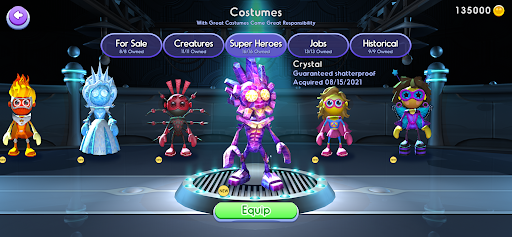

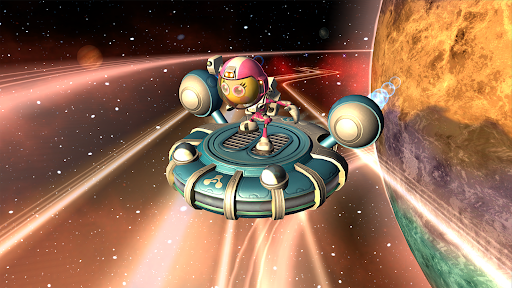
EndeavorRx is the first & only FDA-authorized video game treatment to improve attention for kids 8-17 with primarily inattentive or combined-type ADHD. Access to treatment in the game requires a prescription or order from your child's health care provider. If you receive a prescription for EndeavorRx, you will be sent an email with instructions to complete payment and receive an activation code.
Created by world-class neuroscientists and award-winning game designers, EndeavorRx is powered by Selective Stimulus Management Engine (SSME™) technology that is designed to challenge and target areas of the brain that play a key role in attention function.
When playing the game, the goal is for your child to successfully navigate their character through courses while collecting targets and avoiding obstacles. They’ll chase mystic creatures, race through different worlds, use boosts to problem-solve while building their very own universe — and the difficulty levels adjust in real-time based on each child’s performance.
Follow your child's treatment journey with EndeavorRx Insight®: the official EndeavorRx companion app for caregivers. This free app connects directly to your child’s EndeavorRx treatment, providing a daily snapshot of your child's in-game mission completion and effort score. Download from the app store today!
EndeavorRx is a digital therapeutic indicated to improve attention function as measured by computer-based testing in children ages 8-17 years old with primarily inattentive or combined-type ADHD, who have a demonstrated attention issue. Patients who engage with EndeavorRx demonstrate improvements in a digitally assessed measure, Test of Variables of Attention (TOVA®), of sustained and selective attention and may not display benefits in typical behavioral symptoms, such as hyperactivity. EndeavorRx should be considered for use as part of a therapeutic program that may include clinician-directed therapy, medication, and/or educational programs, which further address symptoms of the disorder. No serious adverse events were reported. Federal law restricts this device to sale by or on the order of a licensed health care provider. For full instructions for use and important safety information, please visit www.endeavorrx.com/instructions-for-use/.
EndeavorRx should be played for approximately 25 minutes a day, 5 days a week for at least 4 consecutive weeks or as directed by your child’s health care provider. At the end of the 4 week treatment period, your child may benefit from additional treatment, as directed by your child’s health care provider.
If your child experiences any side effects related to playing EndeavorRx (such as frustration, headache, dizziness, emotional reaction, nausea, or aggression), stop the treatment and contact your child’s health care provider before resuming.
EndeavorRx may not be appropriate for patients with photo-sensitive epilepsy, color blindness, or physical limitations that restrict use of a mobile device; caregivers should consult with their child’s health care provider.
For more information, visit EndeavorRx.com.
Akili, EndeavorRx, Endeavor, Akili Care, ADHD Insight, Insight, EndeavorRx Insight, SSME, Play Your Medicine, and Akili Assist, as well as the logos for each, are trademarks or registered trademarks of Akili Interactive Labs, Inc. Other trademarks are trademarks or registered trademarks of their respective owners. Please see the Terms of Use below for applicable patent protection for EndeavorRx.
Terms of Use: https://my.akili.care/terms
Privacy Notice: https://my.akili.care/privacy
Pokaż więcej

1. Pobierz instalator MEmu i zakończ instalację

2. Uruchom MEmu, a następnie otwórz Google Play na pulpicie

3. Wyszukaj EndeavorRx® - Kid w Google Play
Install
4. Pobierz i zainstaluj EndeavorRx® - Kid
5. Po zakończeniu instalacji kliknij ikonę, aby rozpocząć

6. Użyj MEmu, aby doświadczyć EndeavorRx® - Kid na swoim komputerze
MEmu Play to najlepszy emulator Androida, z którego korzysta ponad 100 milionów użytkowników, ciesząc się wyjątkowym doświadczeniem aplikacji na Androida. Technologia wirtualizacji MEmu pozwala na płynne uruchamianie tysięcy aplikacji Androida na komputerze, nawet tych najbardziej wymagających.
Większy ekran z lepszą grafiką; Długi czas, bez ograniczeń baterii lub danych mobilnych.
Pełna obsługa mapowania klawiszy dla precyzyjnego sterowania klawiaturą i myszą lub gamepadem.
Wiele kont gier lub zadań na jednym komputerze jednocześnie z menedżerem wielu instancji.
Use EndeavorRx® - Kid on PC by following steps: