Limit Launcher
Güncellendi
Mevcut Sürüm
1.03.16
Sunan

Cep telefonunda Limit Launcher kullanırken fazla şarjlardan endişelenme, kendini küçük ekrandan kurtar ve uygulamayı çok daha büyük bir ekranda kullanmanın tadını çıkar. Şu andan itibaren, klavye ve fare ile uygulamayı tam ekran da kullanmayı dene. MEmu, beklediğin tüm şaşırtıcı özellikleri sunar: hızlı ve kolay kurulum, sezgisel kontroller, bunun dışında pil sınırı, mobil veri ve rahatsız edici aramalar artık yok. Yepyeni MEmu 9, bilgisayarında Limit Launcher kullanmanın en iyi seçimidir. Emilimimizle kodlanan çok örnekli yönetici, aynı anda 2 veya daha fazla hesap açmayı mümkün kılar. Ve en önemlisi, özel emülasyon motorumuz PC'nin tüm potansiyelini serbest bırakabilir, her şeyi pürüzsüz ve eğlenceli hale getirebilir.
Daha fazla göster
Limit Launcher’i MEmu Android Emülatör ile PC’ye indirin. Büyük ekranda oynamanın keyfini çıkarın. Limit Launcher App: The Ultimate Parental Control Tool.
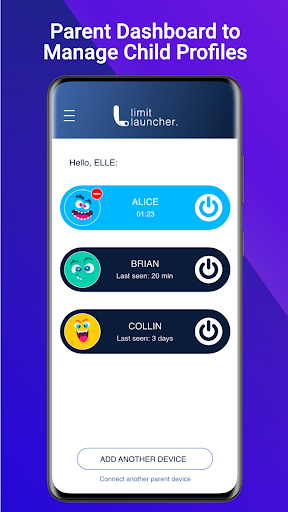
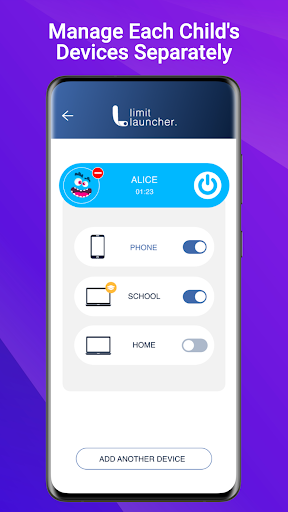
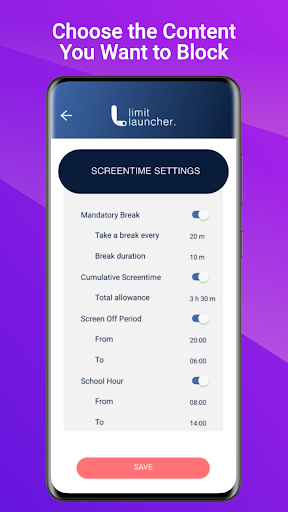
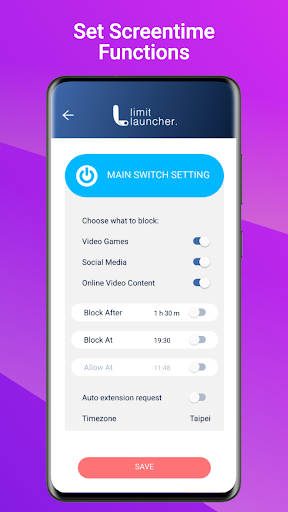
Limit Launcher App: The Ultimate Parental Control Tool
Manage your child's online activities with ease using the Limit Launcher App. With this user-friendly tool, you can control the amount of unproductive time your kids spend on their devices, reducing the risk of online and gaming addiction.
✅Easy to Use
Our user-friendly app is designed for parents of all tech levels. With just one tap, you can turn off gaming, social media, and video content access on all of your child's devices simultaneously. No need to worry about new game releases, Limit Launcher blocks them all from the start.
✅Tamper-Proof Solution
Children are intelligent and will try their hardest to outsmart parental control tools. We developed a solution that not only is extremely difficult to be manipulated, but we also notify parents if something has been tampered with.
✅Focus on Gaming
Limit Launcher is the only parental control tool that allows you to turn off gaming without limiting screen time or internet access. Your child can still use their device for homework and research while ensuring they don't play video games behind your back.
✅Privacy-focused
Your child's privacy is of utmost importance, which is why Limit Launcher is designed to give you peace of mind without damaging your child's trust.
✅Screen Time Management
1. Set mandatory break times across all devices, to rest the eyes
2. Limit daily screen time across all devices
3. Set no-screen periods
4. Set school-specific devices, to not be affected by screen time rules.
✅Online Leisure Management
1. Control gaming, social media, and video content with ease
2. Set timers to automate entertainment habits
3. Receive a notification when your child requests a one-time 5-minute extension.
4. Decide whether to accept or deny the extension request
Try Limit Launcher for free with our 14-day trial. Monthly and yearly subscriptions are available.
Visit our website for more information: https://limitlauncher.com/
Instruction and support are available at https://limitlauncher.com/downloads and https://limitlauncher.com/support
Give us your feedback and suggestions on
Facebook (https://www.facebook.com/LimitLauncher/)
Instagram (https://www.instagram.com/limitlauncher/)
Give us ★★★★★ if you like Limit Launcher. Your ratings are very important to us!
Notes:
This app uses Accessibility services. to build an excellent device experience that helps users with behavioral disabilities set appropriate levels of access and monitoring of screen time, web content, and apps, in order to limit their risks and enjoy life normally.
Daha fazla göster

1. MEmu yükleyicisini indirin ve kurulumu tamamlayın

2. MEmu'yu başlatın ve ana sayfada Google Play'i açın

3. Google Play'de Limit Launcher arayın
Install
4. Limit Launcher indirin ve yükleyin
5. Kurulum tamamlandığında başlamak için simgeye tıklayın

6. Limit Launcher'i PC'de için MEmu'yu kullanın
MEmu Play, 50 milyon kullanıcısıyla en iyi ücretsiz Android emülatörüdür ve en üst düzey Android uygulama deneyiminin keyfini çıkarır. MEmu'nun sanallaştırma teknolojisi, en zorlu uygulamalar da dahil olmak üzere binlerce uygulamayı bilgisayarınızda sorunsuz bir şekilde çalıştırmanızı sağlar.
Daha büyük ekranla daha iyi grafiklere sahip; Pil veya mobil veri sınırlaması olmaksızın uzun süre.
Keymapping klavye ve fare veya gamepad'in hassas kontrolü için destek verir.
Multi-Instance yöneticisi ile tek bir bilgisayarda aynı anda birden fazla oyun hesabı veya görev gerçekleşilebilir.
Use Limit Launcher on PC by following steps: