Limit Launcher
更新日
現在のバージョン
1.03.16
提供元

スマートフォンは不要!パソコンと同じようにキーボードとマウスで操作できます。MEmu Playは、あなたが待ち望んでいたすべての楽しみをお届けします。バッテリー残量や小さな画面を気にすることなく、Limit Launcherをご利用ください。最新のMEmu 9は、Limit LauncherをPCで体験するのに最適です!完璧なキーマッピングシステムにより、PCのようなスムーズな操作性を実現します。マルチインスタンス機能により、複数のアプリケーションを同時に実行できます。独自の仮想化エンジンがPCのパフォーマンスを最大限に引き出します。アプリを使用するだけでなく、高品質な体験を得ることができます。
もっと見る
Limit LauncherをPCでダウンロード!大画面でより楽しむ。電源が落ちてしまうとか通信料が足りないとかの問題を心配する必要がなく、PCの大画面でより快適にゲームを楽しましょう! Limit Launcher App: The Ultimate Parental Control Tool.
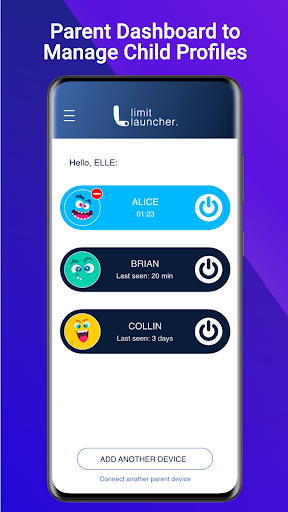
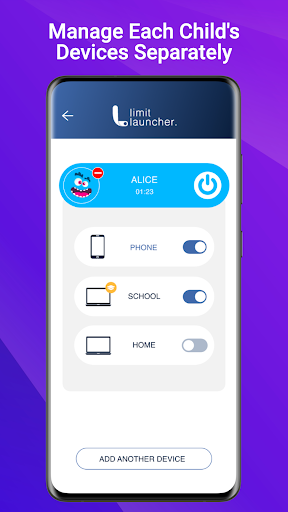
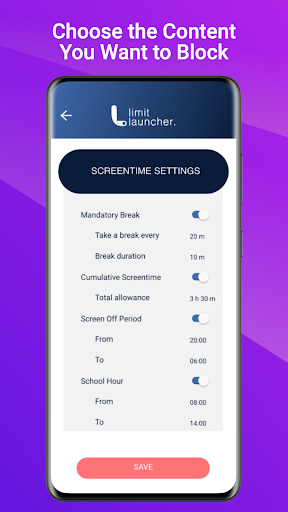
Limit Launcher App: The Ultimate Parental Control Tool
Manage your child's online activities with ease using the Limit Launcher App. With this user-friendly tool, you can control the amount of unproductive time your kids spend on their devices, reducing the risk of online and gaming addiction.
✅Easy to Use
Our user-friendly app is designed for parents of all tech levels. With just one tap, you can turn off gaming, social media, and video content access on all of your child's devices simultaneously. No need to worry about new game releases, Limit Launcher blocks them all from the start.
✅Tamper-Proof Solution
Children are intelligent and will try their hardest to outsmart parental control tools. We developed a solution that not only is extremely difficult to be manipulated, but we also notify parents if something has been tampered with.
✅Focus on Gaming
Limit Launcher is the only parental control tool that allows you to turn off gaming without limiting screen time or internet access. Your child can still use their device for homework and research while ensuring they don't play video games behind your back.
✅Privacy-focused
Your child's privacy is of utmost importance, which is why Limit Launcher is designed to give you peace of mind without damaging your child's trust.
✅Screen Time Management
1. Set mandatory break times across all devices, to rest the eyes
2. Limit daily screen time across all devices
3. Set no-screen periods
4. Set school-specific devices, to not be affected by screen time rules.
✅Online Leisure Management
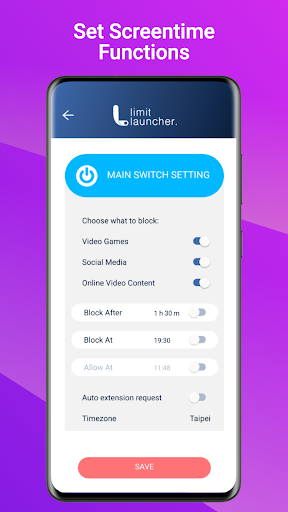
1. Control gaming, social media, and video content with ease
2. Set timers to automate entertainment habits
3. Receive a notification when your child requests a one-time 5-minute extension.
4. Decide whether to accept or deny the extension request
Try Limit Launcher for free with our 14-day trial. Monthly and yearly subscriptions are available.
Visit our website for more information: https://limitlauncher.com/
Instruction and support are available at https://limitlauncher.com/downloads and https://limitlauncher.com/support
Give us your feedback and suggestions on
Facebook (https://www.facebook.com/LimitLauncher/)
Instagram (https://www.instagram.com/limitlauncher/)
Give us ★★★★★ if you like Limit Launcher. Your ratings are very important to us!
Notes:
This app uses Accessibility services. to build an excellent device experience that helps users with behavioral disabilities set appropriate levels of access and monitoring of screen time, web content, and apps, in order to limit their risks and enjoy life normally.
もっと見る

1. MEmuインストーラーをダウンロードしてセットアップを完了する

2. MEmuを起動し、デスクトップでのPlayストアを開く

3. PlayストアでLimit Launcherを検索する
Install
4. Limit Launcherをダウンロードしてインストールする
5. インストールが完了したら、アイコンをクリックしてスタート

6. MEmuを使ってパソコンでLimit Launcherを体験する
MEmu Playは現在、最高の無料Androidエミュレーターであり、5,000万人のユーザーが優れたAndroidアプリ体験を楽しんでいます。MEmuの仮想化テクノロジーにより、数千ものAndroidアプリをコンピューターでスムーズに実行できます。
大画面でより精細;無限の待機、電池とドラフィックの極限を超え
キーボード・マウス・コントローラーを全力でサポート、より快適
マルチインスタンスで複数のゲームを同時に実行
Use Limit Launcher on PC by following steps: