Nebula: Cloud Gaming
Güncellendi
Mevcut Sürüm
1.5.5
Sunan

Cep telefonunda Nebula: Cloud Gaming kullanırken fazla şarjlardan endişelenme, kendini küçük ekrandan kurtar ve uygulamayı çok daha büyük bir ekranda kullanmanın tadını çıkar. Şu andan itibaren, klavye ve fare ile uygulamayı tam ekran da kullanmayı dene. MEmu, beklediğin tüm şaşırtıcı özellikleri sunar: hızlı ve kolay kurulum, sezgisel kontroller, bunun dışında pil sınırı, mobil veri ve rahatsız edici aramalar artık yok. Yepyeni MEmu 9, bilgisayarında Nebula: Cloud Gaming kullanmanın en iyi seçimidir. Emilimimizle kodlanan çok örnekli yönetici, aynı anda 2 veya daha fazla hesap açmayı mümkün kılar. Ve en önemlisi, özel emülasyon motorumuz PC'nin tüm potansiyelini serbest bırakabilir, her şeyi pürüzsüz ve eğlenceli hale getirebilir.
Daha fazla göster
MEmu Play ile bilgisayarınızda Nebula: Cloud Gaming kullanmanın mükemmel deneyimini yaşayın. Masaüstü sürümleri için binlerce Android uygulaması sunan güçlü ve ücretsiz bir Android emülatörüdür. Arkadaşlarınızla bağlantı kurmanın ve çalışmalarınızı daha verimli bir şekilde geliştirmenin keyfini çıkarın! "Play the Latest AAA Games on Your Android Device with Nebula – No Gaming PC Needed!
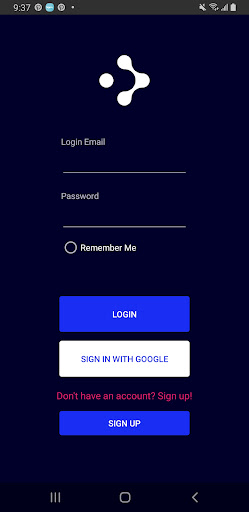
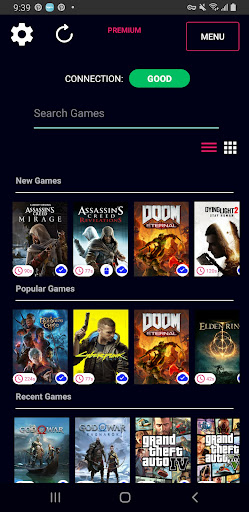
"Play the Latest AAA Games on Your Android Device with Nebula – No Gaming PC Needed!"
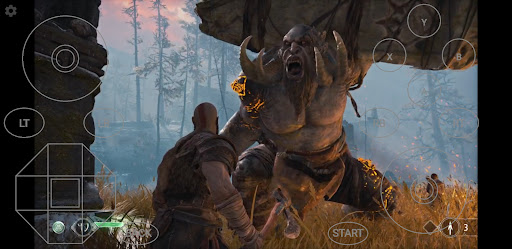
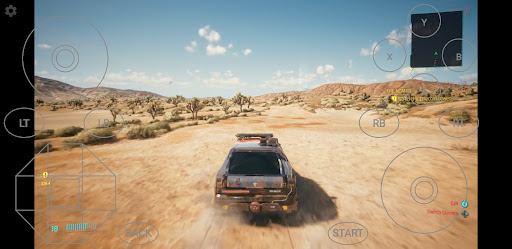
Nebula is your ultimate cloud gaming app, letting you play high-end PC and console-quality games straight from your Android device—no long installations or expensive hardware required. All games are included, and all you need is good internet.
Key Features:
Play AAA Games Anywhere: Enjoy the latest PC games on any Android device—smartphone, tablet, or even your Android TV.
Games Included: Access a wide range of titles without needing to buy or install them.
Free VPN for Optimized Gaming: Automatically connects to our secure Nebula VPN, ensuring smooth gameplay (currently available in Southeast Asia, connecting through Singapore, etc.).
Cloud Save: Pick up right where you left off every time with cloud saves, across any device.
Simple and User-Friendly: Easy setup, intuitive interface, and Bluetooth controller support.
How Does Nebula Work?
Nebula turns your Android device into a gaming powerhouse. Simply download our app, create an account, and select a game. Start playing instantly with just a tap! You can even connect your Bluetooth controller for a console-like experience.
All you need is good internet, and Nebula will handle the rest, securely connecting you to our gaming servers using the built-in Nebula VPN.
Nebula VPN: What You Need to Know
Nebula’s VPN feature is built using the WireGuard protocol and integrates with Android’s VpnService framework to create a securely encrypted connection between your device and our servers. The VPN is active only when you're gaming on Nebula, automatically deactivating when you close the app or it runs in the background.
Is Nebula’s VPN Necessary?
We provide our premium VPN for free as an option to help improve network connections to our servers. Experiment with it to find the best configuration for a smooth gameplay experience. The VPN only manages connection and traffic to Nebula's game servers and nothing else - we do not collect or manage any of your traffic data outside of Nebula's gaming traffic and will never collect, manage or distribute your data.
Nebula VPN Features:
- Secure Gaming: Enjoy a private and protected gaming session with end-to-end encryption.
- Improved Performance: Optimize network routes and reduce latency for a smoother, faster gaming experience.
- Completely Free: Get all the benefits of a paid VPN at no extra cost!
Permissions Required:
To establish a VPN connection, Nebula will prompt you to grant network access when you switch it on. Once granted, the VPN will activate and securely connect you to our network.
For any questions about VpnService or our privacy practices, please reach out to us via the links below.
Minimum Requirements:
Minimum Internet Speed: 30 Mbps
Recommended Speed: 100 Mbps and above for the best experience.
Get Started in 3 Simple Steps:
Download the app and create an account at www.nebula.my.
Log in with your account and browse our game library.
Select a game and start playing instantly!
Flexible Pricing Plans
We offer a range of pricing options to suit every gamer’s needs. Check them out here: www.nebula.my/pricing.
Connect with Us:
Discord: Nebula - Gaming Platform
Instagram: @nebula_my
Contact Form: www.nebula.my/contact
Email: admin@nebula.my
Learn More:
Visit us at www.nebula.my for more information, or check out our Privacy Policy and Terms & Conditions:
Privacy Policy
Terms and Conditions
Note: WireGuard is a registered trademark of Jason A. Donenfeld.
Daha fazla göster

1. MEmu yükleyicisini indirin ve kurulumu tamamlayın

2. MEmu'yu başlatın ve ana sayfada Google Play'i açın

3. Google Play'de Nebula: Cloud Gaming arayın
Install
4. Nebula: Cloud Gaming indirin ve yükleyin
5. Kurulum tamamlandığında başlamak için simgeye tıklayın

6. Nebula: Cloud Gaming'i PC'de için MEmu'yu kullanın
MEmu Play, 50 milyon kullanıcısıyla en iyi ücretsiz Android emülatörüdür ve en üst düzey Android uygulama deneyiminin keyfini çıkarır. MEmu'nun sanallaştırma teknolojisi, en zorlu uygulamalar da dahil olmak üzere binlerce uygulamayı bilgisayarınızda sorunsuz bir şekilde çalıştırmanızı sağlar.
Daha büyük ekranla daha iyi grafiklere sahip; Pil veya mobil veri sınırlaması olmaksızın uzun süre.
Keymapping klavye ve fare veya gamepad'in hassas kontrolü için destek verir.
Multi-Instance yöneticisi ile tek bir bilgisayarda aynı anda birden fazla oyun hesabı veya görev gerçekleşilebilir.
Use Nebula: Cloud Gaming on PC by following steps: