Nebula: Cloud Gaming
Bijgewerkt
Huidige Versie
1.4.23
Aangeboden door

Maak je geen zorgen meer over extra kosten bij het gebruik van Nebula: Cloud Gaming op je mobiele telefoon, bevrijd jezelf van het kleine scherm en geniet van het gebruik van de app op een veel groter display. Vanaf nu, krijg een volledige schermervaring van je app met toetsenbord en muis. MEmu biedt je alle verrassende functies die je verwachtte: snelle installatie en eenvoudige configuratie, intuïtieve besturing, geen beperkingen meer van batterij, mobiele data en storende oproepen. De gloednieuwe MEmu 9 is de beste keuze voor het gebruik van Nebula: Cloud Gaming op je computer. MEmu multi-instance manager maakt het mogelijk om tegelijkertijd 2 of meer accounts te openen. En het belangrijkste, onze exclusieve emulatiemotor kan het volledige potentieel van je PC benutten, waardoor alles soepel en plezierig wordt.
Meer tonen
Geniet van een fantastische ervaring met Nebula: Cloud Gaming op je pc met MEmu Play. Het is een krachtige gratis Android-emulator die je duizenden Android-apps biedt voor de desktopversie. Geniet van contact met vrienden en verbeter je werk met hogere efficiëntie! "Play the Latest AAA Games on Your Android Device with Nebula – No Gaming PC Needed!
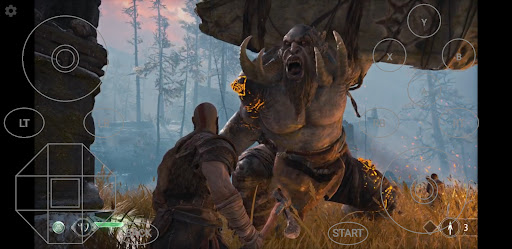
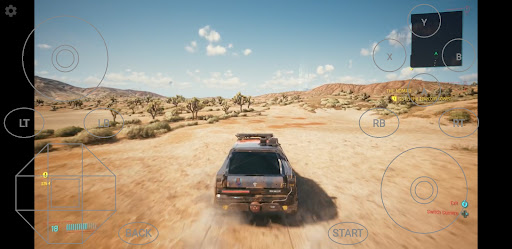
"Play the Latest AAA Games on Your Android Device with Nebula – No Gaming PC Needed!"
Nebula is your ultimate cloud gaming app, letting you play high-end PC and console-quality games straight from your Android device—no long installations or expensive hardware required. All games are included, and all you need is good internet.
Key Features:
Play AAA Games Anywhere: Enjoy the latest PC games on any Android device—smartphone, tablet, or even your Android TV.
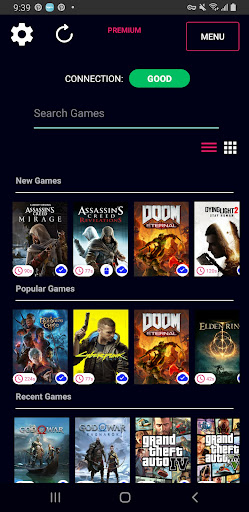
Games Included: Access a wide range of titles without needing to buy or install them.
Free VPN for Optimized Gaming: Automatically connects to our secure Nebula VPN, ensuring smooth gameplay (currently available in Southeast Asia, connecting through Singapore, etc.).
Cloud Save: Pick up right where you left off every time with cloud saves, across any device.
Simple and User-Friendly: Easy setup, intuitive interface, and Bluetooth controller support.
How Does Nebula Work?
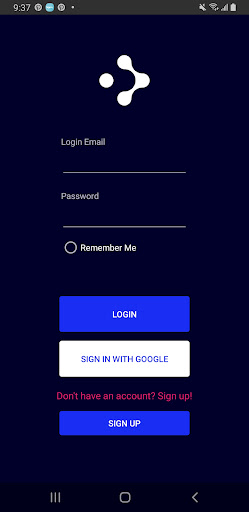
Nebula turns your Android device into a gaming powerhouse. Simply download our app, create an account, and select a game. Start playing instantly with just a tap! You can even connect your Bluetooth controller for a console-like experience.
All you need is good internet, and Nebula will handle the rest, securely connecting you to our gaming servers using the built-in Nebula VPN.
Nebula VPN: What You Need to Know
Nebula’s VPN feature is built using the WireGuard protocol and integrates with Android’s VpnService framework to create a securely encrypted connection between your device and our servers. The VPN is active only when you're gaming on Nebula, automatically deactivating when you close the app or it runs in the background.
Is Nebula’s VPN Necessary?
We provide our premium VPN for free as an option to help improve network connections to our servers. Experiment with it to find the best configuration for a smooth gameplay experience. The VPN only manages connection and traffic to Nebula's game servers and nothing else - we do not collect or manage any of your traffic data outside of Nebula's gaming traffic and will never collect, manage or distribute your data.
Nebula VPN Features:
- Secure Gaming: Enjoy a private and protected gaming session with end-to-end encryption.
- Improved Performance: Optimize network routes and reduce latency for a smoother, faster gaming experience.
- Completely Free: Get all the benefits of a paid VPN at no extra cost!
Permissions Required:
To establish a VPN connection, Nebula will prompt you to grant network access when you switch it on. Once granted, the VPN will activate and securely connect you to our network.
For any questions about VpnService or our privacy practices, please reach out to us via the links below.
Minimum Requirements:
Minimum Internet Speed: 30 Mbps
Recommended Speed: 100 Mbps and above for the best experience.
Get Started in 3 Simple Steps:
Download the app and create an account at www.nebula.my.
Log in with your account and browse our game library.
Select a game and start playing instantly!
Flexible Pricing Plans
We offer a range of pricing options to suit every gamer’s needs. Check them out here: www.nebula.my/pricing.
Connect with Us:
Discord: Nebula - Gaming Platform
Instagram: @nebula_my
Contact Form: www.nebula.my/contact
Email: admin@nebula.my
Learn More:
Visit us at www.nebula.my for more information, or check out our Privacy Policy and Terms & Conditions:
Privacy Policy
Terms and Conditions
Note: WireGuard is a registered trademark of Jason A. Donenfeld.
Meer tonen

1. Download de MEmu-installatie en voltooi de setup

2. Start MEmu en open vervolgens Google Play op het bureaublad

3. Zoek Nebula: Cloud Gaming in Google Play
Install
4. Download en installeer Nebula: Cloud Gaming
5. Klik op het icoon om te starten na het voltooien van de installatie

6. Ervaar Nebula: Cloud Gaming op pc met MEmu
MEmu Play is de beste Android-emulator, met meer dan 100 miljoen gebruikers die genieten van de superieure Android-app-ervaring. Dankzij de virtualisatietechnologie van MEmu kun je duizenden Android-apps soepel op je computer draaien, zelfs de meest veeleisende.
Groter scherm met betere graphics; Lange duur, zonder beperking van batterij of mobiele data.
Volledige Keymapping-ondersteuning voor nauwkeurige besturing van toetsenbord en muis of gamepad.
Meerdere game-accounts of taken op één PC tegelijk met Multi-Instance manager.
Gebruik Nebula: Cloud Gaming op PC door de volgende stappen te volgen: