FANBOX Viewer
更新日期
目前版本
2.3.1
提供者

想體驗FANBOX Viewer,可是手機熒幕太小,一載軟體就變燙,怎麼辦?透過逍遙模擬器,在電腦的大熒幕上暢快體驗!用鍵鼠操作更精準流暢,逍遙模擬器滿足您的所有期待。在電腦上下載安裝FANBOX Viewer,不用擔心電池當掉,想體驗多久就多久,順暢跑一天~全新的逍遙模擬器9,絕對是您體驗FANBOX Viewer電腦版的最佳選擇。完美的按鍵映射系統讓FANBOX Viewer如PC軟體般順手;強大的多開功能可同時執行多個任務;獨家虛擬化技術更能徹底釋放電腦效能,保障長時間穩定運作。我們致力於不讓設備限制您的體驗,助您輕鬆高效,暢快無比!
更多
透過逍遙模擬器,在電腦上下載FANBOX Viewer,享受大熒幕的暢快體驗。 ▽翻譯員招募公告.
▽翻譯員招募公告
該應用程式是由日本人開發的,可能存在翻譯成多種語言不足的情況。如果您願意為翻譯做出貢獻,請透過以下 GitHub 問題表達您的意願,我們將不勝感激。如果您是Android應用程式開發者,也歡迎您直接提交Pull Request。我們預先感謝大家的合作!
https://github.com/matsumo0922/PixiView-KMP/issues/new
▽應用程式的功能
▼ 透過應用程式順利查看貼文!
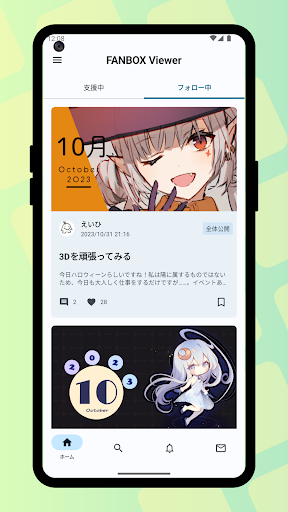
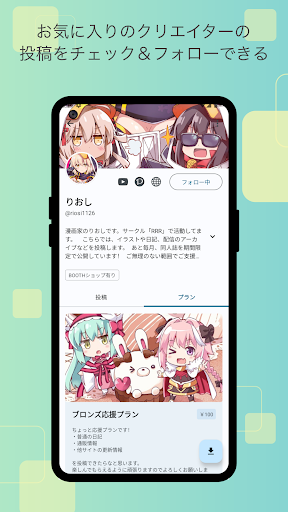
雖然並不總是能夠順利地在網頁版本上查看帖子,但該應用程式利用其功能可以讓您快速查看一個又一個帖子!提供插畫和文件下載功能,支持您喜愛的創作者,享受更好的FANBOX生活!
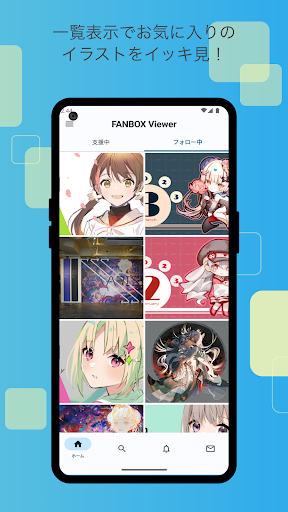
▼ 易於查看的清單顯示!
如果您想專注於查看插圖,建議使用清單視圖設定(網格模式)。像相簿應用程式一樣顯示插圖,透過在易於瀏覽的網格中顯示插圖來增強舒適度!
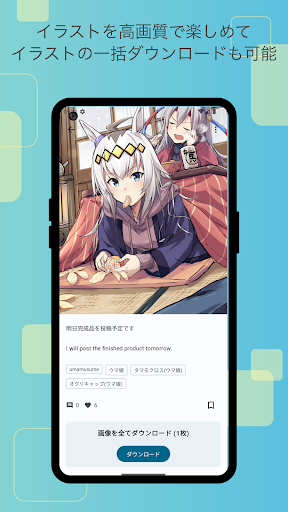
▼ 插圖批量下載!
您不僅可以一次下載帖子中的所有插圖,還可以批量下載您喜歡的創作者的帖子!
▼ 透過按讚儲存您最喜歡的貼文!
透過按讚功能,您可以透過按讚來儲存您最喜歡的帖子,以便以後輕鬆重新訪問它們。告別想知道該貼文去了哪裡的麻煩。
▼ 人性化設計!
完全符合 Google 推薦的最新「Material Design」。我們的目標是易於查看和操作的佈局。在支援多種詳細設定的同時,作為FANBOX客戶端應用程式的功能非常簡單,我們努力讓那些不需要複雜設定、只是為了查看插圖的人也能輕鬆使用。
▼ 應用程式鎖定功能!
該應用程式可以在啟動時請求生物識別身份驗證或設備密碼驗證!當您將智慧型手機借給某人時,這可以防止其他人看到私人帖子,從而確保您的隱私!
▽ 所需權限
▼ WRITE_EXTERNAL_STORAGE
用於保存插圖和文件。
▽支持
透過 GitHub issues 接受詢問。請使用下面的連結提交您的詢問,包括應用程式版本、Android 版本以及您所使用的裝置名稱等詳細資訊。
https://github.com/matsumo0922/PixiView-KMP/issues/new
更多

1. 下載逍遙安裝器並完成設置

2. 啟動逍遙後打開位於桌面上的谷歌商店

3. 在谷歌商店中搜尋FANBOX Viewer
Install
4. 下載並安裝FANBOX Viewer
5. 下載完成後點擊圖標來啟動

6. 透過逍遙享受在電腦上體驗FANBOX Viewer
逍遙安卓是優秀的安卓模擬器,全球超過5000萬用戶的優先選擇。逍遙安卓以虛擬化技術為核心,為用户打造突破手機配備局限的應用平台!
大屏精細展示;無限待機,超越電池和流量限制
鍵鼠,手把操作全面支持,操作更精準
用逍遙多開同時運行多個遊戲、應用。
Use FANBOX Viewer on PC by following steps: