
FANBOX Viewer
Aggiornata
Versione corrente
2.1.8
Offerta da

Non devi più preoccuparti dei sovraccarichi durante l'utilizzo di FANBOX Viewer sul tuo cellulare, liberati dal piccolo schermo e goditi dell'App su uno schermo molto più grande. D'ora in poi, sperimenta la tua App a schermo intero con tastiera e mouse. MEmu ti offre tutte le sorprendenti funzioni che ti aspettavi: installazione rapida e impostazione semplice, controlli intuitivi, niente più limitazioni di batteria, dati mobili e chiamate fastidiose. Il MEmu 9 nuovo di zecca è la prima scelta per utilizzare FANBOX Viewer sul tuo computer. Codificato con il nostro assorbimento, il gestore multi-istanza consente di aprire 2 o più account contemporaneamente. E soprattutto, il nostro esclusivo motore di emulazione può sbloccare il pieno potenziale del tuo PC, rendendo tutto liscio e piacevole.
Mostra altro
Scarica FANBOX Viewer su PC con MEmu Android Emulator. Divertiti giocando sul grande schermo. ▽ Translator Recruitment Announcement.
▽ Translator Recruitment Announcement
This app is developed by Japanese natives, and there may be instances where translations into multiple languages are insufficient. If you are willing to contribute to the translation, we would appreciate it if you could express your intention via the following GitHub issue. If you are an Android app developer, you are also welcome to directly submit a Pull Request. We thank everyone in advance for their cooperation!
https://github.com/matsumo0922/PixiView-KMP/issues/new
▽ Features of the App
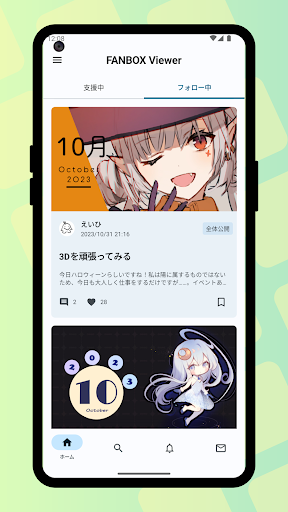
▼ Check posts smoothly through the app!
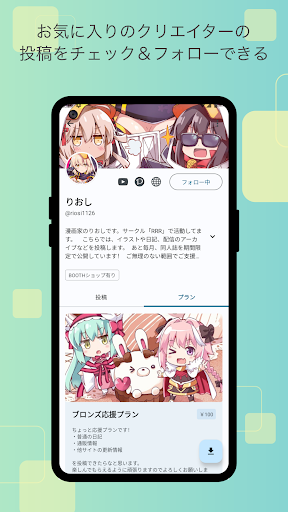
While it's not always possible to smoothly check posts on the web version, the app leverages its capabilities to allow you to quickly check one post after another! With download functionality for illustrations and files, support your favorite creators and enjoy a better FANBOX life!
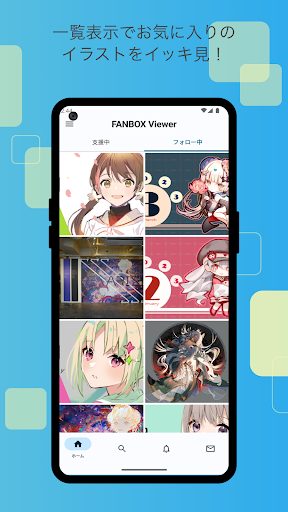
▼ Easy-to-View List Display!
If you want to focus on viewing illustrations, the list view setting (grid mode) is recommended. Displaying illustrations like a photo album app enhances comfort by showing them in an easy-to-browse grid!
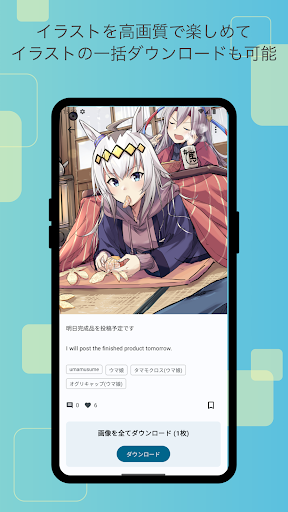
▼ Batch download of illustrations!
Not only can you download all the illustrations in a post at once, but you can also batch download posts from your favorite creators!
▼ Save your favorite posts with likes!
With the like feature, you can save your favorite posts by liking them, making it easy to revisit them later. Say goodbye to the hassle of wondering where that post went.
▼ User-friendly design!
Fully compliant with the latest Google-recommended 'Material Design'. We aimed for a layout that is easy to see and handle. While supporting multiple detailed settings, the functionality as a FANBOX client app is very simple, and we have strived to make it easy to use even for those who do not need intricate settings, simply for viewing illustrations.
▼ App Lock Feature!
The app can request biometric authentication or device password verification upon launch! This prevents others from seeing private posts when you lend your smartphone to someone, ensuring your privacy!
▽ Required Permissions
▼ WRITE_EXTERNAL_STORAGE
Used to save illustrations and files.
▽ Support
Inquiries are accepted through GitHub issues. Please use the link below to submit your inquiry, including details such as the app version, Android version, and the name of the device you are using.
https://github.com/matsumo0922/PixiView-KMP/issues/new
Mostra altro

1. Scarica il programma di installazione di MEmu e completa l'installazione

2. Avvia il Memu e apri il Google Play sulla homepage

3. Cerca FANBOX Viewer in Google Play
Install
4. Scarica e installa FANBOX Viewer
5. Al termine dell'installazione, fai clic sull'icona per avviar

6. Divertiti giocando a FANBOX Viewer su PC con MEmu
MEmu App Player è il miglior emulatore Android gratuito, utilizzato da 50 milioni di persone per ottenere un'esperienza di gioco Android superba. La tecnilogia di virtualizzazione MEmu ti permette di giocare a migliaia di giochi Android con semplicità sul tuo computer, anche i giochi con la grafica più esigente.
Schermo più grande con una grafica migliore; Lunga durata, senza limitazione di batteria o dati mobili.
Supporto completo per mappa di tastiera per un controllo preciso di tastiera e mouse o gamepad.
Multipli account di gioco o attività su un singolo PC contemporaneamente con il gestore di multi istanza.
Use FANBOX Viewer on PC by following steps: