
FANBOX Viewer
อัปเดตเมื่อ
เวอร์ชันปัจจุบัน
2.1.8
ให้บริการโดย

เมื่อใช้ FANBOX Viewer บนโทรศัพท์ของคุณไม่ต้องกังวลกับการชาร์จไฟมากเกินไปปลดปล่อยตัวคุณเองจากหน้าจอขนาดเล็กและสนุกกับการใช้แอพนี้บนหน้าจอขนาดใหญ่ จากนี้ไปรับประสบการณ์เต็มหน้าจอของแอปพลิเคชันของคุณด้วยคีย์บอร์ดและเมาส์ MEmu มีคุณสมบัติที่น่าแปลกใจที่คุณคาดหวัง: การติดตั้งที่รวดเร็วและการตั้งค่าที่ง่ายควบคุมได้ง่ายไม่ จำกัด แบตเตอรี่ข้อมูลมือถือและการโทรที่รบกวน MEmu 9 ใหม่ล่าสุดเป็นตัวเลือกที่ดีที่สุดสำหรับการใช้ Meitu – โปรแกรมแก้ไขภาพแนวธรรมชาติ บนคอมพิวเตอร์ของคุณ ด้วยรหัสการดูดซึมของเราผู้จัดการหลายอินสแตนซ์ทำให้สามารถเปิดบัญชี 2 บัญชีขึ้นไปในเวลาเดียวกันได้ และที่สำคัญที่สุดเอ็นจิ้นจำลองพิเศษของเราสามารถปลดปล่อยศักยภาพของPCของคุณและทำให้ทุกอย่างราบรื่นและสนุกสนาน
แสดงเพิ่มเติม
ดาวน์โหลด FANBOX Viewer บน PC ด้วย MEmu Android Emulator สนุกกับการเล่นบนหน้าจอขนาดใหญ่ ▽ Translator Recruitment Announcement.
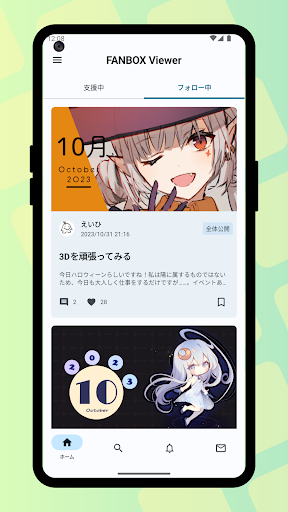
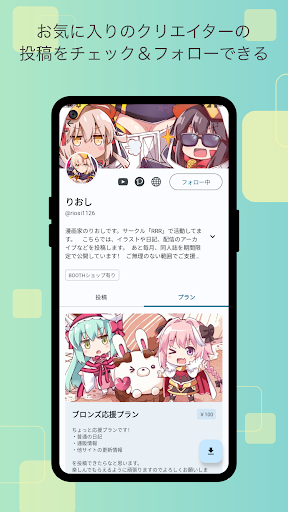
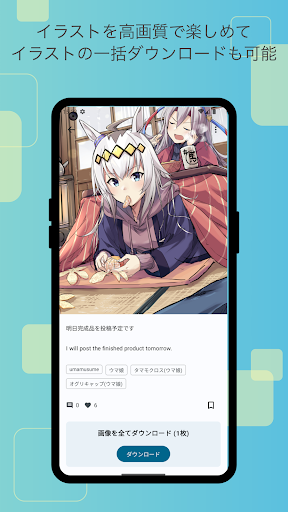
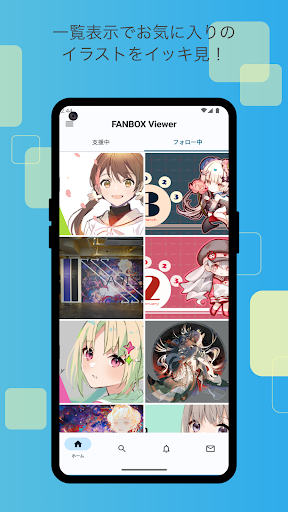
▽ Translator Recruitment Announcement
This app is developed by Japanese natives, and there may be instances where translations into multiple languages are insufficient. If you are willing to contribute to the translation, we would appreciate it if you could express your intention via the following GitHub issue. If you are an Android app developer, you are also welcome to directly submit a Pull Request. We thank everyone in advance for their cooperation!
https://github.com/matsumo0922/PixiView-KMP/issues/new
▽ Features of the App
▼ Check posts smoothly through the app!
While it's not always possible to smoothly check posts on the web version, the app leverages its capabilities to allow you to quickly check one post after another! With download functionality for illustrations and files, support your favorite creators and enjoy a better FANBOX life!
▼ Easy-to-View List Display!
If you want to focus on viewing illustrations, the list view setting (grid mode) is recommended. Displaying illustrations like a photo album app enhances comfort by showing them in an easy-to-browse grid!
▼ Batch download of illustrations!
Not only can you download all the illustrations in a post at once, but you can also batch download posts from your favorite creators!
▼ Save your favorite posts with likes!
With the like feature, you can save your favorite posts by liking them, making it easy to revisit them later. Say goodbye to the hassle of wondering where that post went.
▼ User-friendly design!
Fully compliant with the latest Google-recommended 'Material Design'. We aimed for a layout that is easy to see and handle. While supporting multiple detailed settings, the functionality as a FANBOX client app is very simple, and we have strived to make it easy to use even for those who do not need intricate settings, simply for viewing illustrations.
▼ App Lock Feature!
The app can request biometric authentication or device password verification upon launch! This prevents others from seeing private posts when you lend your smartphone to someone, ensuring your privacy!
▽ Required Permissions
▼ WRITE_EXTERNAL_STORAGE
Used to save illustrations and files.
▽ Support
Inquiries are accepted through GitHub issues. Please use the link below to submit your inquiry, including details such as the app version, Android version, and the name of the device you are using.
https://github.com/matsumo0922/PixiView-KMP/issues/new
แสดงเพิ่มเติม

1. ดาวน์โหลดตัวติดตั้ง MEmu และสิ้นสุดการติดตั้ง

2. เริ่ม MEmu จากนั้นเปิด Google Play บนหน้าแรก

3. ค้นหา FANBOX Viewer ใน Google Play
Install
4. ดาวน์โหลดและติดตั้ง FANBOX Viewer
5. เมื่อติดตั้งเสร็จให้คลิกที่ไอคอนเพื่อเริ่มใช้งาน

6. ใช้ MEmu เพื่อสัมผัสประสบการณ์ FANBOX Viewer บนคอมพิวเตอร์ของคุณ
MEmu Play คือโปรแกรมจำลอง Android ที่ดีที่สุด มีผู้ใช้มากกว่า 50 ล้านคน มอบประสบการณ์การใช้งานแอป Android ขั้นสุดยอดให้กับคุณ เทคโนโลยีจำลองเสมือนของ MEmu ช่วยให้คุณรันแอป Android หลายพันแอปบนคอมพิวเตอร์ได้อย่างราบรื่น แม้แอปที่กินทรัพยากรเครื่องสูงที่สุด
จอใหญ่และกราฟฟิกสวยกว่า; เล่นได้นาน, ไม่ต้องใช้แบตเตอรี่โทรศัพท์หรือเน็ตโทรศัพท์.
ระบบปรับแต่งปุ่มคีย์บอร์ดและเม้าส์ตามที่คุณเลือก
เล่นมากกว่าหนึ่งเกมบน PC ในเวลาเดียวกันด้วยระบบหลายจอหรือ Multi-Instance manager.
Use FANBOX Viewer on PC by following steps: