Hand Tracking: Magic Effects
更新日期
目前版本
1.1.9
提供者

想體驗Hand Tracking: Magic Effects,可是手機熒幕太小,一載軟體就變燙,怎麼辦?透過逍遙模擬器,在電腦的大熒幕上暢快體驗!用鍵鼠操作更精準流暢,逍遙模擬器滿足您的所有期待。在電腦上下載安裝Hand Tracking: Magic Effects,不用擔心電池當掉,想體驗多久就多久,順暢跑一天~全新的逍遙模擬器9,絕對是您體驗Hand Tracking: Magic Effects電腦版的最佳選擇。完美的按鍵映射系統讓Hand Tracking: Magic Effects如PC軟體般順手;強大的多開功能可同時執行多個任務;獨家虛擬化技術更能徹底釋放電腦效能,保障長時間穩定運作。我們致力於不讓設備限制您的體驗,助您輕鬆高效,暢快無比!
更多
使用逍遙模擬器在電腦上享受Hand Tracking: Magic Effects的卓越體驗。這是一款功能強大的免費安卓模擬器,為您提供數千款安卓應用程式的桌面版本。與好友互動,有效率完成工作,盡情享受! HAND TRACKING: MAGIC EFFECTS – MAKE MAGIC WITH YOUR HANDS!
HAND TRACKING: MAGIC EFFECTS – MAKE MAGIC WITH YOUR HANDS!
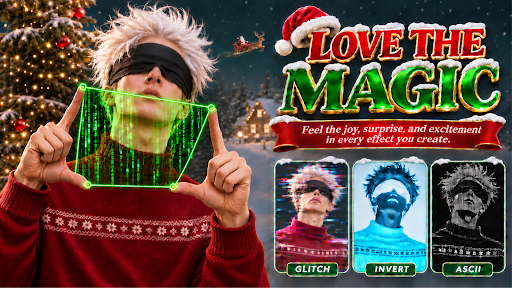
Turn hand gestures into amazing camera effects! Hand Tracking: Magic Effects is a creative hand tracking camera app that lets you control visual filters with your fingers. Make a frame with your thumbs and index fingers, then move your hands to see the effect in real time.
Create anime-inspired hand sign videos, finger magic tricks, and fun short clips. All you need is your camera and imagination!
HAND TRACKING & FINGER CONTROL
Your hands control the camera effects! Form a four-point frame with the thumb and index finger of each hand, then move your fingers to change the effect area.
• Track hand gestures and finger movements in real time.
• Resize and reposition the filter area with your hands.
• Apply interactive effects inside your finger-made frame.
• Make creative photos and videos with gesture-controlled filters.
MAGIC HAND EFFECTS & ANIME HAND SIGNS
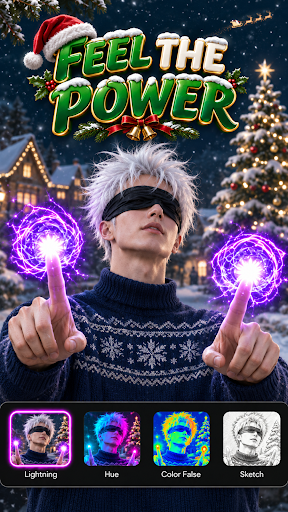
Love anime-style powers and dramatic hand signs? Turn everyday gestures into epic-looking moments with magic-inspired camera effects. Explore glowing energy, colorful visual transformations, and cinematic hand gesture ideas.
Try finger magic videos, power-up poses, and creative magic reveals—no advanced editing required.
VIDEO FILTERS & CAMERA EFFECTS
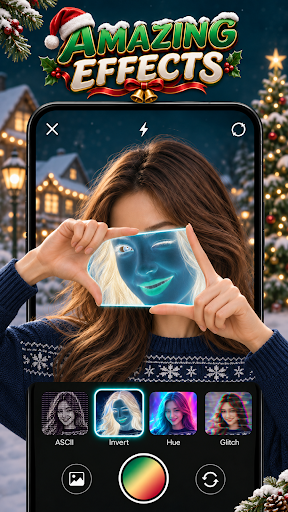
Find a visual style for every mood with a collection of real-time effects:
• Matrix – futuristic green digital code.
• ASCII – retro text-art camera effects.
• Glitch – distorted, cyber-style visuals.
• Grayscale – classic black-and-white filters.
• Invert – bold inverted color effects.
• Neon Outline – bright glowing edges.
• Neon Glow – colorful light-inspired looks.
• Sketch – hand-drawn, pencil-style visuals.
• Hue & False Color – creative color shifts.
• Spotted – playful dot-pattern transformations.
Switch styles to make digital, retro, and futuristic finger frame videos.
REVERSE EFFECTS – CHANGE THE WORLD OUTSIDE
Go beyond standard filters! With Reverse Effects, apply a visual effect outside your hand-made frame while leaving the inside different. Try grayscale, glitch, or neon outside the frame for dramatic contrast.
Use reverse hand tracking effects for reveal clips, camera tricks, creative transitions, and hand gesture video challenges.
FINGER CHARACTERS – BRING YOUR FINGERTIPS TO LIFE
Give every finger a little personality! Choose up to five finger characters and watch them follow your fingertip movements. Create funny finger videos, cute character scenes, and playful gesture moments to share with friends.
Mix characters and make entertaining short videos.
RECORD VIDEOS, TAKE PHOTOS & SHARE
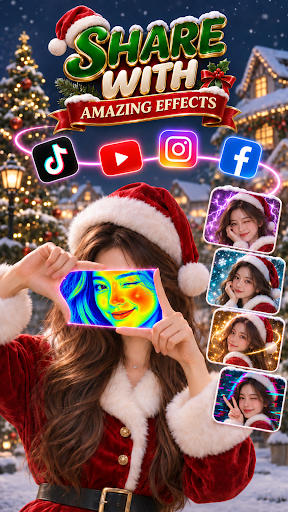
Creating for TikTok, Instagram Reels, or YouTube Shorts? Create hand tracking videos, magic hand gesture edits, anime-style hand sign clips, finger control challenges, and reverse filter reveals.
• Take photos with creative camera filters.
• Record short videos with real-time hand effects.
• Save your favorite moments to your device.
• Share your creations with friends and social media.
WHY CHOOSE HAND TRACKING: MAGIC EFFECTS?
Real-time hand tracking and finger-controlled effects.
Interactive four-point hand frame filters.
Magic-inspired visuals and anime-style gesture ideas.
Matrix, ASCII, Glitch, Neon, Sketch, and color filters.
Reverse Effects for inside-versus-outside transformations.
Finger Characters that follow your movements.
Easy photo and short video creation.
Whether you're looking for a hand tracking filter, finger tracking camera, magic effects app, hand gesture video maker, or fun anime-style filters, Hand Tracking: Magic Effects lets your creativity lead.
Open the camera, choose an effect, make a hand sign, and create a little magic with every move!
更多

1. 下載逍遙安裝器並完成設置

2. 啟動逍遙後打開位於桌面上的谷歌商店

3. 在谷歌商店中搜尋Hand Tracking: Magic Effects
Install
4. 下載並安裝Hand Tracking: Magic Effects
5. 下載完成後點擊圖標來啟動

6. 透過逍遙享受在電腦上體驗Hand Tracking: Magic Effects
逍遙安卓是優秀的安卓模擬器,全球超過5000萬用戶的優先選擇。逍遙安卓以虛擬化技術為核心,為用户打造突破手機配備局限的應用平台!
大屏精細展示;無限待機,超越電池和流量限制
鍵鼠,手把操作全面支持,操作更精準
用逍遙多開同時運行多個遊戲、應用。
Use Hand Tracking: Magic Effects on PC by following steps: