
Temp Number Now – Receive SMS
更新日期
目前版本
1.0.9
提供者

想體驗Temp Number Now – Receive SMS,可是手機熒幕太小,一載軟體就變燙,怎麼辦?透過逍遙模擬器,在電腦的大熒幕上暢快體驗!用鍵鼠操作更精準流暢,逍遙模擬器滿足您的所有期待。在電腦上下載安裝Temp Number Now – Receive SMS,不用擔心電池當掉,想體驗多久就多久,順暢跑一天~全新的逍遙模擬器9,絕對是您體驗Temp Number Now – Receive SMS電腦版的最佳選擇。完美的按鍵映射系統讓Temp Number Now – Receive SMS如PC軟體般順手;強大的多開功能可同時執行多個任務;獨家虛擬化技術更能徹底釋放電腦效能,保障長時間穩定運作。我們致力於不讓設備限制您的體驗,助您輕鬆高效,暢快無比!
更多
使用逍遙模擬器在電腦上享受Temp Number Now – Receive SMS的卓越體驗。這是一款功能強大的免費安卓模擬器,為您提供數千款安卓應用程式的桌面版本。與好友互動,有效率完成工作,盡情享受! Temp Number Now is a free app that gives you temporary, disposable phone numbers for SMS verification.
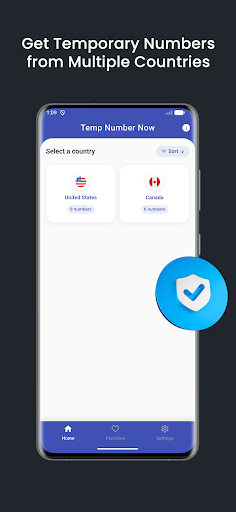
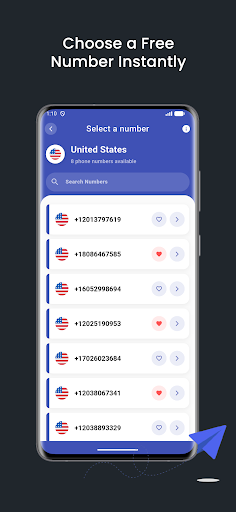
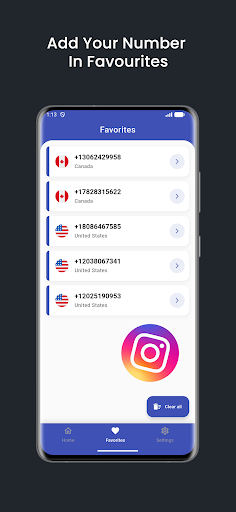
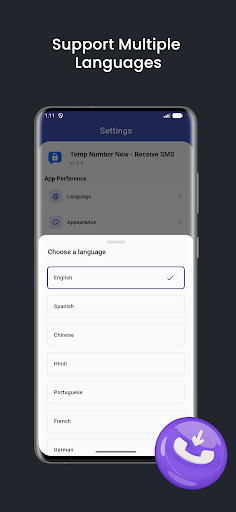
Temp Number Now is a free app that gives you temporary, disposable phone numbers for SMS verification. With Temp Number Now, you can get a unique virtual number to receive one-time passwords and verification codes without exposing your real phone. In today’s digital world, many users prefer a secondary number for sign-ups and account verification. In fact, a survey found that 67% of internet users have used a temporary or secondary phone number for online activities.Temp Number Now lets you join those millions by protecting your privacy and keeping your personal number safe from spam and unwanted calls.
Key Features
- Free Disposable Numbers: Get a virtual phone number at no cost. Each number is temporary and ideal for one-time SMS verifications. Use it for social media sign-ups, online shopping accounts, or any service that sends an OTP.
- Wide Country Coverage: Choose numbers from popular countries like USA, Canada, the UK, and Australia. This broad coverage means you can access local numbers that work seamlessly with apps and websites worldwide.
- No Registration Required: Tap to get a number instantly without creating an account. There’s no signup or personal information needed, just pick a number and start receiving SMS right away.
- Instant SMS Inbox: Messages arrive in real time. As soon as a service sends a code, it appears instantly in the app’s inbox so you can copy and use it immediately.
- Privacy Protection: Your real number remains hidden. Using a temporary number shields your personal phone from spam, tracking, or unwanted contacts. This added privacy is ideal for maintaining anonymity when joining new platforms or making online purchases.
- Versatile Use: Perfect for any online service – from social apps and gaming to banking and travel. Temp Number Now works for any site or app that needs phone verification.
How to Use Temp Number Now
1. Select a Country: Open the app and choose the country (e.g. USA, Canada, UK, Australia) for your temporary number. A list of available virtual numbers will appear.
2. Copy the Number: Tap the number you want, then paste it into the phone field of the website or app you’re signing up for. (No SIM card needed.)
3. Receive SMS: Go back to Temp Number Now’s Inbox. The verification code or message will appear there almost instantly. You can then copy the code and complete your registration or login.
For example, one app’s instructions are to select a country and number, enter it where needed, then check the app’s SMS inbox for the incoming message. Temp Number Now works the same way, providing your code quickly and easily.
Why Choose Temp Number Now?
- Free & Easy: All virtual numbers and incoming SMS messages are 100% free. Enjoy cost-free, unlimited verification without any hidden fees.
- Privacy First: Keep your personal phone number private. Using a secondary number to verify accounts is a well-known privacy measure. Temp Number Now helps shield you from spam and unwanted calls by acting as a buffer between your real phone and any online service.
- Broad Compatibility: Works with any SMS-based service or app, from social media platforms to online shopping. Major verification services like Google or Facebook accept these temporary numbers.
- Developer-Friendly: Ideal for app developers and testers who need quick SMS testing numbers. As noted by other services, such apps are primarily intended for testing purposes.
- User-Friendly: The interface is clean and simple. Even first-time users can navigate easily to select numbers and view messages, making it straightforward to secure your accounts.
Disclaimer
Temp Number Now is designed for legitimate and testing use only. It is not intended for spam, fraud, or any illegal activities. Please use the service responsibly. (For reference, similar apps explicitly state that misuse or illegal use is strictly prohibited.)
更多

1. 下載逍遙安裝器並完成設置

2. 啟動逍遙後打開位於桌面上的谷歌商店

3. 在谷歌商店中搜尋Temp Number Now – Receive SMS
Install
4. 下載並安裝Temp Number Now – Receive SMS
5. 下載完成後點擊圖標來啟動

6. 透過逍遙享受在電腦上體驗Temp Number Now – Receive SMS
逍遙安卓是優秀的安卓模擬器,全球超過5000萬用戶的優先選擇。逍遙安卓以虛擬化技術為核心,為用户打造突破手機配備局限的應用平台!
大屏精細展示;無限待機,超越電池和流量限制
鍵鼠,手把操作全面支持,操作更精準
用逍遙多開同時運行多個遊戲、應用。
Use Temp Number Now – Receive SMS on PC by following steps: