
AniWatch
Оновлено
Поточна версія
1.0.2
Постачальник

Перестаньте турбуватися про надмірні витрати, використовуючи ххх на своєму мобільному телефоні, звільніться від крихітного екрану і насолоджуйтеся використанням програми на набагато більшому дисплеї. Відтепер отримуйте повний екран свого додатка за допомогою клавіатури та миші. MEmu пропонує вам усі дивовижні функції, які ви очікували: швидка установка та просте налаштування, інтуїтивно зрозумілі елементи керування, більше обмежень від акумулятора, мобільних даних та тривожних дзвінків. Зовсім новий MEmu 9 – найкращий вибір для використання Єдина Школа на вашому комп’ютері. За допомогою нашого поглинання менеджер із кількома примірниками одночасно дозволяє відкрити 2 або більше рахунків. І найголовніше, наш ексклюзивний емуляційний двигун може вивільнити весь потенціал вашого ПК, зробити все гладким і приємним.
Show more
Насолоджуйтесь чудовим досвідом використання AniWatch на ПК за допомогою MEmu Play. Це потужний безкоштовний емулятор Android, який пропонує тисячі програм Android для настільних комп'ютерів. Насолоджуйтесь спілкуванням з друзями та покращенням своєї роботи з більшою ефективністю! AniWatch helps users follow favorites and find working streams without jumping between different sites.

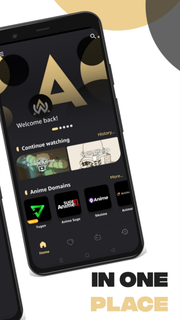
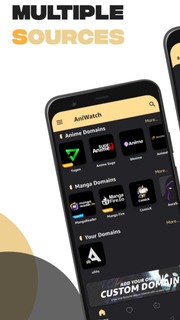
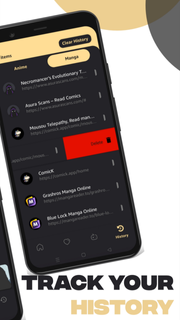
AniWatch helps users follow favorites and find working streams without jumping between different sites. It is built for mobile use, so navigation stays simple and episodes load in a straightforward way. Because it combines several popular sources, it presents choices that suit subbed or dubbed preferences. As a result, users can keep up with new releases while on the go. For those comparing versions, installing the AniWatch APK offers a direct way to try the app experience. AniWatch features for mobile viewingExtensive catalog coverageAniWatch organizes TV series, movies, specials, and OVAs and ONAs into clear sections. You can browse by genre or use an A to Z list to scan titles quickly. Both subbed and dubbed options appear where available, which helps you choose the format you prefer.Multi-source episode finderAniWatch searches across multiple domains, including sources such as YugenAnime, 9Anime, AniWatch, AnimeSuge, AnimixPlay, and AnimeDao. If one source is slow or down, you can switch to another option and continue watching. This approach helps users find a working stream faster, especially during peak hours.Search and navigation designed for quick discoveryThe search tool handles direct titles and common name variations, so finding a show is straightforward. Filters and clear menus guide you to specific types of content without extra taps. As you move between seasons and episodes, the layout keeps progress and choices easy to follow.Playback optimized for mobileAniWatch focuses on smooth, high-quality playback designed to reduce buffering on typical mobile connections. The player responds well to scrubbing and quick jumps, keeping control simple on small screens. This helps users watch episodes with fewer interruptions.Updates and seasonal trackingContent updates regularly, so new episodes and seasonal releases appear as sources provide them. AniWatch keeps sections fresh, which makes it easier to check what just arrived. For ongoing series, returning to your show list offers a quick way to resume. Important notes for AniWatch usersAniWatch links to media hosted on third-party services, so availability and stream quality can vary by source and region. At times, a title may show up with missing episodes until the linked host updates or returns. The website includes extra sections such as Most Popular, Random, and Watch2gether, which some users prefer for broader discovery. If the AniWatch app feels limited compared with the site, open the mobile website and use the “Aniwatch App” footer link or add it to your home screen for quick access.Version names may change over time; confirm the AniWatch latest version on the APKPure page before installing. Users searching for AniWatch TV APK often compare the app and site experience, and it is normal to see small differences between them. If content looks different on AniWatch Android versus the website, try switching sources within the app or use the site to verify episodes. Troubleshooting common issuesIf images are not showing, start by refreshing the page, then check your connection and try opening a different source. Thumbnails may take time to load when the host is slow, so waiting a moment and reloading can help. When a show appears but no episodes are listed, review filters and language options, then switch to another source and check again. If issues persist, clear app cache and data, or update to the AniWatch latest version for potential fixes.When streams stall or buffer frequently, pick another source within the same episode and test playback. If a particular host is down, the episode may work on a different host. For discovery problems, use genre pages and the A to Z list to find titles even when a source index is incomplete. Many users also check the site when troubleshooting, then return to the AniWatch app once availability improves. How to use AniWatch on AndroidTo get started, download AniWatch and open it on your phone. The app helps you search across sources and watch episodes in subbed or dubbed formats. Use the steps below to move from install to playback quickly. Download and install the AniWatch APK on your Android device, then open the app from your home screen. Allow permissions if prompted, and wait for the home content to load so you can browse sections. Use the search bar for a title or browse by categories, then pick subbed or dubbed and select a show. Open an episode, choose a source, and tap play; if playback stalls, switch to another source and try again. For quick web access, open the AniWatch website in your mobile browser, then add it to your home screen from the browser menu to create a shortcut. Start watching with AniWatchAniWatch combines multi-source streaming and manga reading with simple navigation and stable playback. To begin, install the AniWatch latest version and explore titles across different sources on mobile.
Show more

1. Download MEmu installer and finish the setup

2. Start MEmu then open Google Play on the desktop

3. Search AniWatch in Google Play
Install
4. Download and Install AniWatch
5. On install completion click the icon to start

6. Enjoy using AniWatch on PC with MEmu
MEmu App Player є кращим безкоштовним емулятором Android, і 50 мільйонів людей вже користуються його чудовим ігровим досвідом Android. Технологія віртуалізації MEmu дає вам змогу відтворювати тисячі ігор Android на вашому комп'ютері, навіть найбільш насичених графікою.
Bigger screen with better graphics; Long duration, without limitation of battery or mobile data.
Full Keymapping support for precise control of keyboard and mouse or gamepad.
Multiple game accounts or tasks on single PC at one time with Multi-Instance manager.
Use AniWatch on PC by following steps: